

Risk Control
Risk Control EA is a MetaTrader Expert Advisor designed to help traders manage account exposure with ease. It features a graphical risk interface, smart hedging suggestions, manual hedging controls, and real‑time economic event alerts. With pop‑up and mobile notifications, volume monitoring, and preview functionality, it provides a complete toolkit for protecting capital and trading with confidence.
Category : Utilities, Loss Recoveries
Version : 4.1
Updated : 2026-01-15
Key Features
Description
At its core, Risk Control EA analyzes all open positions and displays cumulative buy/sell volumes per currency in a clear, scaled chart. This allows traders to instantly see where their largest exposures lie. The smart hedging system automatically suggests up to three symbols to hedge high‑volume currencies, with customizable percentages and lot sizes, while the manual hedging section lets users open or close positions with full control. A preview mode shows the impact of new trades before execution, ensuring informed decisions.
Risk Control EA is more than just an Expert Advisor — it’s a complete risk management solution. With its intuitive interface, smart hedging, and real‑time alerts, it empowers traders to manage exposure, anticipate market events, and protect their capital effectively.
Usage Manual:
The EA features an on‑chart graphical control panel, organized into three main sections: Risk Graph, Smart Hedging, and Manual Hedging — each explained in detail below.
Account Risk Graph:
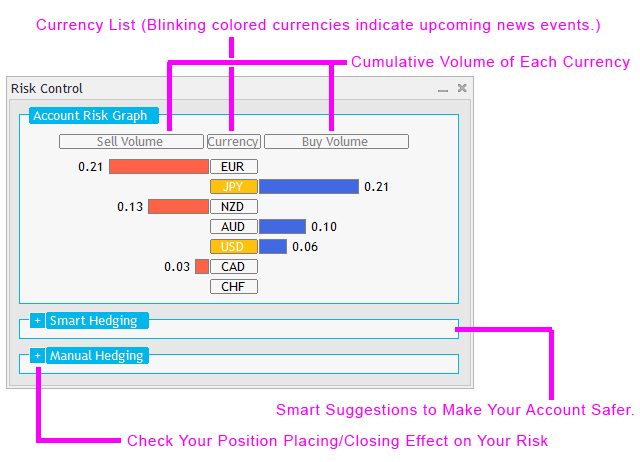
The EA analyzes all open positions on the account, calculating overall buy and sell volumes for each currency and presenting them in a scaled graphical chart. This visualization helps traders quickly identify which currencies carry the largest exposure, making it easier to decide whether to open or close positions. On the chart, buy volumes are displayed on the right and sell volumes on the left, with cumulative values shown clearly. For example, if a currency has 0.70 lots in buy and 0.31 lots in sell, the chart will display a net 0.39 buy volume.
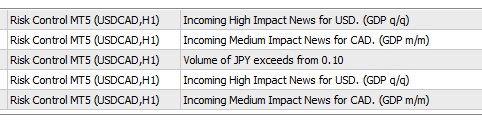
Risk Control EA also integrates an economic event alert system. When a currency is affected by upcoming news, its name will blink in color: green for low‑impact events, orange for medium‑impact, and red for high‑impact. Hovering over the currency name reveals event details and the remaining time until release. In addition, pop‑up alerts and mobile notifications ensure you’re informed on both desktop and phone before these events occur. All alert timings and notification preferences can be customized in the EA’s input parameters.
A separate alert system also notifies you when a currency’s volume exceeds a predefined threshold, helping you stay ahead of risky conditions.
Smart Hedging:
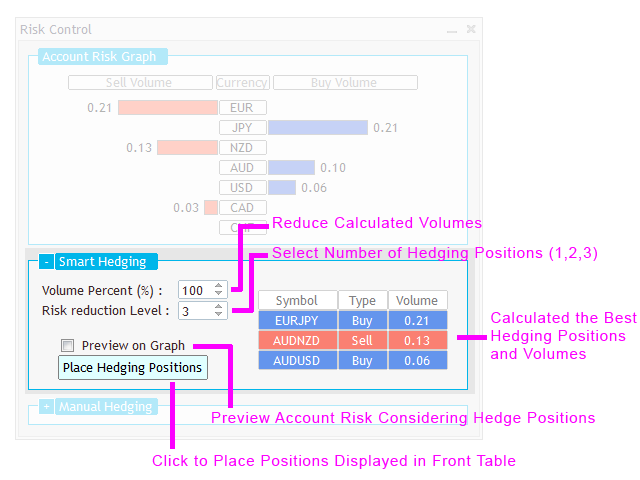
The EA analyzes account exposure and suggests opening up to three optimal symbols in the opposite direction (hedging positions) to reduce the risk of high‑volume currencies. It prioritizes hedging the largest exposures first, automatically calculating the appropriate lot sizes. Traders can define the percentage of each currency’s volume to hedge, from 1% to 100%, and choose whether to open one, two, or three positions. A detailed table on the right side displays the proposed symbols and lot sizes, while the preview option allows you to see the impact on overall currency volumes before execution. Once satisfied, simply click ‘Place Hedging Positions’ to open the selected trades.
Manual Hedging:
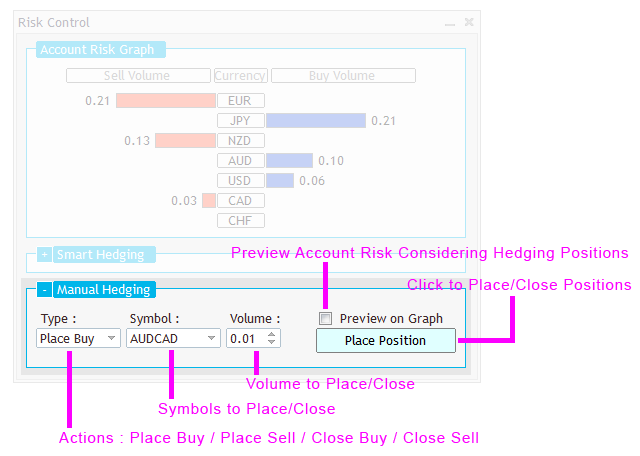
This section is designed for traders who prefer to open or close positions manually. After selecting the symbol, lot size, and desired action, you can enable the preview option to see how the change will affect overall currency volumes before execution. If the preview results meet your expectations, simply confirm the action by clicking the ‘Place Position’ or ‘Close Position’ buttons.
Input Parameters:
Risk Control EA offers several key input adjustments to customize its behavior. These include:
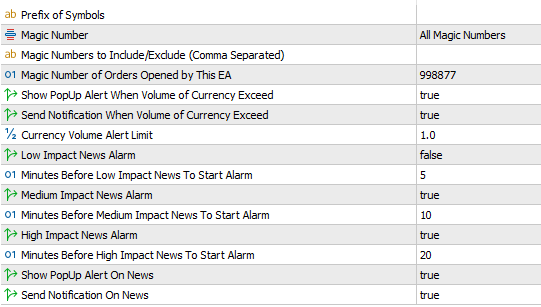
- Prefix of Symbols: Enter a prefix if your broker’s symbols use one (e.g., iEURUSD → prefix ‘i’).
- Magic Number Modes: Choose between All, Include, or Exclude. Multiple values can be entered, separated by commas, to include or exclude specific magic numbers.
- Magic Number of Orders: Defines the unique identifier for trades opened by this EA.
- Volume Alerts:
- Show Pop‑Up Alert When Currency Volume Exceeds Limit
- Send Mobile Notification When Currency Volume Exceeds Limit
- Currency Volume Alert Limit: Set the threshold for alerts and notifications.
- News Alerts:
- Enable alarms for low, medium, and high‑impact news.
- Customize how many minutes before each event the alarm should trigger.
- Show Pop‑Up Alert On News
- Send Notification On News
Note for MT4 Version:
In the MT4 terminal, external event data requires enabling EA access to web resources. To set this up:
- Open Tools → Options in your terminal.
- Go to the Expert Advisors tab, enable the Allow WebRequest option, and add
https://nfs.faireconomy.mediato the list.
Need Help?
Here are some helpful resources. If you have questions or need assistance, feel free to contact us. You can submit a support ticket or leave a comment. we’ll respond as quickly as possible.
Screenshots
Pricing
New Offer Every 6 Hours up to 50%. Follow.
Testing is free. How to do?

Testing on Live
2 Days of unlimited testing
1 Account Activation
Full Support

Lifetime
Unlimited use, forever
10 Accounts Activation
VIP Support
Free Updates
$ 30.00
 to be a light for all traders.
The EA works well, but the interface could be more modern. A cleaner design would improve usability.
MetaTrader’s built-in interface framework has certain design limitations, which gives it a classic look and feel. We’ve worked hard to make the most of what’s available and deliver the best possible user experience within those constraints.
This is the safety net every trader needs. It prevents account blow‑ups and keeps me consistent.
Essential for serious traders.
The dashboard is clear and intuitive. I can see my risk limits at a glance.
Finally, a tool that enforces my rules automatically.
The alerts are too basic. Don’t promise advanced notifications if they’re not there.
Hi, could you please explain a bit more? What exactly is missing from the notifications?
For example account drawdown, new trade opening, …
These notifications are not part of this utility’s scope. The EA only sends notifications related to its own features. For the type of notifications you’re looking for, you can use the Account Monitor EA.
Risk Control EA gives me peace of mind. I can focus on strategy knowing my account is protected.
The comments section is now open. Feel free to share your feedback, reviews, questions, and personal experience with the product. You can also interact with other users and join the discussion. Our support team is active there as well and will respond whenever assistance is needed.