

Close All
Managing multiple trades manually in MetaTrader can be slow and risky. Close All EA is a Forex trade management tool designed to instantly close all positions and pending orders with one click. It’s the fastest way to reduce risk, manage exposure, and keep your trading account safe, plus advanced filtering options for precision trade management.
Category : Utilities
Version : 3.2
Updated : 2026-06-05
Key Features
Description
Close All EA is a professional Forex trade management tool designed for MetaTrader platforms (MT4/MT5). With a single click, you can instantly close all open positions and pending orders — or apply advanced filters to manage trades selectively. Whether you’re a manual trader or using Expert Advisors (EAs), Close All EA helps you save time, reduce risk, and maintain full control over your trading account.
A professional version of this EA is available, called Auto Close EA. It supports automatic closing also.
How it works?
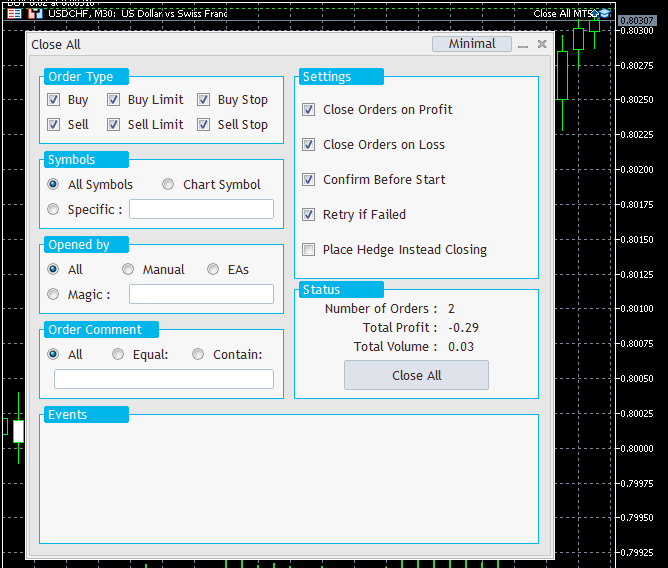
Once attached to a chart, Close All EA displays a graphical panel directly on your MetaTrader terminal. You can configure filters and settings, view a summary of selected trades, and execute the operation by clicking the “Close All” button.
These are main sections of the panel :
Order Type:
Select which types of orders to close: Buy, Sell, Buy Limit, Sell Limit, Buy Stop, Sell Stop
Symbols:
Choose which symbols to apply the operation to:
- All symbols: No filtering; all trades are eligible
- Chart Symbol: Only trades matching the current chart symbol
- Specific: Enter one or more symbols (e.g.,
EURUSD,GBPJPY,GOLD,BTCUSD) separated by commas
Opened by:
Filter trades based on how they were opened:
- All: No filtering
- Manual: Selects only manually opened trades on desktop terminal / Web terminal / Phone App
- EAs: Trades opened by Expert Advisors
- Magic: Enter one or more magic numbers (e.g.,
212,125,40152,36258)
Order Comment:
Filter trades by comment text:
- All: No filtering.
- Equal: Match exact comment (case-sensitive)
- Contain: Match partial text (e.g., input
My01to select trades likeMy01,My015,BestMy0100)
Settings:
These are some general settings. Options available:
- Close orders on profit/loss: Choose to close only profitable or losing trades
- Confirm before start: Enable a safety prompt before executing
- Retry mechanism: If closing fails, EA retries up to 3 times
- Place hedge instead closing: Hedge selected trades with equal lot size (not available on MT5 netting accounts). The magic number of hedge trades can be determined on the EA inputs window.
Summary:
Displays a real‑time overview of selected trades: Number of trades, Total lot size, Total profit.
Clicking Close All will execute the operation based on your filters and settings.
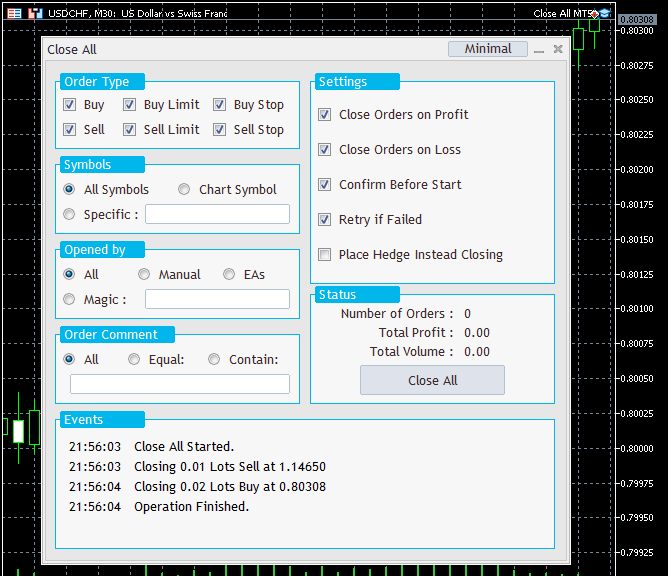
Events:
Track all EA operations for transparency and audit purposes.
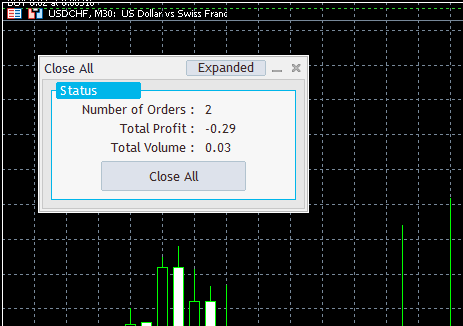
Minimal:
Minimize the panel to view more of the chart. You can toggle back to full mode anytime by clicking Expanded.
Need Help?
Here are some helpful resources. If you have questions or need assistance, feel free to contact us. You can submit a support ticket or leave a comment. we’ll respond as quickly as possible.
Screenshots
Pricing
New Offer Every 6 Hours up to 50%. Follow.
Testing is free. How to do?

Testing on Live
2 Days of unlimited testing
1 Account Activation
Full Support

Lifetime
Unlimited use, forever
10 Accounts Activation
VIP Support
Free Updates
$ 30.00
 to be a light for all traders.
The hedge positions MT4 option gives me flexibility I didn’t have before.
Close All EA is the fastest MT4/MT5 utility I’ve ever used.
Can I use Close All EA on mobile MetaTrader?
No. It’s designed for desktop MT4/MT5.
Does the EA support partial closures?
No. It does not. This EA is designed to close all trades completely using a single click.
Alright. Good.
How can I test the EA? It seems the strategy tester can not test it.
Strategy Tester Limitations: This EA is not compatible with the MetaTrader Strategy Tester.
Experience it live! Activate your free trial using the ‘Testing on Live’ plan available in product Pricing section. This gives you unrestricted access on a live account to evaluate the EA’s performance.
Find out more about how to test our products here: Verifying Products
The one‑click trade closing feature saved me during a news spike. Thanks for the tool.
Managing multiple EAs was always a headache. With the magic number filter EA option, I can close trades from specific robots instantly. Brilliant!”
Is Close All EA compatible with Windows 11?
Hi, Yes the EA can work on any installed Metatrader regardless of the windows version.
I trade multiple symbols at once. The custom symbol selection lets me close only EURUSD or GBPUSD trades without touching the rest. That’s powerful control.
I use the hedge positions MT4 feature daily. Instead of closing trades, I can hedge them instantly and protect my portfolio using this EA.
I like the tool overall, but the confirmation option slows me down when I need instant exits. It should have a faster toggle.
It can be switched off simply.
I am a developer and trader. In my experience, the detailed event reports are fantastic. I can track every action the EA takes, which makes this the most transparent MetaTrader utility I’ve tried.
The comments section is now open. Feel free to share your feedback, reviews, questions, and personal experience with the product. You can also interact with other users and join the discussion. Our support team is active there as well and will respond whenever assistance is needed.