

Jet EA
Jet EA is a fast, reliable trend‑trading robot built for traders who want smart automation without complexity. It uses advanced mathematical filters to catch high‑quality entries, manages every trade with TP/SL for controlled risk, and adapts automatically to different symbols and timeframes. With prop‑firm‑ready protections and only a few essential settings, Jet EA delivers powerful performance in a simple, user‑friendly package.
Category : Trading Robots (EA)
Version : 11.7
Updated : 2026-09-14
Key Features
Description
Jet EA is built for traders who want power, precision, and speed in one unstoppable trading engine. Designed with cutting‑edge mathematical models and ultra‑sharp trend‑detection logic, Jet EA locks onto high‑probability market moves with the accuracy of a professional trading desk. Every position is protected by disciplined TP/SL execution, giving you clean, controlled risk while the EA does the heavy lifting.
Its adaptive intelligence automatically tunes itself to your symbol and timeframe, delivering smooth, consistent performance across Forex majors, crosses, and medium‑term charts. No complicated setup, no cluttered inputs — just a streamlined, high‑performance system that works straight out of the box.
With built‑in prop‑firm protections, smart recovery options, and rock‑solid stability, Jet EA gives you the confidence to trade challenges, funded accounts, or personal portfolios with the same level of precision. If you want an EA that’s fast, reliable, and engineered for real‑world results, Jet EA is your new competitive edge.
Technical Specifications:
| Strategy | Advanced Trend‑Detection Engine |
| Trading Symbols | Forex Currency Pairs (28 Major and Cross Pairs) |
| Supported Timeframes | All (M30,H1 Recommended) |
| VPS | Not necessary |
| Brokers and Account Types | All. (MT5 Netting accounts are not supported) |
| Trading Frequency | High |
Usage Manual:
Using the EA is straightforward and user‑friendly. The primary parameters to adjust are related to money management, with no need for complex entry signal configurations.
General Settings:
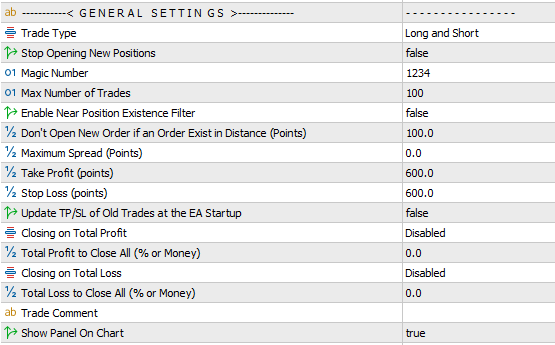
- Trade Type Filter: Specify the trading direction by enabling only Long or Short positions.
- Stop Opening New Positions: Prevents the EA from opening additional trades. Existing positions will continue to be managed until closed, after which the EA halts completely.
- Magic Number: Assigns a unique identifier to the EA’s trades. This is essential when running multiple EAs on the same symbol to distinguish their positions.
- Max Number of Trades: Sets the maximum number of open positions the EA is allowed to hold simultaneously.
- Near Positions Existence Filter: Enables or disables the minimum required price gap between consecutive trades.
- Don’t Open if an Order Exist in Distance: Defines the minimum price gap (in points) required between current open positions and any new trade. This helps avoid clustering multiple trades too close together on the same symbol and in the same direction.
- Maximum Spread Filter: Blocks new trades during periods of high spread. Set a very large value if you wish to disable this filter.
- Take Profit (TP): Defines the profit target for each individual trade, measured in points.
- Stop Loss (SL): Defines the stop loss for each individual trade, measured in points.
- Update TP/SL at Startup: If enabled, any changes made to the TP/SL inputs will also update the TP/SL levels of existing trades.
- Closing on Total Profit/Loss: Enables automatic closure of all open trades once the specified profit or loss target is reached, based on either account currency or a percentage of the account balance.
- Total Profit/Loss to Close All: Specifies the profit or loss threshold—based on account currency or a percentage of account balance—at which all open trades will be closed.
- Trade Comment: Allows you to set a custom comment for all trades opened by the EA.
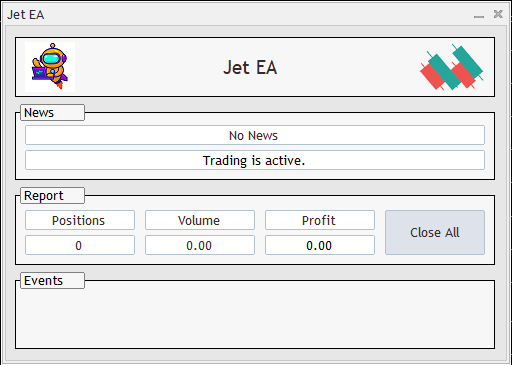
- On‑Chart Panel: Displays a control panel directly on the chart, showing EA status, trade events, open position reports, and includes a one‑click button to close all trades. See the below image.
Signal Settings:
These settings control the EA’s signal engine. To make configuration simple and intuitive, they are displayed using a star‑based scale from 1 to 5. A 1‑star value represents the lowest setting, while a 5‑star value represents the highest.

- Number of Verification: Controls how strictly entry signals are validated before opening a trade. A 1‑star setting applies lighter verification and results in more frequent entries, while a 5‑star setting applies stronger verification and produces fewer, higher‑quality trades.
- Sensitivity to Small Trends: Defines how the EA behaves when detecting smaller trend movements. Lower sensitivity causes the EA to ignore minor trends, while higher sensitivity allows it to enter trades even when the trend size is relatively small.
- Fear of Weak Signals: Adjusts how cautious the EA is when encountering low‑strength signals. Higher values make the EA avoid weak signals entirely, allowing trades only when the signal strength is solid.
Common Settings:
Other options including Lot Size, Trailing Stop, Break‑Even, Date & Time Filters, News Filter, and Notification Settings are shared across all of our trading robots. A detailed explanation of these features is available in the page Common Settings for Trading Robots.
Optimization Guide:
EA optimization is straightforward because there are no complex trading‑adjustment parameters. All input settings can be optimized, but for a faster and more efficient process, the following approach is recommended:
- Parameters to Optimize:
- Time Frame Bounds: M15 to H1
- Number of Verification: 1 to 5
- Sensitivity to Small Trends: 1 to 5
- Fear of Weak Signals: 1 to 5
- Take Profit Bounds: 300 to 600 (step 150) — or 30 to 60 (step 15) for 4‑digit accounts
- Stop Loss Bounds: 300 to 600 (step 150) — or 30 to 60 (step 15) for 4‑digit accounts
- Other Parameters: Default values are sufficient
- Testing Mode: Use Every Tick mode for faster and sufficiently accurate results
- It is recommended to first run optimization using a constant volume setting. This approach helps identify configurations that deliver the highest profit with minimal drawdowns.
Recommendations:
- Supported Pairs: Jet EA supports the following currency pairs: AUDCAD, AUDCHF, AUDJPY, AUDNZD, AUDUSD, CADCHF, CADJPY, CHFJPY, EURAUD, EURCAD, EURCHF, EURGBP, EURJPY, EURNZD, EURUSD, GBPAUD, GBPCAD, GBPCHF, GBPJPY, GBPNZD, GBPUSD, NZDCAD, NZDCHF, NZDJPY, NZDUSD, USDCAD, USDCHF, and USDJPY. Pairs that include CHF are particularly recommended for optimal performance.
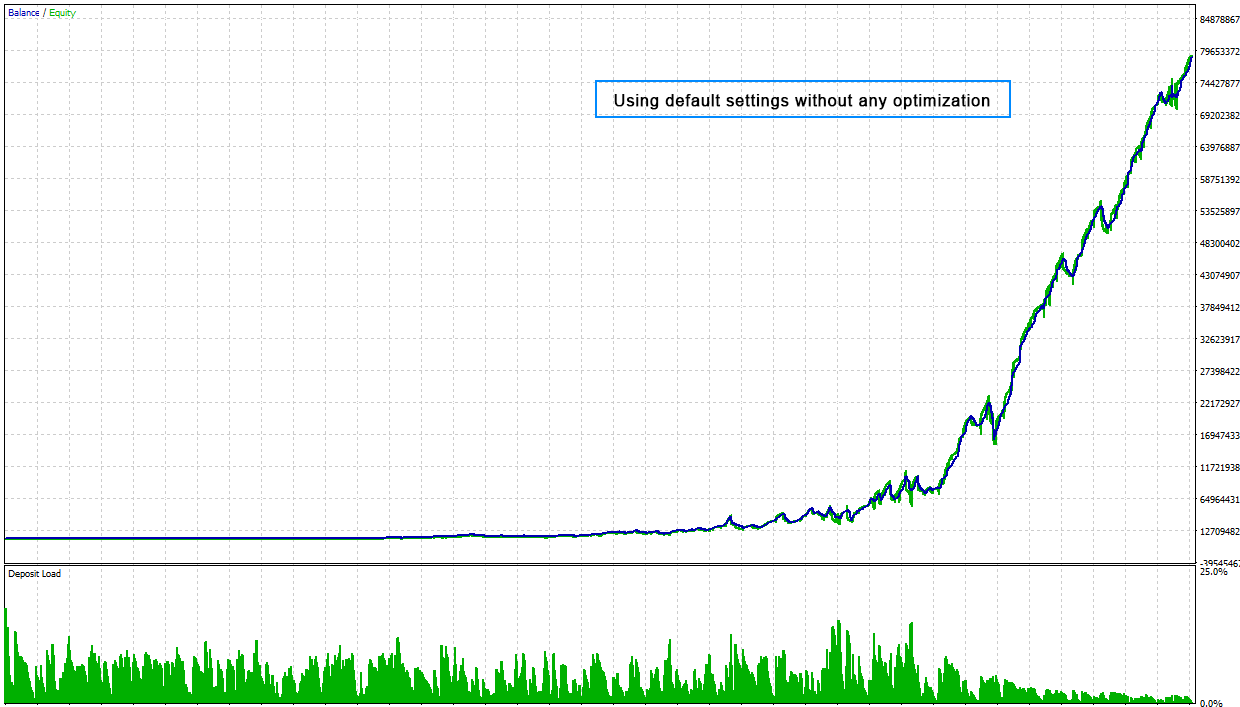
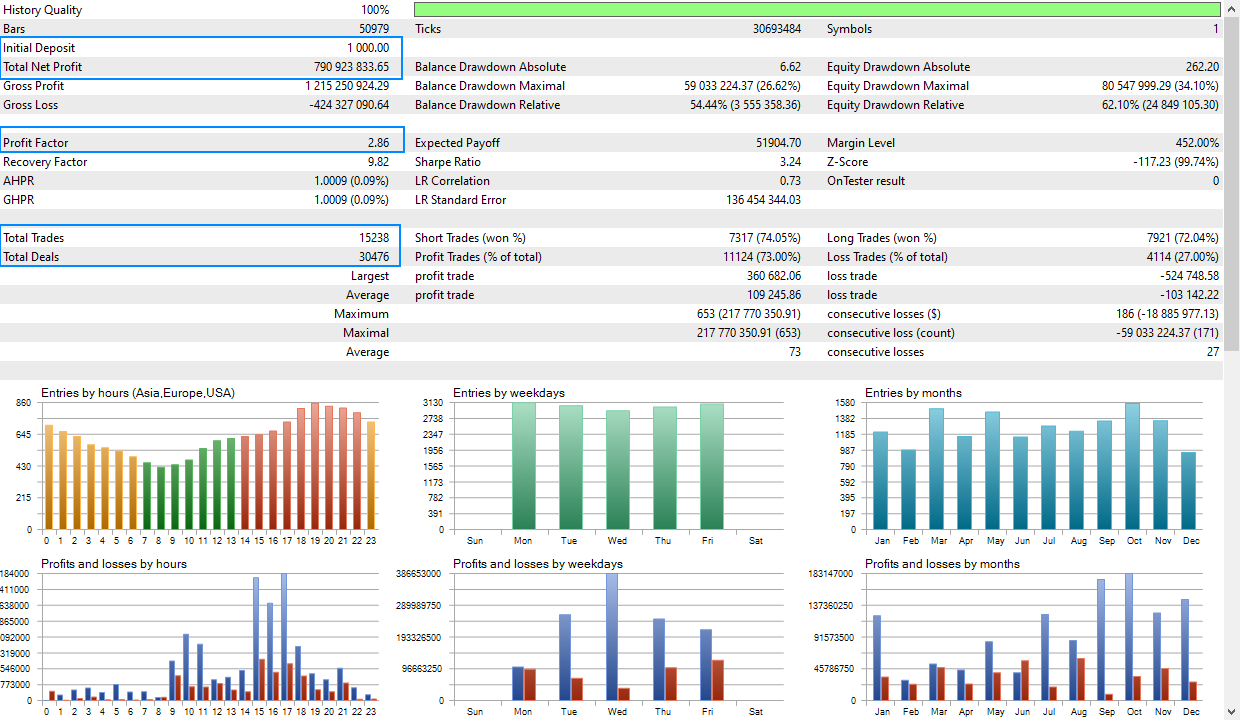
- Volume Guidelines: Always use between 5% and 20% of the volumes applied during backtesting to maintain safe and consistent results.
- Multi‑Symbol Trading: When trading multiple symbols simultaneously, be aware that drawdowns from each instrument can accumulate. To reduce risk, use smaller volumes across symbols.
- Loss Recovery: The EA may experience consecutive losses; however, it is designed to recover these losses in subsequent trades. use lover trading lot sizes to ensure sufficient margin is available to allow the EA to execute its recovery process effectively.
Need Help?
Here are some helpful resources. If you have questions or need assistance, feel free to contact us. You can submit a support ticket or leave a comment. we’ll respond as quickly as possible.
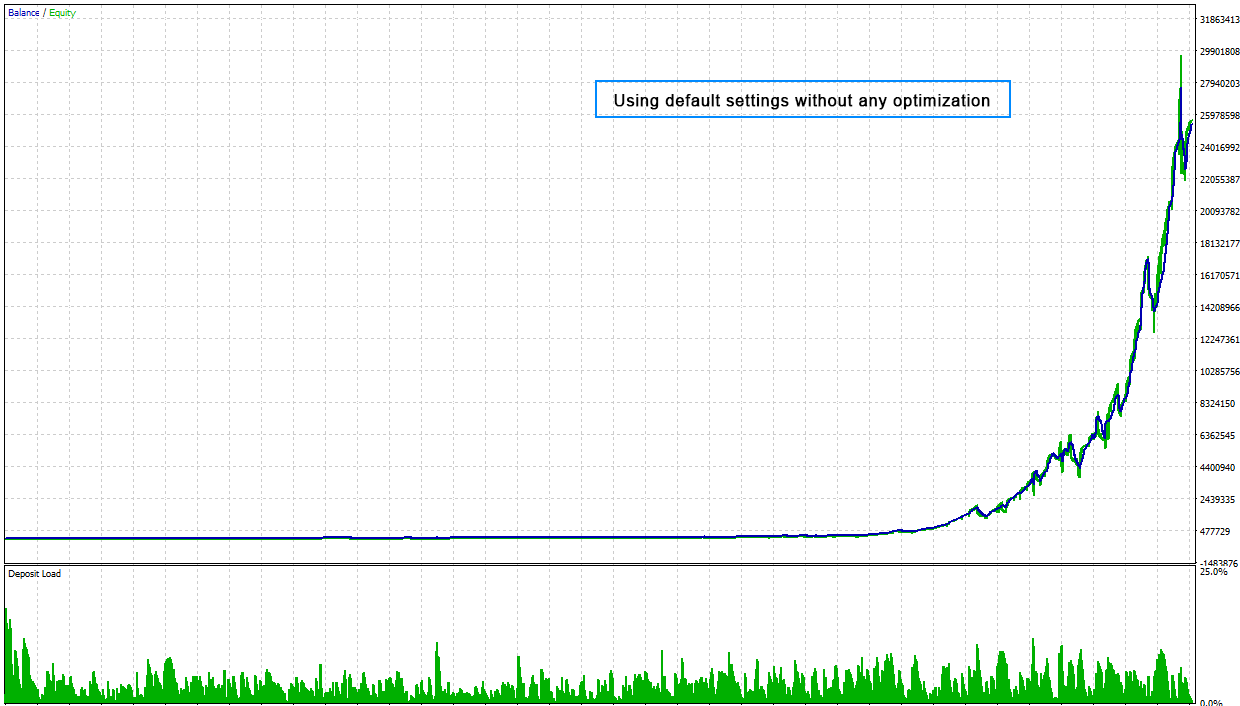
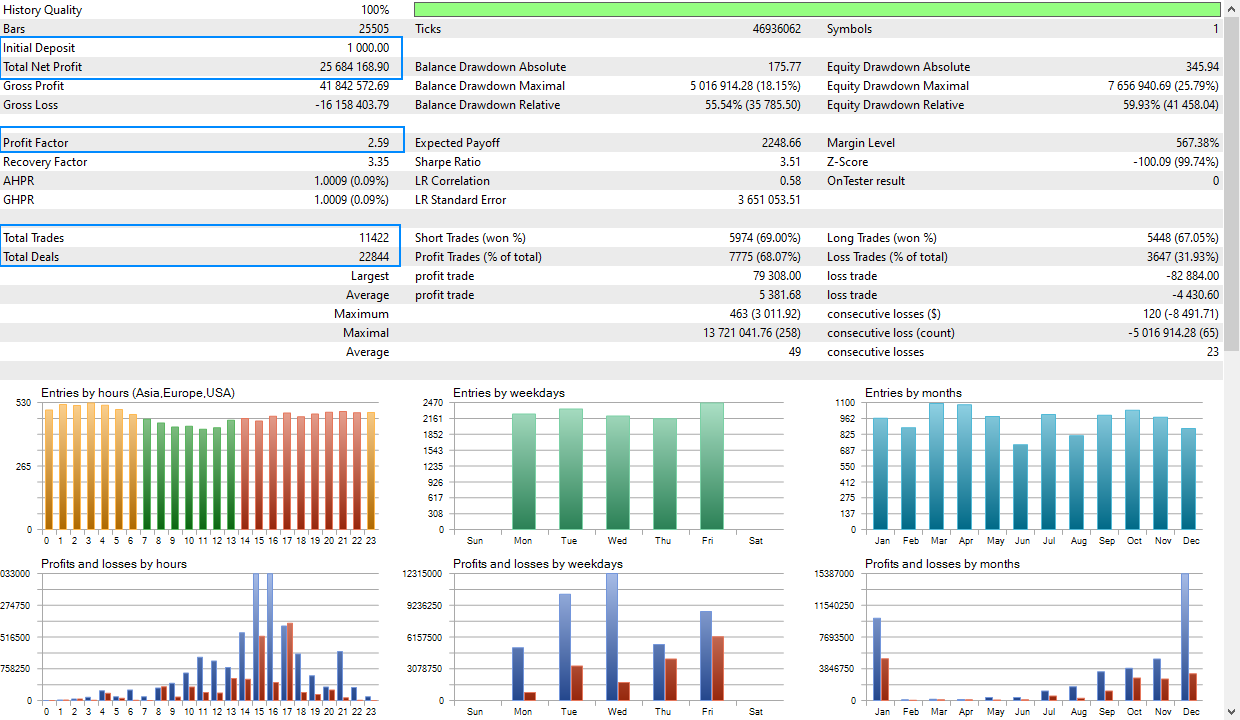
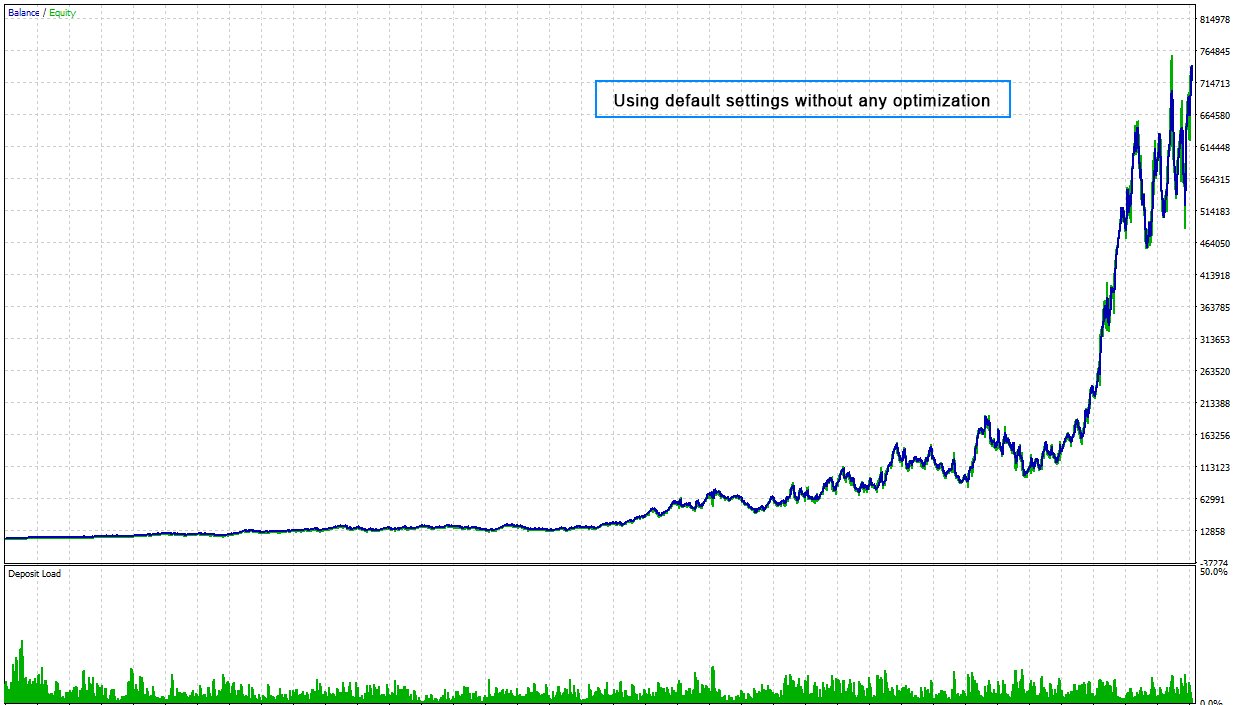
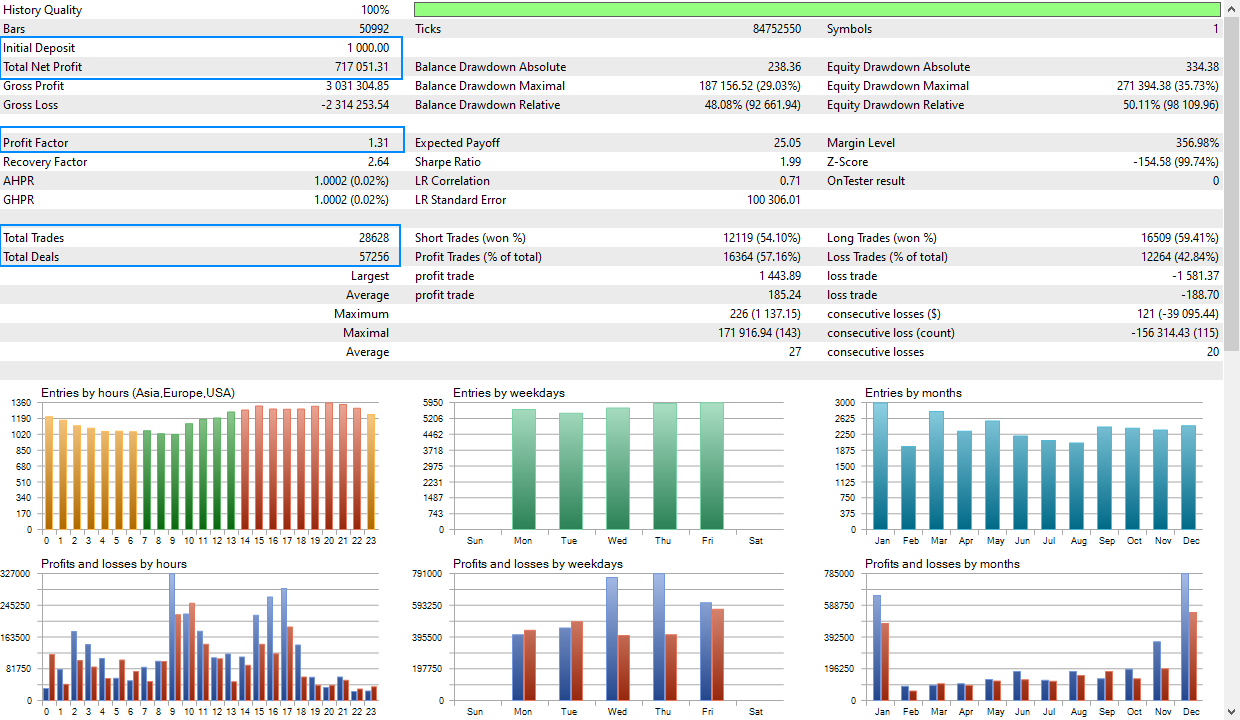
Screenshots
Pricing
New Offer Every 6 Hours up to 50%. Follow.
Testing is free. How to do?

1 Month
1 Month of unlimited use
1 Account Activation
Full Support
Free Updates
$ 100.00

3 Months
3 Months of unlimited use
2 Accounts Activation
Full Support
Free Updates
$ 200.00

6 Months
6 Months of unlimited use
3 Accounts Activation
Full Support
Free Updates
$ 400.00

1 Year
1 Year of unlimited use
4 Accounts Activation
Full Support
Free Updates
$ 600.00

Lifetime
Unlimited use, forever
5 Accounts Activation
VIP Support
Free Updates
$ 800.00

Lifetime Installment
Unlimited use, forever
5 Accounts Activation
Full Support
Free Updates
$ 900.00
– Start using the product from now and pay in three parts.
1- Now pay $300.00 and use the product.
2- Pay $300.00 on 2026.10.15 and continue using.
3- Pay $300.00 on 2026.11.14 to enable lifetime license.
 to be a light for all traders.
How does Jet EA behave during major market sessions like London or New York, and does it adapt its behavior based on session volatility?
It trades normally but respects session filters if enabled.
Is these a way to support netting accounts?
Unfortunately, this strategy requires a hedging account and is not supported on netting accounts. Please switch to a hedging account before running it.
The EA trades less frequently than I expected, but I can see why. It waits for strong confirmations and avoids weak signals. If you’re looking for fast action, this isn’t it. But if you want controlled, low‑risk automation, Jet EA fits that profile.
It is perfect. Low frequency entry is better than entry on every weak signal.
What is the best way to monitor Jet EA’s performance without interfering with its logic or accidentally overriding its decisions?
Just observe the chart; no manual interaction needed.
This helped me stabilize my trading after years of inconsistency.
The trend engine is insanely accurate. I’m impressed.
I don’t like it. It opens many trades. It can be dangerous.
No worries! This is how this Expert Advisor (EA) works. It’s designed to recover from any losses in later trades. To make sure it runs smoothly, you should:
1.Use smaller trading lot sizes.
2.Enable the “Near position existence filter”. This helps reduce the number of open trades.
3.Ensure you always have enough margin available. This gives the EA the necessary room to perform its recovery process effectively.
Basically, by managing the lot size and using that filter, you help the EA do its job of recovering from losses properly.
I understood. Thanks.
I appreciate how the EA handles losing streaks. Yes, it can have consecutive losses, but the recovery logic is structured and safe. You just need proper margin.
I use this robot on three symbols with reduced lot sizes, and the drawdown stays manageable. Good.
Does Jet EA use any dangerous strategies?
No. It avoids martingale, grid, and high‑risk multipliers.
I’ve used many robots that looked good in backtests but failed in live trading. But Jet EA is the opposite. It is stable, disciplined, and built for real‑world conditions.
I love how Jet EA adapts to different symbols. CHF pairs performed best for me, just as recommended.
Hi, If I optimize Jet EA for one pair, can I safely use the same settings on another pair?
Hi, Not recommended; optimize per symbol.
Ok, Thanks a lot.
I trust this robot more than any robot I’ve tried in the last 5 years.
Jet EA trades exactly how I wish I could trade manually.
Hello. Is this a scalper system?
Hi.
No it is not a scalping system. But this is a specific HFT trading strategy.
Reliable, stable, and disciplined. This EA is different.
How do I choose the right lot size?
Use 5–20% of the lot size you used in backtesting to maintain safe live performance. When trading multiple symbols simultaneously, use smaller volumes across symbols.
I’m still in the testing phase, and while the EA hasn’t done anything wrong, I’m waiting to see long‑term results. The logic is solid, but I want more time before fully committing. So far, it’s behaving responsibly.
Hi support. Can I use the EA on a cent account?
Yes, cent accounts work fine.
Jet EA didn’t work for me. The entries were too slow and I didn’t see the results I expected.
Hi,
Surely you did something wrong. Please check your terminal experts panel or the EA events panel for error logs. If you can not find the issue, please send more details and screenshot to help you for setup.
Oh, That was my fault. The auto trading button was off. It is working now. Thank you.
What happens if I change settings while trades are open?
It will continue using new settings. If SL/TP sync is enabled, existing trades may update accordingly.
How does Jet EA behave during extremely low‑volatility periods, such as holidays or late‑session hours?
It reduces trading or stops entirely.
Jet EA helped me build confidence in automated trading again after several bad experiences with over‑optimized robots.
What I love most is the consistency. Jet EA doesn’t try to trade every candle. It waits for strong setups, verifies them multiple times, and only then enters. This reduces noise and improves win quality.
How many days do you use this EA? Do you find a specific bug?
About 9 months.
No. Nothing.
What I appreciate most about Jet EA is the transparency. No hidden grids, no martingale, no secret multipliers. Every trade has a clear SL and TP, and the logic is easy to follow. The trend engine is mathematically sound, and the verification layers make the entries feel reliable. This is one of the few EAs I trust to run unattended.
Dear support,
Do you accept account management? If yes, what are the fees and rates?
Sorry, we don’t offer this service at the moment—maybe in the future. However, if you need any assistance with our products, we’re always here to help.
There’s no need to pay extra for account management; our trading robots are easy to use. You can simply install one of them on your account and start trading.
It never opens random trades.
Hi, What am I doing wrong? It opens many consecutive trades!
Hello, you’re right. This is an HFT‑style EA. Try using higher timeframes and adjust the “Near Position Filter” if you want fewer trades.
tnx.
Really 5 stars! I did it.
Perfect until now. Jet EA helped me pass Phase 1 of my prop challenge with controlled risk and stable entries. I will update this message later.
Hi, Can I use this EA on Cryptos?
Hi, yes. You can use the EA on all instruments, but it delivers its best performance on Forex currency pairs.
Which currency pairs are recommended?
Hi, all Forex currency pairs are supported, including the full set of 28 major and cross pairs. In most cases, CHF‑based pairs tend to deliver stronger performance.
The comments section is now open. Feel free to share your feedback, reviews, questions, and personal experience with the product. You can also interact with other users and join the discussion. Our support team is active there as well and will respond whenever assistance is needed.