

Account Monitor
The Account Monitor is a MetaTrader utility designed to keep traders connected to their account health at all times. It automatically tracks critical conditions such as drawdown, margin level, equity changes, connectivity, and position activity, then delivers instant notifications via mobile push, email, or desktop pop‑ups. Whether you’re monitoring risk, ensuring connectivity, or staying updated on trades, Account Monitor acts as your personal sentinel for account safety.
Category : Utilities
Version : 2.8
Updated : 2025-11-05
Key Features
Description
The Account Monitor EA is a powerful MetaTrader utility that keeps traders fully informed about their account status by continuously tracking and alerting on critical conditions in real time. It monitors all key events within the trading account and provides fully customizable alerts. Notifications are delivered through multiple channels — free push alerts to Android/iOS devices, email messages, or instant desktop pop‑ups — ensuring you never miss important updates. In addition, the EA displays live account information directly on the chart. Easy to attach to any chart and configurable with flexible input settings, Account Monitor offers traders a reliable solution for risk management, connectivity monitoring, and trade awareness.
Usage Manual:
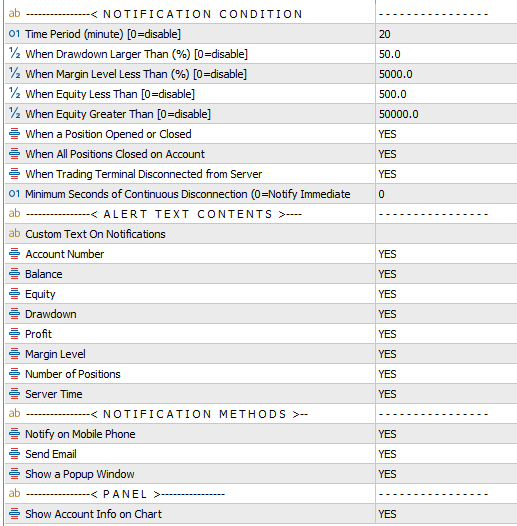
Step 1 – Attach EA
- Load Account Monitor onto any chart with any timeframe.
- You can attach it to multiple charts with different input settings for customized monitoring.
Step 2 – Configure Inputs
Notification Conditions:
- Constant time period
- Drawdown larger than specified value
- Margin level smaller than specified value
- Equity greater or smaller than specified value
- Position opened or closed
- All positions closed
- Terminal connection lost (with minimum seconds of disconnection)
Notification Content:
- Custom text
- Account number
- Balance, equity, profit, drawdown
- Margin level, number of open positions
- Server time
Step 3 – Set Notification Method
Mobile Push (Android/iOS):
- Install MetaTrader app on your phone.
- From Messages tab, copy your MQID.
- On PC MetaTrader: Tools → Options → Notifications → Enable Push Notifications → Enter MQID.
- Test to confirm setup.
Email:
- On PC MetaTrader: Tools → Options → Email → Enable Email Notifications → Enter mail server data.
Popup Window:
- No setup required.
- To change sound, go to Tools → Options → Events → adjust Alert Wave.
Step 4 – Monitor in Real Time
- Account Monitor runs continuously, sending alerts based on your chosen conditions.
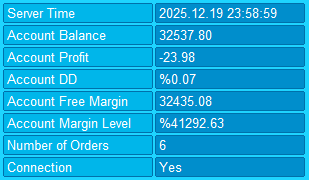
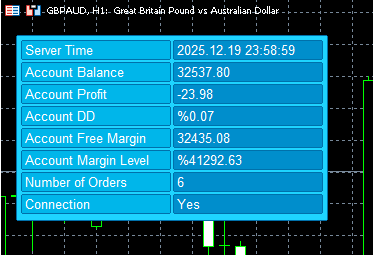
- Data such as balance, equity, margin, DD, and connection status is displayed directly on the chart.
Need Help?
Here are some helpful resources. If you have questions or need assistance, feel free to contact us. You can submit a support ticket or leave a comment. we’ll respond as quickly as possible.
Screenshots
Pricing
New Offer Every 6 Hours up to 50%. Follow.
Testing is free. How to do?

Testing on Live
2 Days of unlimited testing
1 Account Activation
Full Support

Lifetime
Unlimited use, forever
10 Accounts Activation
VIP Support
Free Updates
$ 30.00
 to be a light for all traders.
I love that I can choose between email, push, or popup notifications. Flexibility is key.
I use it daily and it’s become essential in my trading routine.
If you set too many alerts, it can feel overwhelming. Best to configure only what matters.
I appreciate the customizable content in notifications. Seeing balance and equity instantly is great.
Can I receive alerts on my phone?
Absolutely. Push notifications are supported for Android and iOS. Just needs to install MetaTrader app on your phone.
The EA’s ability to notify me when the terminal disconnects has saved me from potential disasters. I once lost connection during high volatility, but Account Monitor alerted me instantly, and I reconnected before missing critical moves.
Account Monitor is lightweight yet powerful. It doesn’t slow down my platform, even when running multiple instances. That’s important for professional traders like me.
It took me a few minutes to set up push notifications, but once configured, it worked perfectly.
The comments section is now open. Feel free to share your feedback, reviews, questions, and personal experience with the product. You can also interact with other users and join the discussion. Our support team is active there as well and will respond whenever assistance is needed.