

New Generation EA
New Generation EA is a fully automated trading system built for traders who want simplicity, intelligence, and adaptability in one package. Powered by advanced trend‑detection algorithms and multi‑layered confirmation logic, it analyzes market structure in real time and executes trades with precision across all Forex pairs and all timeframes. The EA is designed to be effortless to use — no complex configurations, no deep market knowledge required — making it ideal for beginners while still offering the depth and control experienced traders expect.
Category : Trading Robots (EA)
Version : 12.18
Updated : 2026-09-10
Key Features
Description
New Generation EA is built for traders who want a modern, intelligent, and low‑maintenance automated system that adapts to the market instead of forcing trades. At its core is an advanced trend‑detection engine that evaluates price structure, candle behavior, and multi‑timeframe confirmations to identify high‑probability entries with precision. The EA filters out noise, avoids weak signals, and waits for clean momentum before executing a position. This makes it suitable for all Forex pairs and all timeframes, from fast intraday charts to higher‑timeframe swing trading. Despite its sophisticated internal logic, the EA remains incredibly simple to use — no complex indicators, no confusing parameters, and no need for deep market knowledge.
Beyond its entry logic, New Generation EA is equipped with a complete suite of risk‑management tools designed to keep trading safe and controlled. Traders can choose between automatic or manual TP/SL modes, enable trailing or break‑even protection, and activate a structured averaging system when needed. The grid module is fully customizable, allowing users to define distances, volume scaling, and maximum exposure limits. For those who prefer strict discipline, the EA can also operate without averaging, closing trades only through TP, SL, or opposite signals. Combined with time filters, day‑filters, and a robust news‑filtering system, the EA ensures that trades are executed only under favorable conditions.
What truly sets New Generation EA apart is its long‑term vision. The system is designed to grow with its users, with ongoing updates, feature expansions, and community‑driven improvements. Whether you’re a beginner looking for a plug‑and‑play solution or an experienced trader seeking a flexible, trend‑driven engine, New Generation EA provides a stable, intelligent, and future‑proof foundation for automated trading.
Technical Specifications:
| Strategy | Smart trend‑detection with high‑quality entries. |
| Trading Symbols | All 28 Major and Cross Currency Pairs |
| Supported Timeframes | All (M30 is recommended) |
| VPS | Not necessary |
| Brokers and Account Types | All. (MT5 Netting accounts are not supported) |
| Trading Frequency | Low |
Usage Manual:
Using the EA is straightforward and user‑friendly. The primary parameters to adjust are related to money management, with no need for complex entry signal configurations.
General Settings:
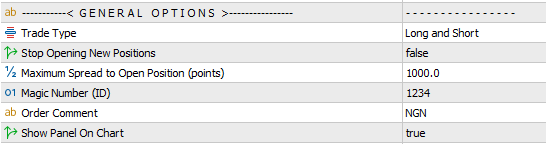
- Trade Type: Specify the trading direction by enabling only Long or Short positions.
- Stop Opening New Positions: Prevents the EA from opening additional trades. Existing positions will continue to be managed until closed, after which the EA halts completely.
- Maximum Spread Filter: Blocks new trades during periods of high spread. Set a very large value if you wish to disable this filter.
- Magic Number: Assigns a unique identifier to the EA’s trades. This is essential when running multiple EAs on the same symbol to distinguish their positions.
- Order Comment: Specifies comment of opened trades.
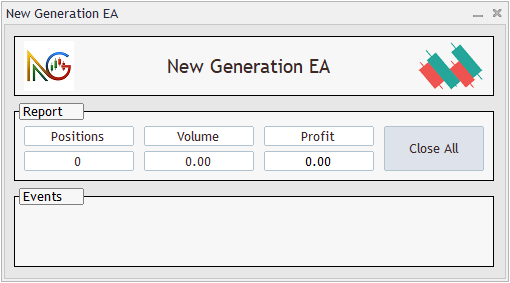
- On‑Chart Panel Displays a control panel directly on the chart, showing EA status, trade events, open position reports, and includes a one‑click button to close all trades. See the below image.
Signal Settings:
These are the only settings used to adjust the EA’s signal engine.

- Signal Amplitude: Controls the strength of the signal. Lower values produce weaker but more frequent entries, while higher values generate stronger but less frequent signals. Recommended range: 1–4.
- Double Verification of Signals: When enabled, the EA confirms the entry direction by estimating the potential movement. If the projected target exceeds the trade’s take‑profit level, the EA allows the entry.
- Filter Signals Using Candle Types: Aligns trade direction with the type of the most recently closed candle for additional confirmation.
- Verify Signals on Daily Timeframe Also: Adds an extra layer of confirmation by checking the signal on the D1 timeframe. This reduces the number of entries but ensures the EA trades only in stronger, more reliable conditions.
Closing Positions Settings:
In this section, you can define how trades should be closed. Available options include setting take profit and stop loss levels to manage risk and secure gains.

- TP and SL Modes:
- Disabled
- Automatic: The EA calculates and applies TP/SL levels dynamically based on market conditions.
- Fixed Manual (Virtual): Uses fixed TP/SL values, but they remain internal and are executed by the EA instead of being placed on the trade.
- Fixed Manual (Real): Applies fixed TP/SL values directly to the trade, allowing the broker’s server to trigger them automatically.
These are recommended starting values for Manual TP/SL. They are typical defaults, and traders can adjust them based on their own optimizations and backtests.
| Timeframe | TP (Points) | SL (Points) |
|---|---|---|
| M5 | 70 | 700 |
| M15 | 150 | 800 |
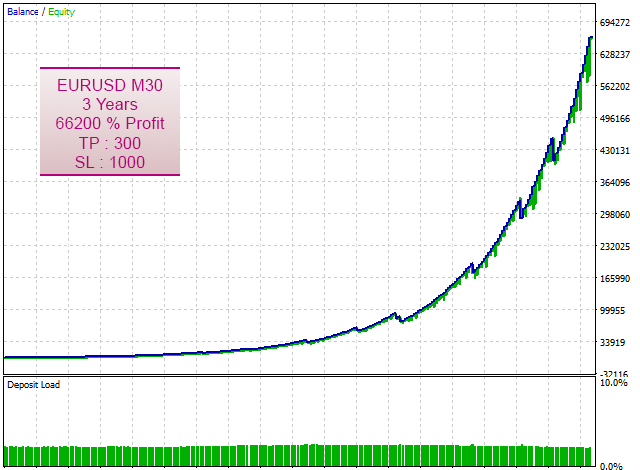
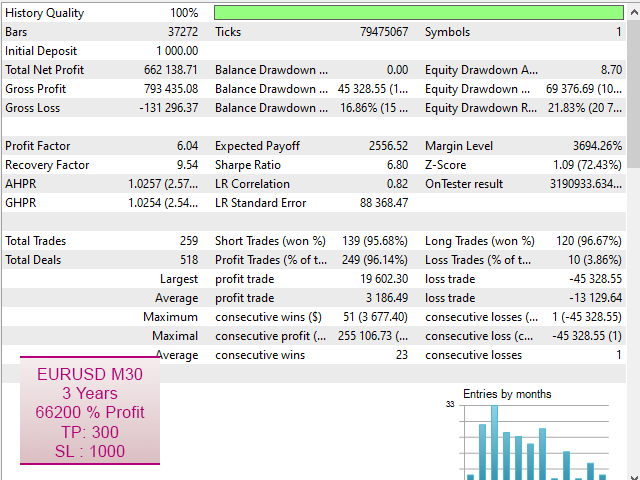
| M30 | 300 | 1000 |
| H1 | 400 | 1200 |
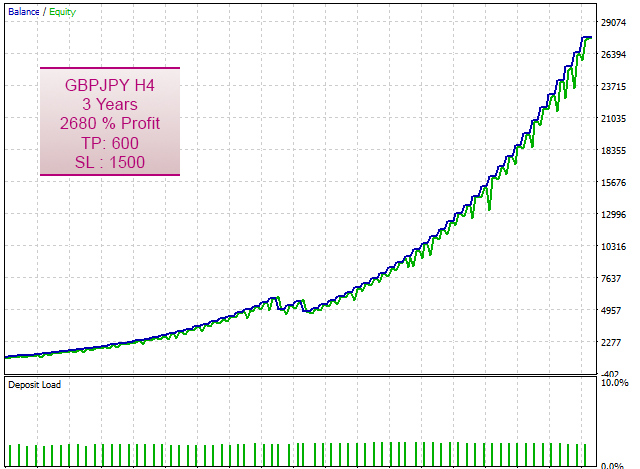
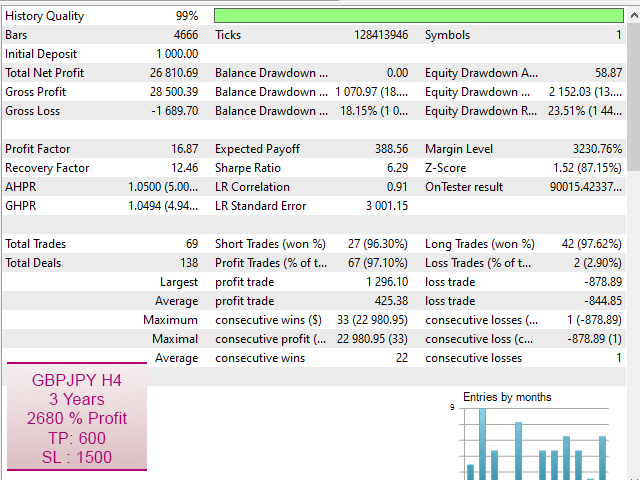
| H4 | 600 | 1500 |
Grid Settings:
An averaging system (grid) is provided, allowing the EA to recover losing trades by strategically opening new positions and balancing them until the overall outcome improves.
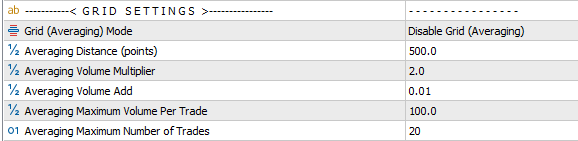
- Grid Mode: Choose how the EA should handle trades that move into loss:
- Disable Grid: Disables this feature.
- Grid Using Add Volumes: Applies an averaging strategy where each new averaging trade increases lot size by adding a fixed value to the previous lot size.
- Grid Using Multiply Volumes: Applies an averaging strategy where each new averaging trade increases lot size by multiplying the previous lot size with a set factor.
- Averaging Distance: Defines the point‑based price gap between consecutive averaging trades.
- Averaging Volume Multiplier: When using the Multiply mode, this factor determines how much the lot size is multiplied for each averaging trade.
- Averaging Volume Add: When using the Add mode, this value specifies how much is added to the lot size for each averaging trade.
- Averaging Maximum Volume: Sets the maximum lot size allowed per trade when averaging is applied.
- Averaging Maximum Number of Trades: Defines the maximum number of averaging trades permitted, limiting exposure and risk.
Risk Management:
This section provides security controls and global account‑level SL/TP options, offering additional tools for stronger overall risk management.
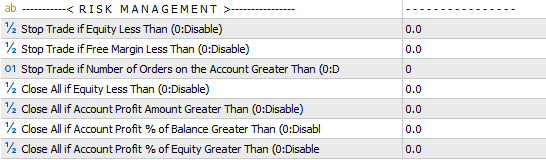
- Stop Trade if Equity Less Than
- Stop Trade if Free Margin Less Than
- Stop Trade if Number of Orders on the Account Greater Than
- Close All if Equity Less Than
- Close All if Account Profit Amount Greater Than
- Close All if Account Profit % of Balance Greater Than
- Close All if Account Profit % of Equity Greater Than
Common Settings:
Other options including Lot Size, Trailing Stop, Break‑Even, Date & Time Filters, News Filter, and Notification Settings are shared across all of our trading robots. A detailed explanation of these features is available in the page Common Settings for Trading Robots.
Optimization Guide:
Optimizing this EA is straightforward and lightweight because it doesn’t rely on complex signal‑related parameters. It’s best to run tests using a small fixed lot size (e.g., 0.01) and a large tester balance (e.g., 10,000). Once you identify the best settings, you can adjust the lot size according to the drawdown observed during optimization and the size of your real account.
Recommendations:
When running multiple instances of the EA on different charts, it is recommended to reduce the lot size for each EA. This helps prevent excessive exposure, as drawdowns from multiple trades can accumulate and potentially lead to a high‑risk situation.
Need Help?
Here are some helpful resources. If you have questions or need assistance, feel free to contact us. You can submit a support ticket or leave a comment. we’ll respond as quickly as possible.
Screenshots
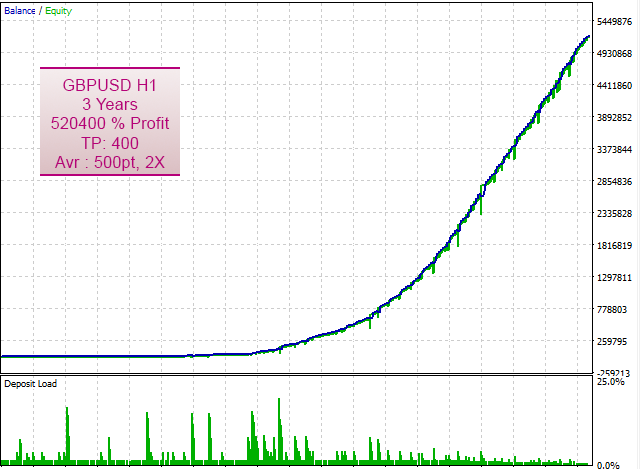
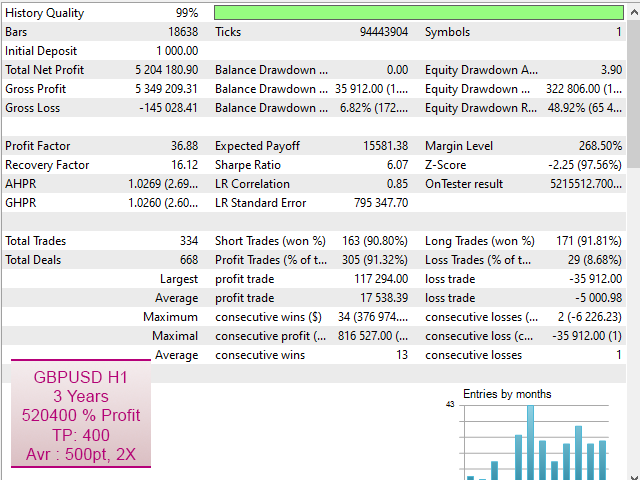
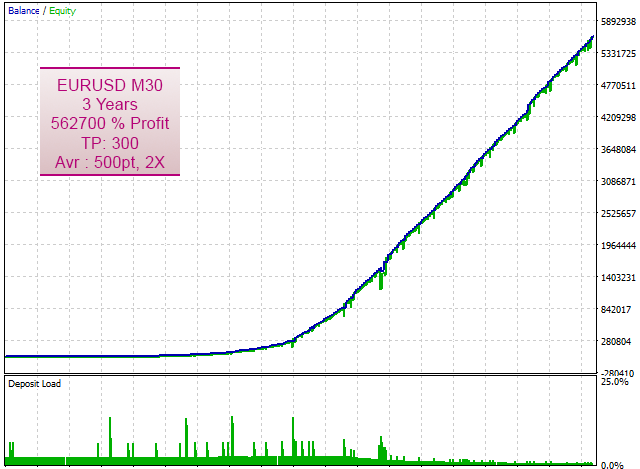
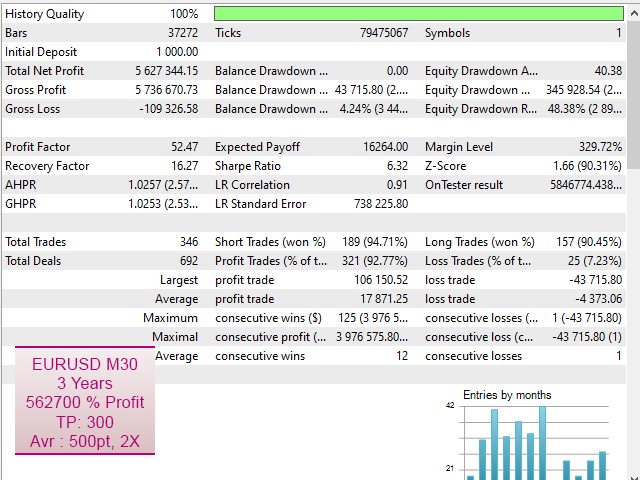
Pricing
New Offer Every 6 Hours up to 50%. Follow.
Testing is free. How to do?

1 Month
1 Month of unlimited use
1 Account Activation
Full Support
Free Updates
$ 100.00

3 Months
3 Months of unlimited use
2 Accounts Activation
Full Support
Free Updates
$ 200.00

6 Months
6 Months of unlimited use
3 Accounts Activation
Full Support
Free Updates
$ 400.00

1 Year
1 Year of unlimited use
4 Accounts Activation
Full Support
Free Updates
$ 600.00

Lifetime
Unlimited use, forever
5 Accounts Activation
VIP Support
Free Updates
$ 800.00

Lifetime Installment
Unlimited use, forever
5 Accounts Activation
Full Support
Free Updates
$ 900.00
– Start using the product from now and pay in three parts.
1- Now pay $300.00 and use the product.
2- Pay $300.00 on 2026.10.15 and continue using.
3- Pay $300.00 on 2026.11.14 to enable lifetime license.
 to be a light for all traders.
The D1 confirmation is a game changer. Fewer trades, better trades.
It took me a while to get comfortable with the averaging system.
Does the EA avoid strategies that rely on unrealistic execution conditions that prop firms don’t allow?
Yes, it uses robust logic that works under real world spreads and slippage.
Perfect balance between automation and safety.
The setup took 2 minutes. The results speak for themselves.
Can I run it on multiple pairs?
Yes, the EA is multi‑pair compatible.
I don’t like the option : “Verify Signals on Daily Timeframe Also”. This blocks opening many profitable positions. Why?
Yes, this option will definitely reduce the number of trades. While it might occasionally block a profitable position, it also prevents many losing ones. It’s generally worth enabling, as most extra confirmation filters can impact correct signals too.
Does the EA use predictive modeling?
Yes. The Double Verification feature estimates potential movement before allowing an entry.
If the market suddenly shifts direction after the EA opens a trade, how does the system determine whether to hold, average, or exit early?
It evaluates trend continuation and uses controlled averaging or exits based on settings.
The on‑chart panel is clean and helpful. I can see everything at a glance.
The EA doesn’t follow my lot size. Why?
Please make sure you selected the correct Volume Calculation Method option.
Sorry, that was my mistake. It is working now. Thanks for your help.
Plugged it in, set my risk, and it just works. Zero stress.
Is the EA suitable for long‑term funded accounts, not just passing challenges?
Yes, it’s designed for stable, sustainable performance.
If you want smart automation, this is the one, this is the best.
Sorry. I am beginner. Can you help me? The EA shows “Spread too high.” What does it mean?
Hello. Sure. We are here to help you.
Your broker’s spread exceeded your max spread setting. Please modify the EA spread settings and use a larger value. Or disable that feature.
Hello, How does the EA differentiate between a genuine breakout and a false breakout caused by liquidity grabs or news spikes?
It filters signals using candle type, amplitude, and multi‑timeframe confirmation.
How does the EA decide whether a trend is strong enough to justify opening a position, especially during periods of mixed volatility and inconsistent candle structure?
It checks trend strength, volatility, and candle confirmation before entering.
The EA trades too little. How do I increase frequency?
Use lower Signal Amplitude or disable Daily confirmation. Also use lower timeframes.
Does the EA adapt to changing market regimes?
Yes. Its filters adjust behavior automatically when volatility or trend consistency shifts.
I love how it filters weak signals. My charts look cleaner than ever.
Does the EA avoid holding trades over the weekend if the prop firm forbids it?
Yes, you can enable the time filter to block weekend exposure.
What impressed me most is how few bad entries this EA takes. It waits patiently for strong setups, and when it enters, the logic makes sense. I’ve seen fewer drawdowns and more stable equity curves compared to my previous robots.
This EA finally gave me consistent entries without noise. Clean, simple, effective.
I’ve seen many EAs that promise ‘AI’ but deliver randomness. This EA doesn’t need buzzwords. The logic is solid, structured, and effective.
It surprised me. I earn 3.5% safe profit within 24 hours only. It is the best EA I find until now. Thank you developer.
Do you use specific settings?
No. Not a specific. I just did some tests to find a matching settings with my own trading idea. It is so simple EA.
Hi, This is very expensive. Do you have offer for beginners or users with lower incomes?
Hi, it’s actually not expensive when you consider the payback period and the EA’s return rate. For beginners, we offer an installment plan so you can pay step by step. We also run random promotions with discounts of up to 50% on all products. Follow this link to stay updated on upcoming offers.
Everyone loan me $5k? I will return $10k after 3 months. I found the best settings for this EA and I can make large profits.
Dear customers, please be cautious and never entrust your money to anyone for trading. This EA does not require any special skills to adjust the settings, and if you need assistance, our support team is here to help.
Dear jmknight5, please avoid repeating such comments. If this continues, we will have to ban your account.
Smart entries. I surprised with the entry points.
The logic is clean, but I wish there were more advanced customization options for experienced traders.
All our products are built to be simple, intuitive, and free from unnecessary complexity. Could you clarify what you mean by “advanced customization”? If you need a specific feature, please share the details. Our team will review it, and if it benefits most traders, we’ll include it in future updates.
Hello.
I find an issue with this EA. The autotrading turns off on every account change. Please update and fix that.
This isn’t an issue with the EA. It’s a default MetaTrader security setting. You can adjust it by going to Tools → Options → Expert Advisors.
This EA feels like a professional tool, not a toy.
I love how the EA respects structure. It trades like a professional trend follower.
The comments section is now open. Feel free to share your feedback, reviews, questions, and personal experience with the product. You can also interact with other users and join the discussion. Our support team is active there as well and will respond whenever assistance is needed.