

Triangular Arbitrage EA
Triangular Arbitrage EA offers fast, low‑risk trading by exploiting tiny price gaps between three related currency pairs at once. It opens fully hedged baskets, avoids market direction risk, and works automatically with plug‑and‑play simplicity. The result is a highly stable, broker‑sensitive strategy designed for consistent, low‑exposure profit opportunities.
Category : Trading Robots (EA)
Version : 7.0
Updated : 2026-06-01
Key Features
Description
Triangular Arbitrage EA is built to capture tiny pricing inefficiencies between three related Forex pairs at the same time. Instead of predicting market direction, it identifies moments when cross‑rates fall out of balance and instantly opens a fully hedged three‑pair basket to lock in profit. This approach removes directional risk and focuses purely on mathematical discrepancies, making the strategy exceptionally stable.
The EA continuously scans all 56 possible triangular combinations across major and cross pairs, selecting only the strongest opportunity when conditions align. Once the profit threshold is reached, all three trades close together as a single basket. With plug‑and‑play simplicity, automatic volume calculation, and no need for complex configuration, the EA is suitable for both beginners and advanced traders.
Because the trades are hedged, exposure is minimal, and the strategy behaves like a fast arbitrage scalper—high precision, low risk, and highly dependent on execution quality. For best results, a fast broker, low latency VPS, and preferably MT5 are recommended.
Technical Specifications:
| Strategy | Triangular Arbitrage Logic |
| Trading Symbols | 28 Major and Cross Currency Pairs |
| Supported Timeframes | All (Results are not related to timeframe) |
| VPS | Recommended. |
| Brokers and Account Types | All. (MT5 Pro/Standard Accounts are recommended.) |
| Trading Frequency | Low |
Usage Manual:
Using the EA is straightforward and user‑friendly. The primary parameters to adjust are related to money management, with no need for complex entry signal configurations.
General Settings:
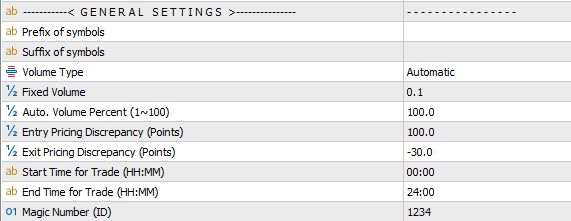
- Prefix/Suffix of Symbols: Enter the prefix or suffix used by your broker’s symbol names. The EA reads the first 6 characters as the core pair name, so if your broker adds extra characters before or after the symbol, specify them here.
- Volume Type: Choose how the EA calculates lot size.
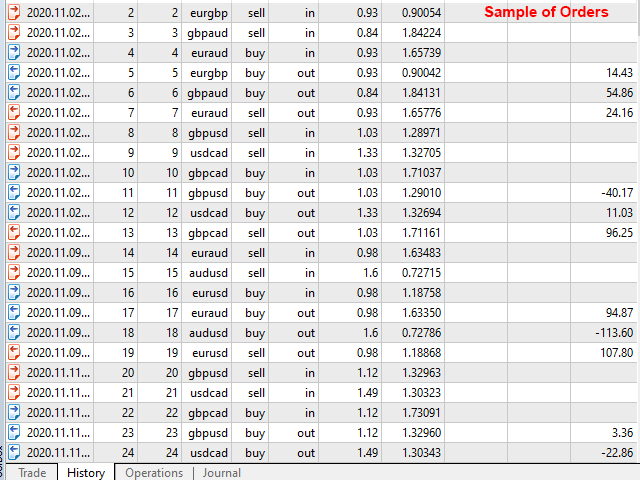
- Fixed Mode: You set a fixed lot size. Two trades use your exact value, and the third trade is automatically adjusted to maintain the strategy’s balance.
- Automatic Mode: You enter a percentage representing how much of the maximum allowable lot size the EA should use. The EA then calculates the optimal lot size based on free margin, leverage, and required margin.
- Fixed Volume: Lot size used when operating in Fixed Mode.
- Automatic: Lot size percentage used when operating in Automatic Mode.
- Entry Pricing Discrepancy: The point‑based price difference required between pairs to trigger a new trade. More Technical Info.
- Exit Pricing Discrepancy: The point‑based price difference required to close the trade basket. More Technical Info.
- Start/End Time: The time window during which the EA is allowed to open new trades.
- Magic Number: A unique identifier for the EA’s positions, useful when running multiple EAs on the same symbol.
Trading Pairs:
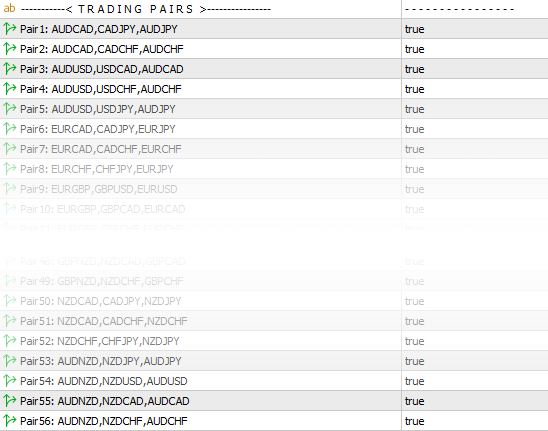
The EA operates across 56 possible triangular pair combinations derived from all 28 major and cross Forex pairs. Each combination can be individually enabled or disabled, and when multiple options are active, the EA automatically selects and trades the most profitable setup available at that moment.
Optimization Guide:
There are two primary parameters to optimize. Start with the recommended settings below for your initial tests, and once you achieve stable results, adjust them according to your strategy and trading plan.
- Entry Pricing Discrepancy Bounds: 50 to 150 (step 20)
- Exit Pricing Discrepancy Bounds: –100 to 0 (step 20)
- Volume: Use Automatic mode at 70%
- Other Inputs: Keep all remaining parameters at default
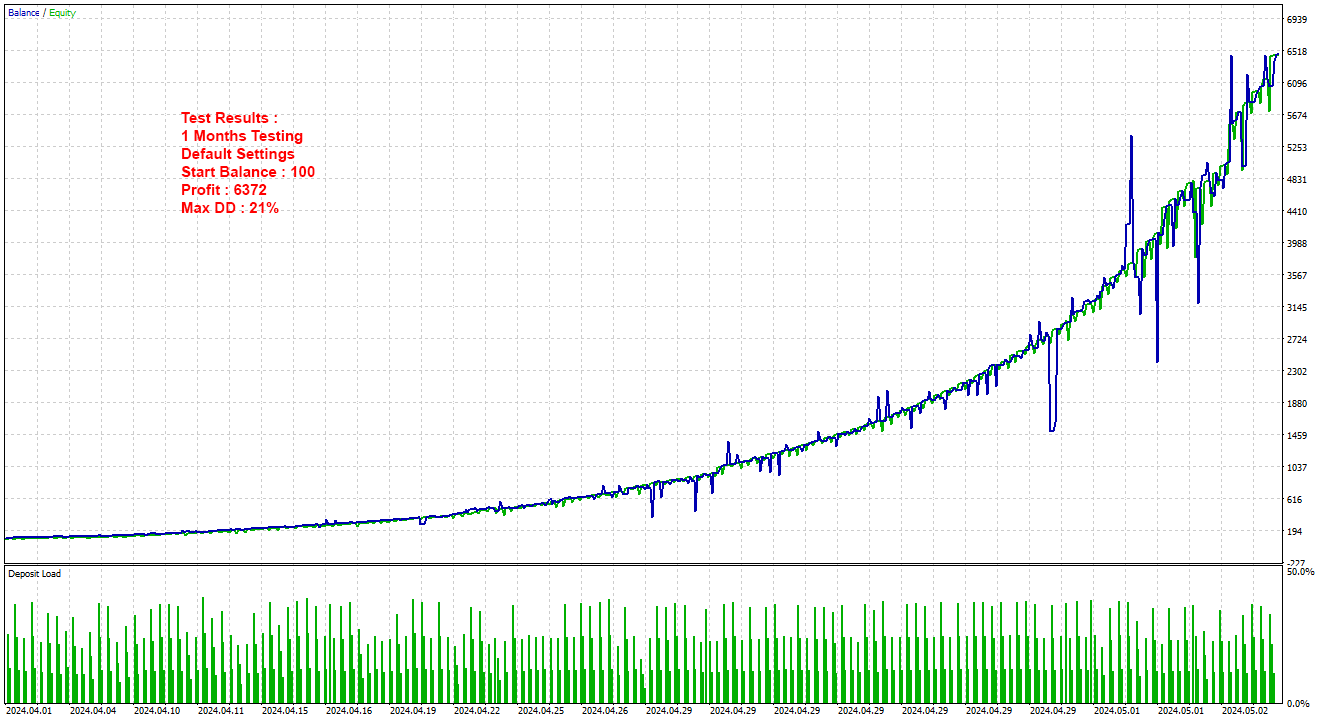
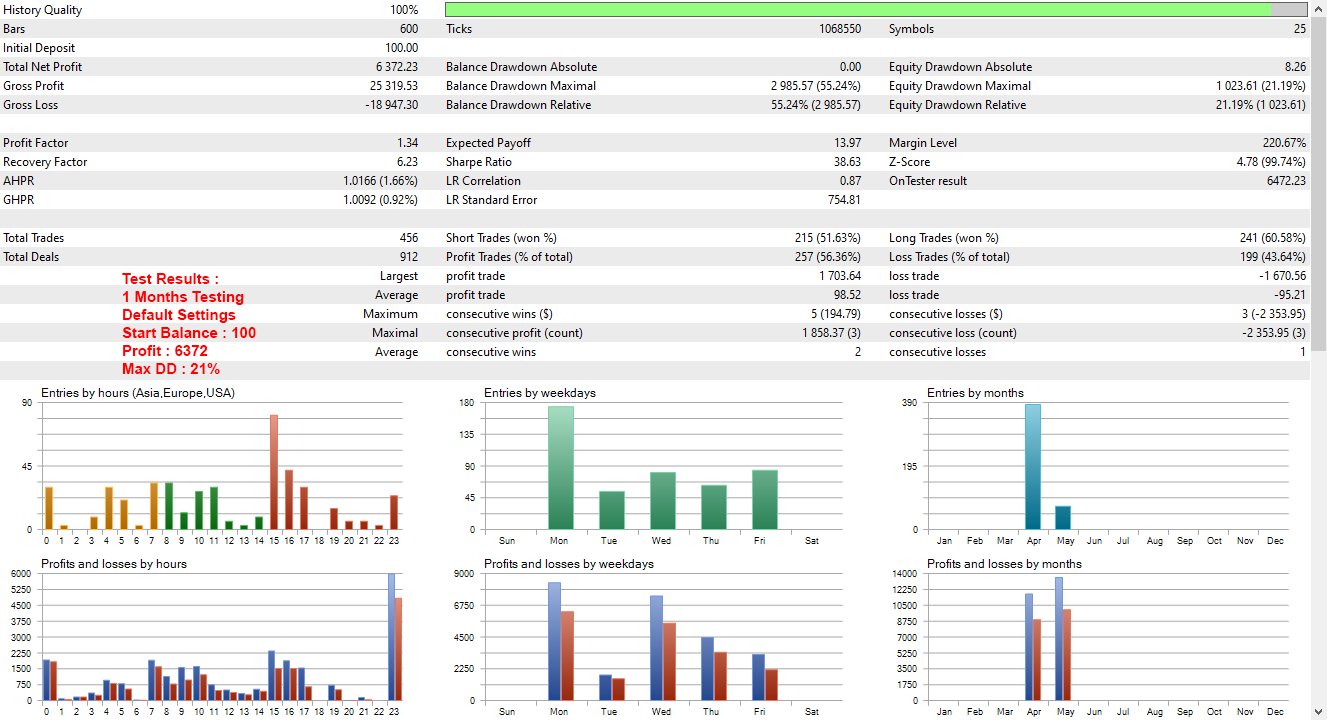
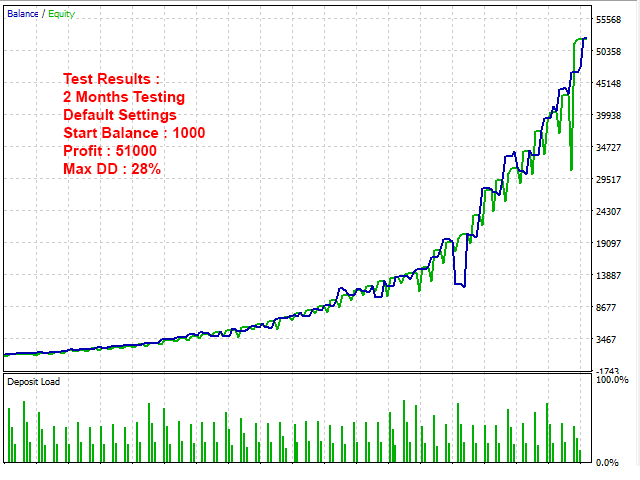
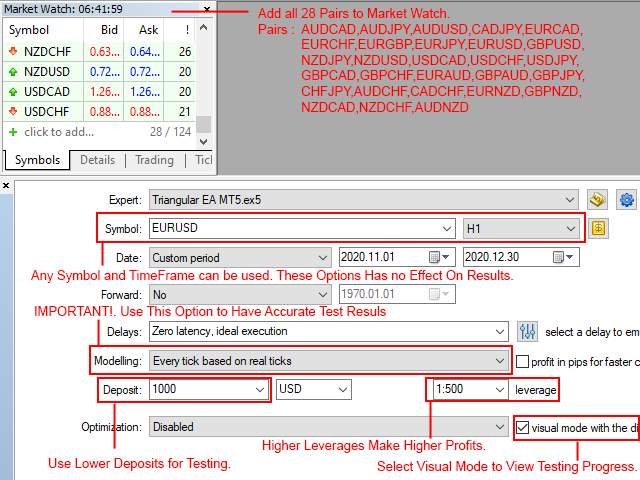
- Start Balance: Begin with a small amount, such as 100 or 200
- Test Leverage: Use higher leverage values, such as 500
- Modeling Quality: Every tick based on real ticks
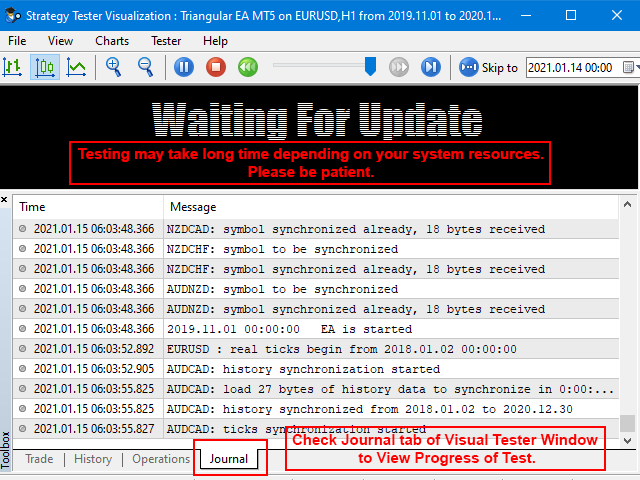
- Testing Period: Since the EA processes data from 28 pairs simultaneously, backtests can be slow. Use shorter testing periods for faster results.
Note that the MT4 strategy tester does not support multi‑symbol EAs. If you plan to trade on MT4, make sure to run your backtests on MT5 using the same broker and the same account type.
Recommendations and Trading Tips:
- The EA is fully multi‑symbol, so you only need to attach it to a single chart—any symbol, any timeframe. Once running, it automatically monitors and trades across all 28 supported Forex pairs. Just ensure all 28 symbols are visible in the Market Watch window. Supported pairs include: AUDCAD, AUDCHF, AUDJPY, AUDNZD, AUDUSD, CADCHF, CADJPY, CHFJPY, EURAUD, EURCAD, EURCHF, EURGBP, EURJPY, EURNZD, EURUSD, GBPAUD, GBPCAD, GBPCHF, GBPJPY, GBPNZD, GBPUSD, NZDCAD, NZDCHF, NZDJPY, NZDUSD, USDCAD, USDCHF, and USDJPY.
- Use a fast VPS and a low‑latency broker to achieve the best performance.
- MT5 offers faster trade execution than MT4, making the MT5 version the preferred choice for optimal performance
- MT4 strategy tester does not support this EA. Use MT5 for testing.
- Use commission‑free accounts for best performance; ECN accounts are not recommended for this strategy.
- Account leverage has a direct impact on this EA’s profitability, so using higher leverage levels is recommended for optimal performance.
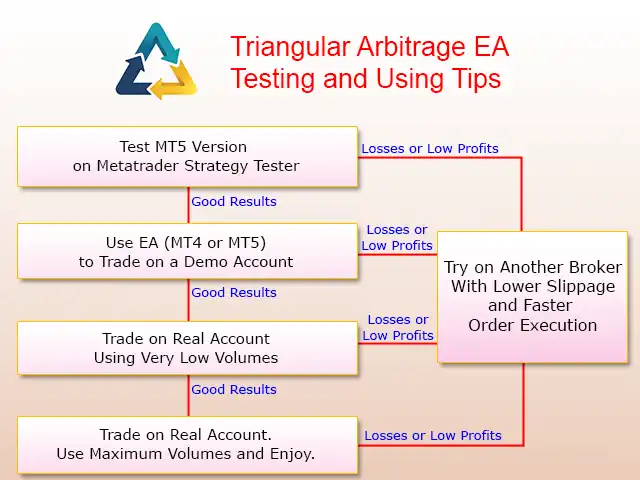
- Important: Real‑world performance may differ from backtest results due to broker‑specific limitations on this type of trading. For initial use, start with a small deposit, and if the results are not satisfactory, consider switching to a more suitable broker. It’s also recommended to run the EA on a demo account before moving to live trading. The following diagram provides a simple step‑by‑step usage guide.
Strategy Technical Details:
How the Strategy Works:
Triangular Arbitrage EA uses a mathematical model to detect pricing inefficiencies between three interconnected Forex pairs. Instead of predicting market direction, the EA compares the quoted cross‑rate with the implicit cross‑rate calculated from two other currency pairs. When these two values differ by a certain number of points (Delta), the EA opens a fully hedged three‑pair basket to lock in the imbalance.
Triangular arbitrage—also known as cross‑currency or three‑point arbitrage—is the process of taking advantage of price differences between three currencies in the Forex market. The strategy executes three linked trades: converting the first currency into a second, the second into a third, and finally the third back into the original. When the quoted cross‑rate differs from the mathematically implied cross‑rate, the trader can lock in a risk‑free profit during the sequence. These opportunities only appear when market prices are temporarily out of balance.
This method removes directional exposure and focuses purely on market inefficiency, making it one of the safest algorithmic trading strategies in Forex.
Visual Explanation:
Imagine three currencies: EUR, USD, GBP. There are two ways to convert EUR → GBP :
- Direct: EUR → GBP. (Using the EURGBP pair)
- Indirect: EUR → USD → GBP. (Using EURUSD and USDGBP)
Under normal conditions: EURGBP = EURUSD × USDGBP
But when the market becomes unbalanced: EURGBP ≠ EURUSD × USDGBP
This difference creates an arbitrage gap.
What the EA Does:
- If Method 2 is cheaper, the EA buys Method 2 and sells Method 1.
- If Method 1 is cheaper, the EA buys Method 1 and sells Method 2.
- All three trades open simultaneously and close as one basket when profit is reached.
This is the core of triangular arbitrage trading.
Example of a Real Arbitrage Opportunity:
Let’s say the market shows:
- EURUSD = 1.10000
- USDGBP = 0.80000
- EURGBP (market quote) = 0.87950
But the implicit cross‑rate should be: 1.10000 × 0.80000 = 0.88000
There is a 50‑point discrepancy: 0.88000 − 0.87950 = 0.00050
This is enough for the EA to open a hedged basket:
- Buy EURUSD
- Buy USDGBP
- Sell EURGBP
When the gap closes, the EA exits all three trades instantly.
Why This Strategy Is Low‑Risk?
- Fully Hedged Structure: All three trades offset each other. Directional risk = near zero.
- No Need for Stop Loss: Because the basket is hedged, SL is only needed for extreme slippage or broker execution issues.
- Mathematical, Not Predictive: The EA does not guess market direction. It reacts to price inefficiencies, not trends.
- High‑Frequency Arbitrage Logic: The EA scans 56 triangular combinations continuously, ensuring it always finds the best imbalance.
Need Help?
Here are some helpful resources. If you have questions or need assistance, feel free to contact us. You can submit a support ticket or leave a comment. we’ll respond as quickly as possible.
Screenshots
Pricing
New Offer Every 6 Hours up to 50%. Follow.
Testing is free. How to do?

1 Month
1 Month of unlimited use
2 Accounts Activation
Full Support
Free Updates
$ 50.00

3 Months
3 Months of unlimited use
4 Accounts Activation
Full Support
Free Updates
$ 100.00

6 Months
6 Months of unlimited use
6 Accounts Activation
Full Support
Free Updates
$ 200.00

1 Year
1 Year of unlimited use
8 Accounts Activation
Full Support
Free Updates
$ 300.00

Lifetime
Unlimited use, forever
10 Accounts Activation
VIP Support
Free Updates
$ 400.00

Lifetime Installment
Unlimited use, forever
10 Accounts Activation
Full Support
Free Updates
$ 450.00
– Start using the product from now and pay in three parts.
1- Now pay $150.00 and use the product.
2- Pay $150.00 on 2026.10.15 and continue using.
3- Pay $150.00 on 2026.11.14 to enable lifetime license.
 to be a light for all traders.
The EA didn’t perform well with my broker. Many trades were rejected or slipped.
Does the EA repaint or recalculate signals?
No. It uses live price discrepancies only.
I have no success on running this EA correctly.
This EA has a more advanced setup process, as noted in the product description. Don’t worry though — our support team is ready to assist you every step of the way. Simply open a ticket, include all relevant details, and we’ll get back to you as soon as possible.
Hi, What are the good broker specifications for this EA?
Hi,
For optimal performance, this EA works best with brokers that offer low slippage and minimal latency, ensuring faster and more accurate trade execution.
Choosing a broker with stable server connections and efficient order processing helps the EA respond instantly to market movements, reducing delays and improving overall trading results.
Thank you. Another question: Which execution model is better? STP or Market Maker?
Technically the STP is better than Market Maker. But again this depends on broker.
Reliable performance so far. Happy with the purchase.
Good EA overall. Just requires proper broker conditions.
Hi friend. Do you find a good one?
Me too. Do you find it?
The EA is very sensitive to broker conditions, but that’s expected for arbitrage.
Why is a commission‑free account recommended?
Arbitrage profits are small in points, so commissions can significantly reduce net gains. Commission‑free accounts maximize profitability and allow the EA to capture more opportunities.
Setup was simple and the EA handled everything automatically.
Why do two users with identical settings sometimes get different results?
Differences in VPS speed, broker execution, spreads, liquidity, and account type all influence performance. Except the other EAs, arbitrage is extremely sensitive to these factors, so even small differences can lead to different outcomes.
I understood.
The EA does what it promises, no hype, just results.
How does the EA behave during periods of low market volatility when pricing discrepancies are rare or minimal?
It waits passively and opens fewer trades.
How does the EA ensure that all three legs are executed at the correct proportional volumes?
The EA calculates conversion rates between currencies and adjusts lot sizes accordingly. This ensures the cycle remains balanced and hedged, regardless of which currencies are involved.
Why are profits small?
Arbitrage is a low‑risk, low‑return strategy by nature. So you can use higher lot sizes. We designed an automatic lot size calculation to open trades with maximum allowable lot sizes.
It is not working on all brokers !!!
This EA is built on a unique trading strategy, so it doesn’t behave like standard EAs. As mentioned in the “Recommendations and Trading Tips,” real‑world results may differ from backtests because some brokers impose limitations on this style of trading. A low‑latency broker and a fast VPS are important for proper performance. If you experience issues, switching to another broker is usually the most effective solution.
How does the EA behave during market open or close when spreads are unstable and liquidity is thin?
It avoids trading due to unstable pricing.
I initially bought this EA out of curiosity, expecting it to be like the many arbitrage robots that fail in real conditions. But this one is different. It scans all 28 pairs, identifies real discrepancies, and only trades when the opportunity is valid. The execution is fast and the risk is controlled. It’s a professional grade tool.
I’ve been running this EA for a few weeks and the execution quality is impressive. It constantly scans all 28 pairs and only opens trades when the discrepancy is meaningful. The risk feels controlled and the strategy is mathematically sound. Definitely one of the more serious EAs I’ve used.
Finally, a robot that trades real triangular arbitrage instead of fake marketing claims.
This EA is perfect for traders who want a low‑risk, mechanical strategy. It doesn’t chase trends or gamble. It simply exploits pricing inefficiencies. I appreciate the discipline built into the logic.
Hi, The number of trades on live are less than the number on backtest on the same period. Is this normal?
Yes, this is normal for this EA. The broker’s conditions and your terminal’s ping time are the main factors that can affect the number of trades on a real account. If the differences become too large, we recommend switching to another broker
Yes, I have the same results. But the important thing is profitability and no-risk trades.
Does the EA work on MT4?
Yes, it trades on MT4, but you must test it on MT5 due to MT4 tester limitations.
The automatic lot sizing is especially useful. I haven’t seen this feature offered in any other EA.
The EA works, but only with the right broker. My first broker blocked some trades, so results were inconsistent.
Hi, friend. Can you suggest a good broker?
It is a good EA if you can find a good broker!
Hi, friend. Can you suggest a good broker?
The comments section is now open. Feel free to share your feedback, reviews, questions, and personal experience with the product. You can also interact with other users and join the discussion. Our support team is active there as well and will respond whenever assistance is needed.