

PIPs Miner EA
PIPs Miner EA is a powerful, calculation‑driven trading system built on advanced mathematical modeling rather than traditional indicators or timeframe‑based signals. Its predictive engine analyzes raw market structure to identify high‑probability movements — often exceeding 1000 pips — while keeping risk low through efficient margin usage and smart money‑management controls.
Category : Trading Robots (EA)
Version : 5.7
Updated : 2026-02-11
Key Features
Description
PIPs Miner EA is built around a specialized mathematical engine that analyzes raw market structure rather than relying on indicators, timeframes, or traditional signal logic. Its core algorithm models price behavior in a way that allows it to anticipate large‑scale movements—often exceeding 1000 pips—without requiring optimization or manual tuning of the signal logic. Because the EA’s signal engine is fully self‑contained, traders only need to configure money‑management parameters such as volume, averaging behavior, TP/SL, and risk controls. This makes the system both powerful and accessible: the intelligence is built into the engine, while the user focuses solely on defining how aggressively or conservatively the EA should manage trades.
Designed for multi‑market flexibility, PIPs Miner EA performs consistently across Forex pairs, indices, metals, stocks, and cryptocurrencies. Its low‑margin, low‑risk structure allows it to operate safely even during volatile conditions, while optional features like averaging, trailing stop, break‑even, day/time filters, and a full news‑filtering system give traders precise control over exposure. The EA’s optimization process is fast and straightforward, focusing only on money‑management parameters rather than signal tuning. With clean inputs, a built‑in trade panel, and support for multiple charts using unique magic numbers, PIPs Miner EA delivers a robust, scalable trading framework suitable for both single‑pair setups and diversified multi‑symbol portfolios.
Technical Specifications:
| Strategy | A mathematical prediction engine that identifies large market movements |
| Trading Symbols | All |
| Supported Timeframes | All. Results are not related to timeframe. |
| VPS | Not necessary |
| Brokers and Account Types | All. (MT5 Netting accounts are not supported) |
| Trading Frequency | Low |
Usage Manual:
Using the EA is straightforward and user‑friendly. The primary parameters to adjust are related to money management, with no need for complex entry signal configurations.
General Settings:
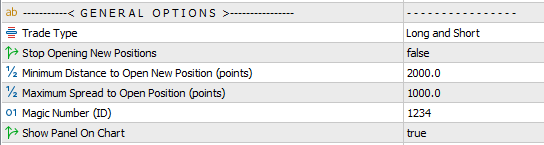
- Trade Type Filter: Specify the trading direction by enabling only Long or Short positions.
- Stop Opening New Positions: Prevents the EA from opening additional trades. Existing positions will continue to be managed until closed, after which the EA halts completely.
- Minimum Distance Between Positions: Defines the minimum price gap (in points) required between current open positions and any new trade. This helps avoid clustering multiple trades too close together on the same symbol and in the same direction.
- Maximum Spread Filter: Blocks new trades during periods of high spread. Set a very large value if you wish to disable this filter.
- Magic Number: Assigns a unique identifier to the EA’s trades. This is essential when running multiple EAs on the same symbol to distinguish their positions.
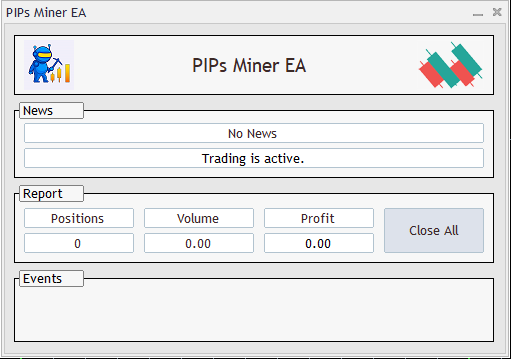
- On‑Chart Panel Displays a control panel directly on the chart, showing EA status, trade events, open position reports, and includes a one‑click button to close all trades. See the below image.
Closing Positions Settings:
In this section, you can define how trades should be closed. Available options include setting take profit and stop loss levels to manage risk and secure gains. Additionally, an averaging system is provided, allowing the EA to recover losing trades by strategically opening new positions and balancing them until the overall outcome improves.
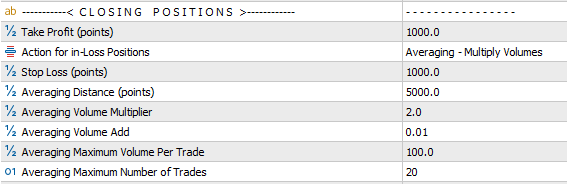
- Take Profit (TP): Defines the profit target for trades, measured in points.
- Actions for Losing Positions: Choose how the EA should handle trades that move into loss:
- Wait for TP: No stop loss is applied; the EA continues to hold the position until the take profit level is reached.
- Stop Loss: The trade is closed once the predefined stop loss value is hit.
- Averaging – Multiply: Applies an averaging strategy where each new averaging trade increases lot size by multiplying the previous lot size with a set factor.
- Averaging – Add: Applies an averaging strategy where each new averaging trade increases lot size by adding a fixed value to the previous lot size.
- Stop Loss (SL): Defines the stop loss for trades, measured in points.
- Averaging Distance: Defines the point‑based price gap between consecutive averaging trades.
- Averaging Volume Multiplier: When using the Multiply mode, this factor determines how much the lot size is multiplied for each averaging trade.
- Averaging Volume Add: When using the Add mode, this value specifies how much is added to the lot size for each averaging trade.
- Averaging Maximum Volume: Sets the maximum lot size allowed per trade when averaging is applied.
- Averaging Maximum Number of Trades: Defines the maximum number of averaging trades permitted, limiting exposure and risk.
Common Settings:
Other options including Lot Size, Trailing Stop, Break‑Even, Date & Time Filters, News Filter, and Notification Settings are shared across all of our trading robots. A detailed explanation of these features is available in the page Common Settings for Trading Robots.
Optimization Guide:
The EA’s core engine does not require optimization. The only adjustable parameters are related to money management, which you can fine‑tune based on your own strategy, risk plan, and trading experience.
For easier and faster optimization, we recommend the following approach:
- Optimization Period: Run optimization on the last 6 months of data before using the EA.
- Update Frequency: Refresh optimization every 2 months to keep settings aligned with current market conditions.
- Parameters to Optimize: (for Currency Pairs)
- Minimum Distance to Open New Position: 1000 to 5000 (step 1000) — or 100 to 500 (step 100) for 4-digit accounts
- Action for in-Loss Positions: Averaging-Multiply
- Take Profit Bounds: 500 to 3000 (step 500) — or 50 to 300 (step 50) for 4‑digit accounts
- Averaging Distance Bounds: 1000 to 7000 (step 1000) — or 100 to 700 (step 100) for 4‑digit accounts
- Averaging Volume Multiplier Bounds: 1 to 5 (step 0.5)
- Other Parameters: Default values are sufficient
- Testing Mode: Use Every Tick mode for faster and sufficiently accurate results
- It is recommended to first run optimization using a constant volume setting. This approach helps identify configurations that deliver the highest profit with minimal drawdowns.
- For best results, it is also advised to optimize the Custom Parameter to fine‑tune performance.
Recommendations:
When running multiple instances of the EA on different charts, it is recommended to reduce the lot size for each EA. This helps prevent excessive exposure, as drawdowns from multiple trades can accumulate and potentially lead to a high‑risk situation.
Need Help?
Here are some helpful resources. If you have questions or need assistance, feel free to contact us. You can submit a support ticket or leave a comment. we’ll respond as quickly as possible.
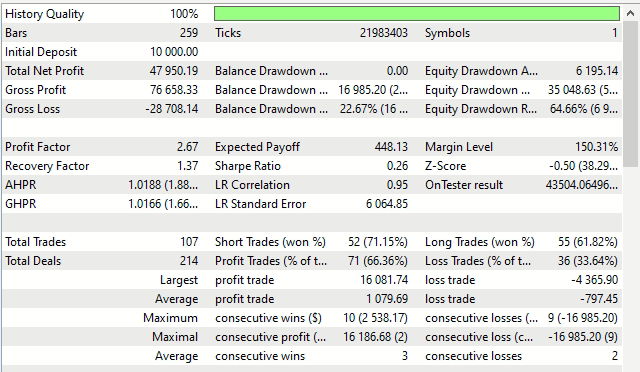
Screenshots
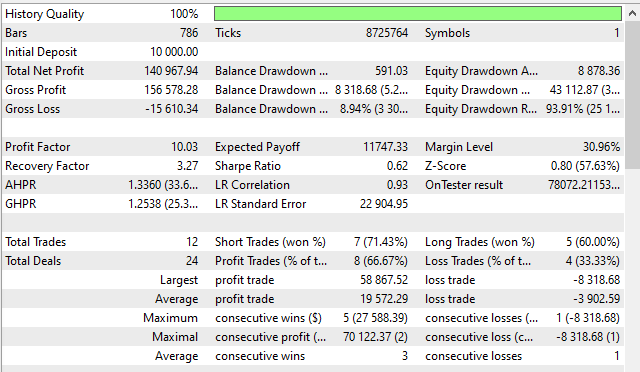
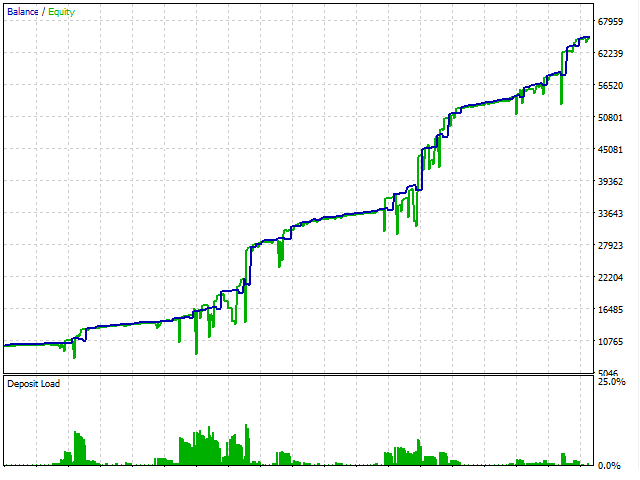
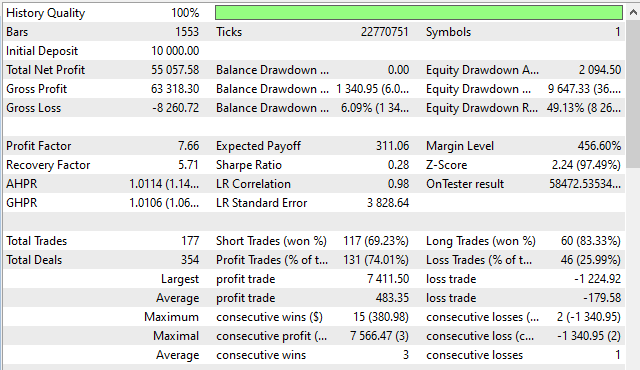
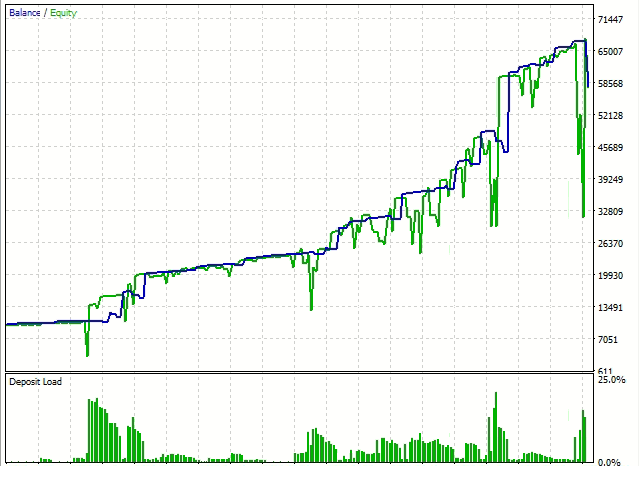
Pricing
New Offer Every 6 Hours up to 50%. Follow.
Testing is free. How to do?

3 Months
3 Months of unlimited use
2 Accounts Activation
Full Support
Free Updates
$ 50.00

6 Months
6 Months of unlimited use
3 Accounts Activation
Full Support
Free Updates
$ 100.00

1 Year
1 Year of unlimited use
4 Accounts Activation
Full Support
Free Updates
$ 150.00

Lifetime
Unlimited use, forever
5 Accounts Activation
VIP Support
Free Updates
$ 200.00
 to be a light for all traders.
I’ve used many EAs that rely on indicators, and most fail during volatility. PIPs Miner EA is different. The mathematical engine doesn’t care about timeframe tricks or repainting signals. It trades based on structure, and the results feel much more stable.
Does timeframe matter?
No, the signal engine is timeframe‑independent.
The built in panel is a great feature. I can monitor trades and close them manually if needed. It makes the EA feel more interactive.
Works great on metals and indices.
The EA’s low‑risk structure makes it ideal for long‑term trading. It doesn’t chase trades or overexpose the account.
Hi support. Can it work on indices such as US30?
Hi,
Yes, it support this symbol also. Just you need to adjust settings to be compatible with this symbol behavior.
Sorry. What about cryptos? Can it work on cryptos?
Of course. It works on all symbols and instruments, including cryptos.
Can I use it for prop‑firm challenges?
Yes, with conservative volume settings.
Finally an EA that doesn’t need endless optimization.
When using the “WaitforTP” option for losing positions, how does the EA ensure that trades don’t remain open indefinitely during long sideways markets?
It doesn’t. If enable this option, the position will remain open until reaching the determined profit.
I tested it on multiple brokers and it remained consistent.
I’ve tested the EA on multiple brokers and the results are consistent. The mathematical engine is robust and doesn’t rely on indicators. The EA trades based on structure, not noise.
If I run the EA on multiple timeframes for the same symbol, does the timeframe‑independent signal engine prevent conflicts, or can overlapping trades still occur?
Overlapping trades can occur. Please use different magic numbers.
Does the EA rely on indicators?
No — the signal engine is fully mathematical and independent of indicators or timeframe logic.
PIPs Miner EA is perfect for traders who want a low‑stress trading experience. It doesn’t chase trades or open positions recklessly. The averaging system is controlled and customizable. The EA uses very little margin, which makes it safe even during volatility. I run it on multiple charts and it handles everything smoothly. The optimization process is fast and easy. This EA is a great long‑term tool.
I like how the EA behaves during consolidation. The EA is ideal for traders who want stability.
Hi. I confused. The name is PIPs Miner. But the inputs are Points based as I see. Which one is correct?
Hello.
That’s just the display name. The EA actually uses Points in its input parameters.
A question : How do I reduce drawdown?
Increase averaging distance and lower volume settings.
No need to touch the signal engine at all. It is a perfect ability. Everything is automated.
Very fast and easy to optimize.
Hi.
Can I disable averaging completely?
Yes, by choosing StopLoss or WaitforTP.
The comments section is now open. Feel free to share your feedback, reviews, questions, and personal experience with the product. You can also interact with other users and join the discussion. Our support team is active there as well and will respond whenever assistance is needed.