

Neural Network EA
A Neural Network EA is an automated trading system powered by Artificial Neural Networks (ANN), designed to learn market behavior from historical data and apply that knowledge to future trades with high precision. It analyzes patterns, adapts to changing conditions, and executes trades based on a learned strategy—without requiring complex inputs or heavy optimization. This makes it ideal for traders seeking a smart, self‑adjusting algorithm that works across all symbols and timeframes.
Category : Trading Robots (EA)
Version : 3.4
Updated : 2026-03-01
Key Features
Description
The Neural Network EA is built around an adaptive Artificial Neural Network core that studies historical market behavior and transforms it into a dynamic, data‑driven trading strategy. Instead of relying on rigid rules or heavy optimization cycles, the EA “learns” from 1–2 years of past price action and extracts patterns that consistently repeat in the market. This learned strategy is then applied to live or test trading, allowing the EA to react intelligently to changing conditions while maintaining the structure of its trained model. Because the learning process is visual, transparent, and produces a clear Learn String, traders can easily update or refine the strategy every couple of weeks to keep it aligned with current market volatility and trends.
Beyond its neural‑based logic, the EA includes a full suite of professional trading tools: automatic TP/SL selection based on timeframe, flexible money‑management modes, averaging systems, trailing stop and break‑even logic, and detailed time and news filters. It supports all symbols and timeframes, works efficiently on lightweight systems, and requires no complicated inputs—making it accessible even for traders who are new to machine‑learning EAs. By combining ANN‑powered pattern recognition with practical risk‑control features, the Neural Network EA offers a powerful solution for traders searching for an “AI Forex robot,” “machine learning trading EA,” or “neural network automated trading system.”
Technical Specifications:
| Strategy | A neural‑network model that reacts to patterns learned from historical data. |
| Trading Symbols | All |
| Supported Timeframes | All |
| VPS | Not necessary |
| Brokers and Account Types | All. (MT5 Netting accounts are not supported) |
| Trading Frequency | Low |
Usage Manual:
In this section, we provide a brief overview of all EA inputs, followed by a step‑by‑step tutorial on how to train the EA.
General Settings:
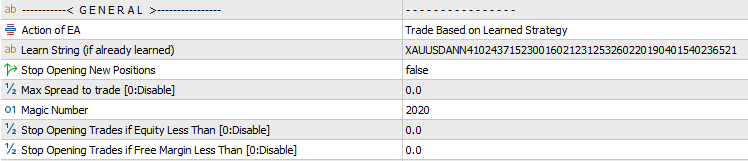
- Action of EA: Choose how the EA operates:
- Learn: Trains the EA using historical data.
- Trade Based on Learned Strategy: Uses a previously generated Learn String to trade with the trained model.
- Trade Without Learning: Executes trades using default logic without any training.
- Learn String: Paste the Learn String generated at the end of the training process.
- Stop Opening New Positions: Prevents the EA from opening additional trades. Existing positions will continue to be managed until closed, after which the EA halts completely.
- Maximum Spread Filter: Blocks new trades during periods of high spread. Set a very large value if you wish to disable this filter.
- Magic Number: Assigns a unique identifier to the EA’s trades. This is essential when running multiple EAs on the same symbol to distinguish their positions.
- Stop Opening Trades if Equity/Free Margin Is Below: A safety control that prevents new trades when account conditions become critical.
Closing Positions Settings:
In this section, you can define how trades should be closed. Available options include setting take profit and stop loss levels to manage risk and secure gains. Additionally, an averaging system is provided, allowing the EA to recover losing trades by strategically opening new positions and balancing them until the overall outcome improves.
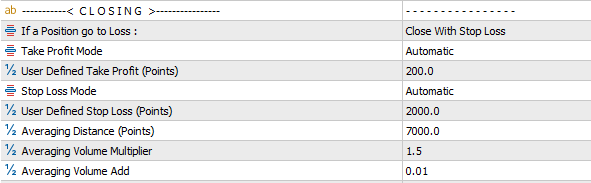
- Actions for Losing Positions: Choose how the EA should handle trades that move into loss:
- Wait to Close with TP: No stop loss is applied; the EA continues to hold the position until the take profit level is reached.
- Close with Stop Loss: The trade is closed once the predefined stop loss value is hit.
- Averaging – Multiply: Applies an averaging strategy where each new averaging trade increases lot size by multiplying the previous lot size with a set factor.
- Averaging – Add: Applies an averaging strategy where each new averaging trade increases lot size by adding a fixed value to the previous lot size.
- Take Profit Mode: Available modes: Automatic or User‑Defined. When Automatic is selected, the EA calculates the optimal value automatically based on the current symbol and timeframe.
- User Defined Take Profit: Defines the profit target for trades, measured in points.
- Stop Loss Mode: Available modes: Automatic or User‑Defined. When Automatic is selected, the EA calculates the optimal value automatically based on the current symbol and timeframe.
- User Defined Stop Loss (SL): Defines the stop loss for trades, measured in points.
- Averaging Distance: Defines the point‑based price gap between consecutive averaging trades.
- Averaging Volume Multiplier: When using the Multiply mode, this factor determines how much the lot size is multiplied for each averaging trade.
- Averaging Volume Add: When using the Add mode, this value specifies how much is added to the lot size for each averaging trade.
Common Settings:
Other options including Lot Size, Trailing Stop, Break‑Even, Date & Time Filters, and News Filter are shared across all of our trading robots. A detailed explanation of these features is available in the page Common Settings for Trading Robots.
Training Manual:
This is a step‑by‑step guide for training the EA on MT5. The process on MT4 is nearly identical, with only minor interface differences.
- Open the MetaTrader Strategy Tester and select the EA.
- Choose your preferred symbol and timeframe.
- Set the testing period to the last one or two years.
- Change the modelling mode to Every Tick.
- Use a low initial balance for faster training.
- Enable Visual Mode for better monitoring.
- In the Inputs tab, keep all default settings and only change Action to Learn.
- Start the tester.
- In the visual window, move the speed slider to the maximum for faster training.
- Wait for the test to finish; the EA will display a Learn String on the chart.
- Copy the Learn String.
- Training is now complete. Proceed to testing the trained model.
- Change Action to Trade Based on Learned Strategy and paste the Learn String into the input field.
- Run the tester again to view trading results powered by the trained machine‑learning model.
- Adjust trading volume and rerun tests to find the best money‑management configuration.
- Once satisfied, attach the EA to a live chart and begin real trading.
Recommendations:
- When running multiple instances of the EA on different charts, it is recommended to reduce the lot size for each EA. This helps prevent excessive exposure, as drawdowns from multiple trades can accumulate and potentially lead to a high‑risk situation.
- Train the EA on any symbol and timeframe you plan to trade. Note that a Learn String generated for one symbol/timeframe cannot be used on another.
- Use Automatic SL/TP settings so the EA can determine the most effective levels based on the selected timeframe.
- A training period of 1–2 years is sufficient, and it’s recommended to refresh the Learn String every two weeks to keep the model updated.
- For best results, perform the learning process using all default settings.
Need Help?
Here are some helpful resources. If you have questions or need assistance, feel free to contact us. You can submit a support ticket or leave a comment. we’ll respond as quickly as possible.
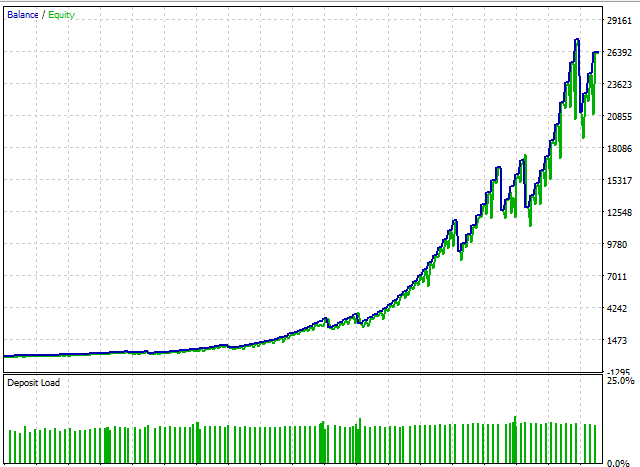
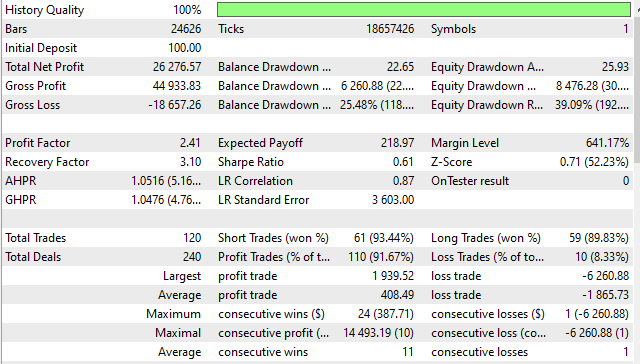
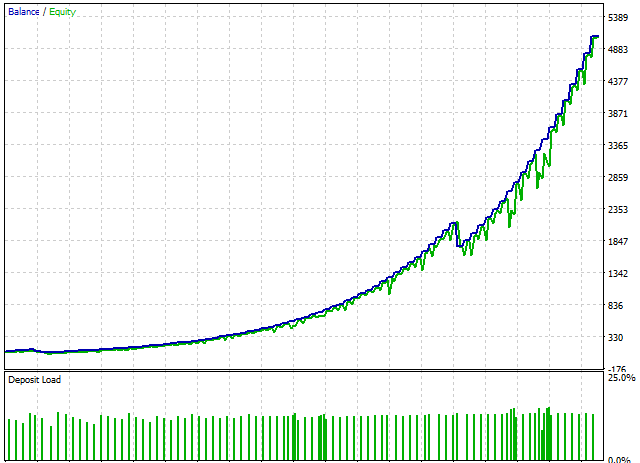
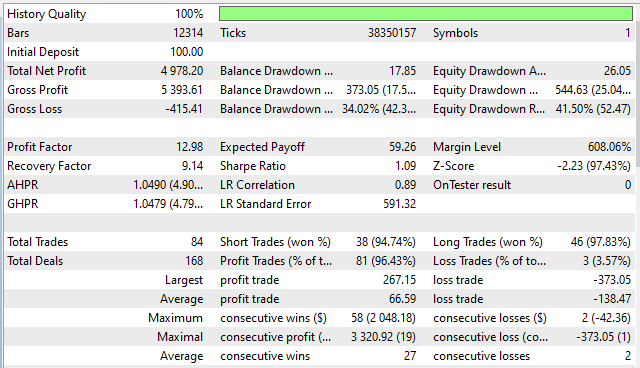
Screenshots
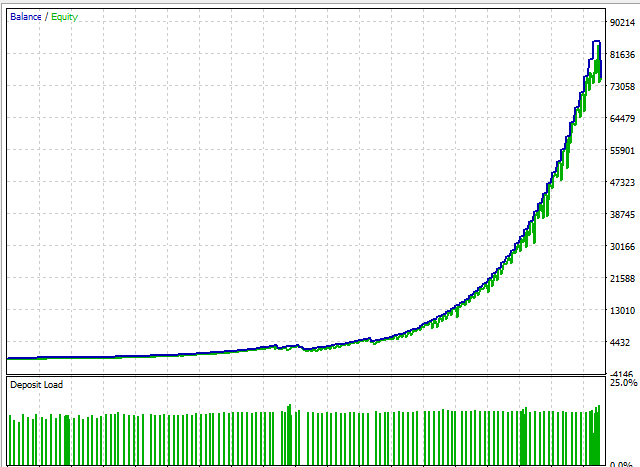
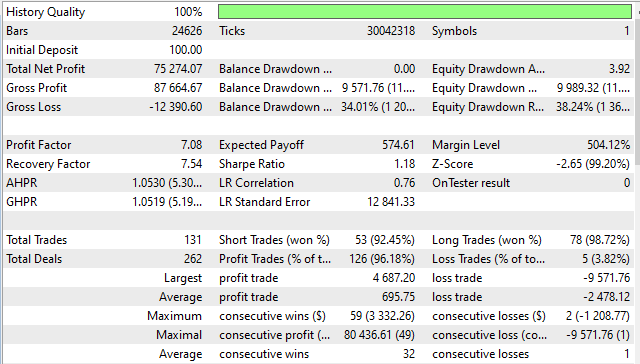
Pricing
New Offer Every 6 Hours up to 50%. Follow.
Testing is free. How to do?

1 Month
1 Month of unlimited use
1 Account Activation
Full Support
Free Updates
$ 50.00

3 Months
3 Months of unlimited use
2 Accounts Activation
Full Support
Free Updates
$ 100.00

6 Months
6 Months of unlimited use
3 Accounts Activation
Full Support
Free Updates
$ 200.00

1 Year
1 Year of unlimited use
4 Accounts Activation
Full Support
Free Updates
$ 300.00

Lifetime
Unlimited use, forever
5 Accounts Activation
VIP Support
Free Updates
$ 400.00

Lifetime Installment
Unlimited use, forever
5 Accounts Activation
Full Support
Free Updates
$ 450.00
– Start using the product from now and pay in three parts.
1- Now pay $150.00 and use the product.
2- Pay $150.00 on 2026.10.16 and continue using.
3- Pay $150.00 on 2026.11.15 to enable lifetime license.
 to be a light for all traders.
I don’t like it. It is hard to use. The win rate is not good.
Hi,
We’ve done our best to explain the usage manual and help with setting up the EA. The EA is designed to be straightforward and easy to use, and when set up correctly, it offers one of the highest win rates in the Forex market.
That said, if you need more information, feel free to ask — I’m happy to help. You can also contact our support team via ticket for assistance with easy and correct setup.
The best ML based EA I’ve used so far.
What makes this EA different from indicator based robots?
Traditional EAs follow fixed rules (e.g., MA cross, RSI levels). This EA doesn’t rely on indicators at all. Instead, it analyzes raw price behavior across thousands of data points and builds a neural network model that recognizes recurring patterns. This makes it more adaptive and less predictable than rule based systems.
The EA trades calmly and consistently.
I’ve noticed that the EA behaves very differently depending on the symbol and timeframe I choose. Can you explain why the neural‑network model reacts so uniquely to each market environment, and whether this means I need to train separate models for every chart I plan to trade?
Yes, each symbol/timeframe has its own structure, so every chart needs its own Learn String.
Risk control is excellent. No reckless behavior.
Why does the EA sometimes behave differently after retraining?
Because the market changes. New volatility, new trends, and new structures influence what the neural network learns. Retraining ensures the model stays relevant.
Can I run multiple charts at once?
Yes. Each chart needs its own Learn String.
It is unique. The strategy tester results matched live performance closely.
Does it close trades during news?
No. It can avoid opening trades during high/medium/low impact events if filters are enabled.
I love how it adapts to each symbol individually.
If I want to trade multiple symbols at once, how does the EA manage risk across charts, and is there any interaction between the trained models, or does each chart operate completely independently?
Each chart runs independently, so risk must be managed per symbol.
Hi, Why doesn’t it trade some days?
Because it waits for high‑quality patterns instead of forcing trades.
How does the EA’s neural‑network model actually influence live trading decisions, and what happens internally when the market conditions don’t match the patterns it learned during training?
The EA’s neural‑network model is essentially a compressed representation of the patterns it identified during training. When you run the EA in live or backtest mode, it continuously compares current market conditions to the patterns stored in the Learn String. If the live structure resembles something the model has seen before (such as a volatility profile, candle formation, or momentum shift) the EA considers it a valid trading opportunity. When the market conditions do not match the learned patterns, the EA simply stays out. This is intentional. Neural networks are strongest when they operate within familiar structures, and forcing trades in unfamiliar conditions would reduce accuracy. This is why the EA sometimes appears selective or quiet. It’s filtering out noise… Read more »
Why is it necessary to retrain the EA every two weeks?
Financial markets evolve constantly. Volatility cycles shift, liquidity changes, and new price behaviors emerge. A Learn String generated two months ago may no longer reflect the current structure of the market. Retraining ensures the neural network stays aligned with the most recent price behavior.
What happens if I continue trading with an outdated Learn String for a long period of time?
If you continue trading with an outdated Learn String, the EA may still function, but its accuracy gradually declines. It may miss opportunities, react slower to new patterns, or avoid trades entirely because the market no longer resembles the environment it learned from.
Retraining every two weeks keeps the model fresh without being overly time‑consuming. It’s a balance between stability and adaptability. Some traders retrain weekly for fast‑moving symbols like GOLD or NASDAQ, while others retrain monthly for slower pairs like EURUSD.
This EA feels like trading with a brain instead of a script.
The EA is well‑designed, but I think beginners might underestimate the importance of proper training. If you rush the process or use too little historical data, the model won’t be strong. Once trained correctly, it works well, but the learning curve is real. It’s not a ‘buy and forget’ type of EA.
Hi. How does the neural network actually “learn”?
Hello,
During training, the EA processes historical price movements and identifies relationships between candles, volatility, and structure. It then encodes these relationships into a Learn String — a compact representation of the trained model. When trading, it compares live market conditions to the patterns it learned.
How does the EA behave when the market suddenly shifts from trending to ranging conditions, and does the neural network adapt to this transition or simply wait until the structure matches something it learned previously?
It waits until the structure matches its learned patterns again.
I was skeptical about neural‑network EAs, but this one changed my mind. The training process is simple, and the Learn String makes it easy to reuse the model. After training on EURUSD H1, the EA delivered stable, consistent trades.
As someone who trades multiple symbols, I appreciate that each Learn String is unique. Training per symbol gives me more confidence in the strategy’s accuracy.
I like that the EA doesn’t chase trades. It waits for patterns it recognizes from training, which reduces noise and unnecessary losses.
How does the EA handle situations where the market enters a prolonged consolidation phase that wasn’t strongly represented in the training data, and does it attempt trades or simply wait for clearer conditions?
It usually waits, since consolidations rarely match learned patterns.
Is this forced to do training on the EA. I am not expert on metatrader.
For optimal performance, it’s recommended to follow this step. Please review the product description, and if you need any assistance, feel free to let me know so I can help.
The EA handles volatility very well. Even during news spikes, it avoids dangerous entries thanks to the built in filters. It feels like trading with discipline baked in.
hi, Can I use a Learn String from EURUSD on GOLD?
Hi, no. Each symbol behaves differently, so make sure you use the training data that matches the correct symbol and timeframe.
The comments section is now open. Feel free to share your feedback, reviews, questions, and personal experience with the product. You can also interact with other users and join the discussion. Our support team is active there as well and will respond whenever assistance is needed.