

Fundamental Analysis Robot
Fundamental Analysis Robot is a fully automated trading system that executes trades based on signals generated by the Fundamental Analysis Indicator. With built‑in risk management, advanced filters, and a user‑friendly interface, the robot provides traders with a disciplined, reliable, and event‑driven approach to automated trading.
Category : Trading Robots (EA)
Version : 3.7
Updated : 2026-04-21
Key Features
Description
This trading robot combines cutting-edge technology with a streamlined user experience to offer powerful predictive capabilities — capable of anticipating market moves exceeding 3,000 pips (30,000 points). Its intelligent calculation engine analyzes data patterns and price behavior to identify high-probability turning points, especially effective on higher timeframes where macro trends dominate. Designed for traders of all levels, it requires no complex input configurations or optimization routines — simply attach it to your chart and start trading. Whether you’re trading Forex pairs, metals, indices, stocks, or cryptocurrencies, Fundamental Analysis Robot adapts seamlessly to any symbol, helping you stay ahead of market shifts driven by economic forces.
Note that The EA itself does not apply a fundamental analysis strategy. However, its advanced algorithms are capable of capturing market trends with a scale and reliability comparable to fundamental analysis. That is why we chose the name ‘Fundamental Analysis Robot’ — to reflect its ability to detect and follow major market movements with similar certainty.
See also:
Technical Specifications:
| Strategy | Signals generated by our proprietary Fundamental Analysis Indicator |
| Trading Symbols | All |
| Supported Timeframes | All |
| VPS | Not necessary |
| Brokers and Account Types | All. (MT5 Netting accounts are not supported) |
| Trading Frequency | Low |
Usage Manual:
Using the EA is straightforward and user‑friendly. The primary parameters to adjust are related to money management, with no need for complex entry signal configurations.
General Settings:
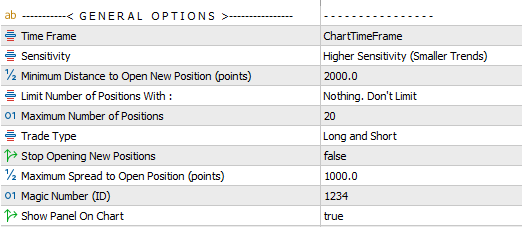
- Timeframe Selection: Choose the trading timeframe. This option allows you to run the EA on a timeframe different from the chart’s default.
- Sensitivity: The primary parameter that influences signal behavior is “Sensitivity”, which controls how responsive the indicator is to local price changes.
- Low Sensitivity → Focuses on capturing larger, long‑term trends.
- Medium Sensitivity → Balances between major moves and moderate fluctuations.
- High Sensitivity → Reacts quickly to smaller market shifts, changing direction more frequently.
- Minimum Distance Between Positions: Defines the minimum price gap (in points) required between current open positions and any new trade. This helps avoid clustering multiple trades too close together on the same symbol and in the same direction.
- Limit Number of Positions: This feature is designed to help manage risk by preventing an excessive number of open trades. You can choose to limit the maximum positions based on
- The current symbol
- The current magic number
- Or the total number of open positions across the entire account
- Maximum Number of Positions: This parameter defines the maximum number of positions allowed according to the selected option.
- Trade Type Filter: Specify the trading direction by enabling only Long or Short positions.
- Stop Opening New Positions: Prevents the EA from opening additional trades. Existing positions will continue to be managed until closed, after which the EA halts completely.
- Maximum Spread Filter: Blocks new trades during periods of high spread. Set a very large value if you wish to disable this filter.
- Magic Number: Assigns a unique identifier to the EA’s trades. This is essential when running multiple EAs on the same symbol to distinguish their positions.
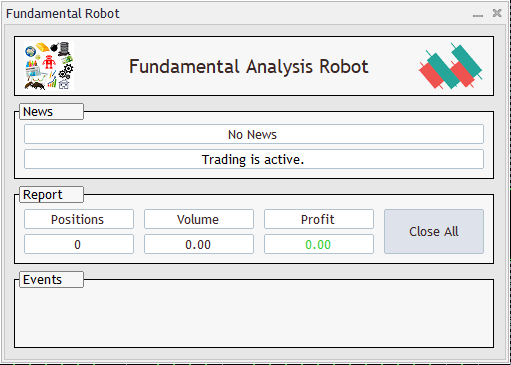
- On‑Chart Panel Displays a control panel directly on the chart, showing EA status, trade events, open position reports, and includes a one‑click button to close all trades. See the below image.
Closing Positions Settings:
In this section, you can define how trades should be closed. Available options include setting take profit and stop loss levels to manage risk and secure gains. Additionally, an averaging system is provided, allowing the EA to recover losing trades by strategically opening new positions and balancing them until the overall outcome improves.
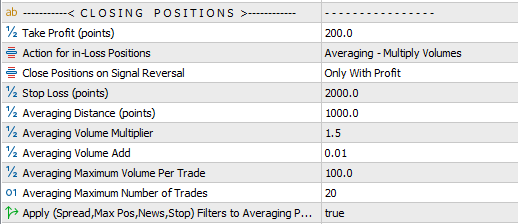
- Take Profit (TP): Defines the profit target for trades, measured in points.
- Actions for Losing Positions: Choose how the EA should handle trades that move into loss:
- Wait for TP: No stop loss is applied; the EA continues to hold the position until the take profit level is reached.
- Stop Loss: The trade is closed once the predefined stop loss value is hit.
- Averaging – Multiply: Applies an averaging strategy where each new averaging trade increases lot size by multiplying the previous lot size with a set factor.
- Averaging – Add: Applies an averaging strategy where each new averaging trade increases lot size by adding a fixed value to the previous lot size.
- Close Positions on Signal Reversal:Enable this setting to automatically close existing positions when a new reversal signal is detected. For example, if a buy trade is currently open and the EA identifies a valid sell entry, the buy trade will be closed and a new sell trade will be opened. You can configure the behavior to close positions only when they are in profit, or to close them under any condition.
- Stop Loss (SL): Defines the stop loss for trades, measured in points.
- Averaging Distance: Defines the point‑based price gap between consecutive averaging trades.
- Averaging Volume Multiplier: When using the Multiply mode, this factor determines how much the lot size is multiplied for each averaging trade.
- Averaging Volume Add: When using the Add mode, this value specifies how much is added to the lot size for each averaging trade.
- Averaging Maximum Volume: Sets the maximum lot size allowed per trade when averaging is applied.
- Averaging Maximum Number of Trades: Defines the maximum number of averaging trades permitted, limiting exposure and risk.
- Apply Filters to Averaging Positions: Every filter you set will also be enforced on averaging positions.
Common Settings:
Other options including Lot Size, Trailing Stop, Break‑Even, Date & Time Filters, News Filter, and Notification Settings are shared across all of our trading robots. A detailed explanation of these features is available in the page Common Settings for Trading Robots.
Optimization Guide:
The EA’s core engine does not require optimization. The only adjustable parameters are related to money management, which you can fine‑tune based on your own strategy, risk plan, and trading experience.
For easier and faster optimization, we recommend the following approach:
- Optimization Period: Run optimization on the last 6 months of data before using the EA.
- Update Frequency: Refresh optimization every 2 months to keep settings aligned with current market conditions.
- Parameters to Optimize: (for Currency Pairs)
- Time Frame Bounds: H1 to D1
- Take Profit Bounds: 300 to 2100 (step 300) — or 30 to 210 (step 30) for 4‑digit accounts
- Averaging Distance Bounds: 1000 to 7000 (step 1000) — or 100 to 700 (step 100) for 4‑digit accounts
- Averaging Volume Multiplier Bounds: 2.0 to 5.0 (step 1.0)
- Other Parameters: Default values are sufficient
- Testing Mode: Use Every Tick mode for faster and sufficiently accurate results
- It is recommended to first run optimization using a constant volume setting. This approach helps identify configurations that deliver the highest profit with minimal drawdowns.
- For best results, it is also advised to optimize the Custom Parameter to fine‑tune performance.
Recommendations:
- When running multiple instances of the EA on different charts, it is recommended to reduce the lot size for each EA. This helps prevent excessive exposure, as drawdowns from multiple trades can accumulate and potentially lead to a high‑risk situation.
- The recommended trading timeframes range from H1 to D1.
Need Help?
Here are some helpful resources. If you have questions or need assistance, feel free to contact us. You can submit a support ticket or leave a comment. we’ll respond as quickly as possible.
Screenshots
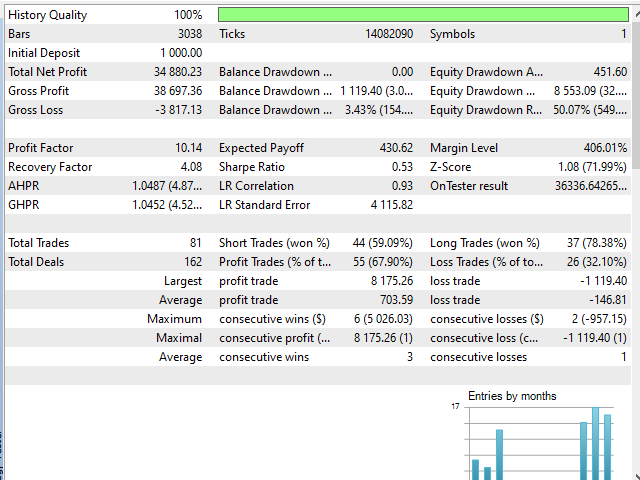
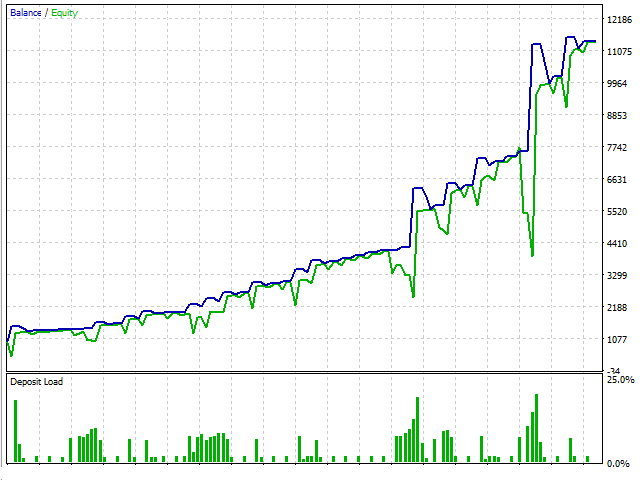
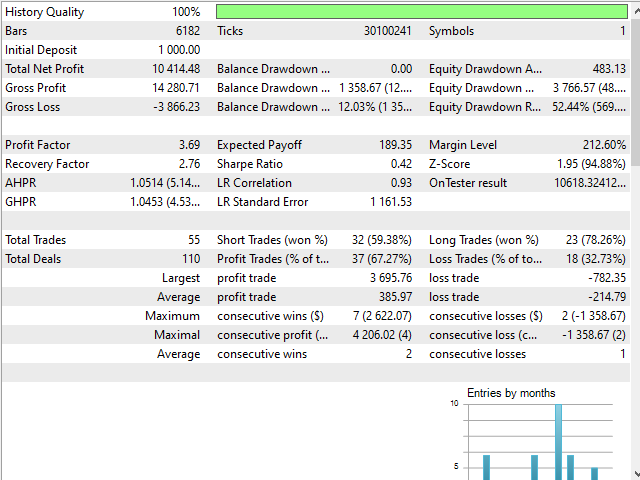
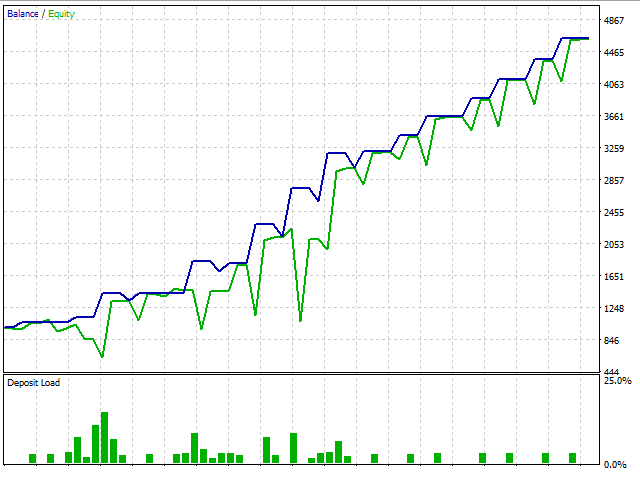
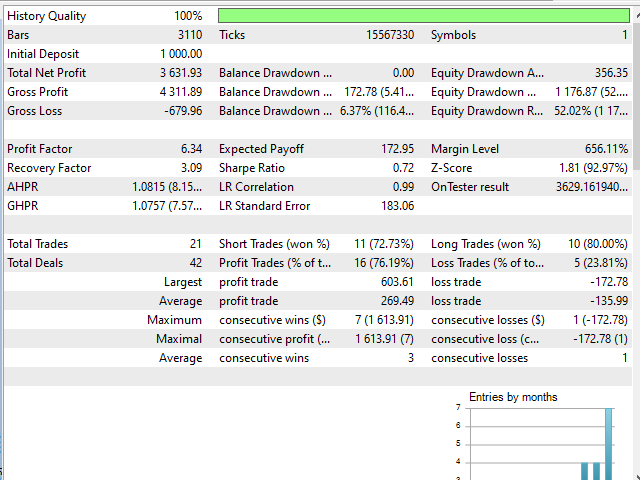
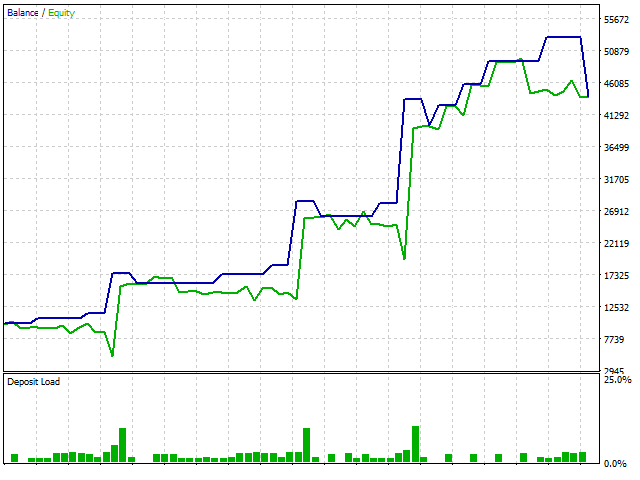
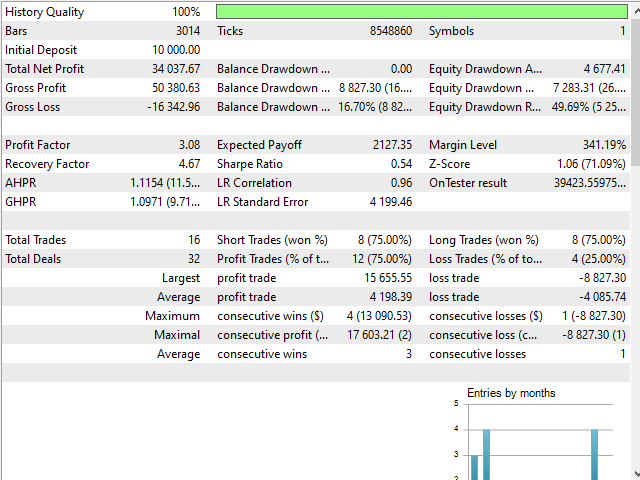
Pricing
New Offer Every 6 Hours up to 50%. Follow.
Testing is free. How to do?

3 Months
3 Months of unlimited use
2 Accounts Activation
Full Support
Free Updates
$ 50.00

6 Months
6 Months of unlimited use
3 Accounts Activation
Full Support
Free Updates
$ 100.00

1 Year
1 Year of unlimited use
4 Accounts Activation
Full Support
Free Updates
$ 150.00

Lifetime
Unlimited use, forever
5 Accounts Activation
VIP Support
Free Updates
$ 200.00
 to be a light for all traders.
How does break even protection work, and why is it important?
Break even moves the stop loss to entry once a profit threshold is reached. This ensures trades don’t turn into losses after being in profit. It’s especially useful during reversals or sudden volatility. Combined with trailing stop, it creates layered protection for your account. This feature adds discipline and reduces emotional stress.
How does the reversal signal option work, and what choices do I have when enabling it?
The reversal option closes existing trades when a new opposite signal is detected. For example, if a buy trade is open and the robot identifies a valid sell entry, the buy will close and a sell will open. You can configure whether positions close only if they are in profit or under any condition. This flexibility allows traders to decide how aggressive or conservative they want to be with reversals. It ensures the robot adapts to changing market sentiment without leaving conflicting trades open.
It’s not chasing every tick. It’s waiting for meaningful signals. That patience translates into safer trading.
The averaging system can feel aggressive if you set multipliers too high. Stick to conservative settings.
Is it suitable for volatile markets?
Yes, it thrives when fundamentals drive price action.
It’s not a get‑rich‑quick robot. If you expect daily profits, you’ll be disappointed. It’s built for steady growth.
What impressed me most was the trend detection. Instead of scalping noise, it caught a multi‑day move on GBP/USD.
Can the robot detect larger market trends, and how does it avoid getting caught in short‑term volatility?
Yes, the robot is designed to identify extended moves driven by fundamental factors. It filters out short‑term fluctuations by waiting for strong signals from the Fundamental Analysis Indicator. This means it doesn’t chase every tick but instead focuses on bigger shifts in sentiment or economic conditions. By combining trend detection with risk management tools, it captures longer moves while avoiding unnecessary exposure. This makes it suitable for traders who prefer steady growth over scalping.
Does it trade too little?
Some users may feel that way, but it avoids bad entries by design.
Hi, support.
Is this needed to download and purchase Fundamental Indicator also?
Hi,
No it is not needed. The indicator embedded inside the EA.
Trend detection is spot‑on. Caught the last big EUR/USD move perfectly.
Setup was straightforward. I only adjusted my lot size and timeframe, and the robot handled the rest. It’s refreshing to use an EA that doesn’t require endless tweaking.
Hi. How the EA detect fundamental events? Is this an AI?
This isn’t traditional fundamental analysis. The EA’s behavior and performance simply resemble the outcomes you’d expect from a fundamental‑driven approach, which is why we named it Fundamental Robot.
I was skeptical about fundamental trading automation, but this robot proved me wrong. It closes trades intelligently and avoids risky entries. The averaging system is balanced and doesn’t spiral out of control.
Hello, you’re right. This isn’t traditional fundamental analysis. The EA’s behavior and performance simply resemble the outcomes you’d expect from a fundamental‑driven approach, which is why we named it Fundamental Robot.
I run it on multiple symbols, and the magic number separation works flawlessly. No overlapping trades, no confusion — just clean execution.
The comments section is now open. Feel free to share your feedback, reviews, questions, and personal experience with the product. You can also interact with other users and join the discussion. Our support team is active there as well and will respond whenever assistance is needed.