

Loss Recover Pro
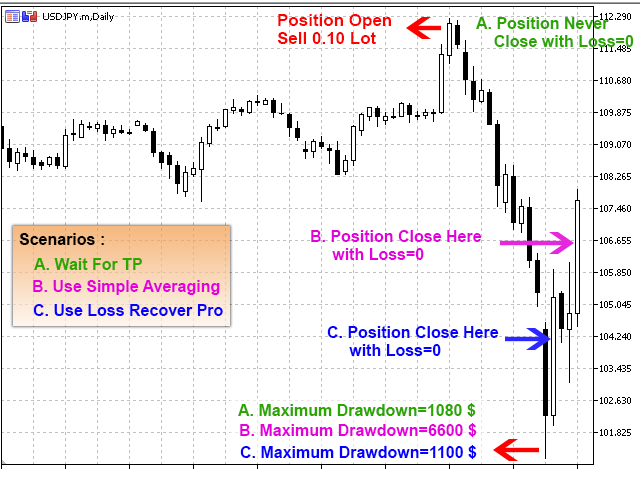
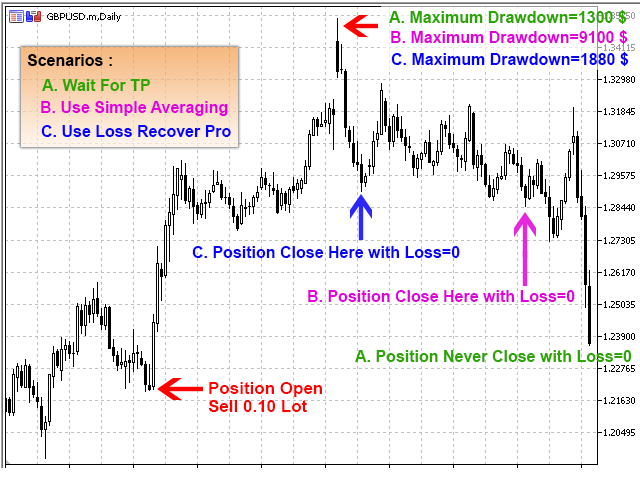
Loss Recover Pro is a smart Expert Advisor designed to recover losing trades without relying on risky martingale or averaging strategies. Whether your position was opened manually or by another EA, this tool gradually offsets losses through a step-by-step recovery system that works in any market trend. It opens calculated trades in both directions and manages them mathematically until the original loss is neutralized — all without oversized or dangerous exposure.
Category : Loss Recoveries
Version : 15.4
Updated : 2026-06-14
Key Features
Description
Loss Recover Pro is a powerful recovery engine for traders facing drawdown from wrongly opened positions — whether manual or EA-driven. Unlike traditional recovery tools that rely on aggressive martingale or averaging, this EA uses a controlled, step-by-step strategy to gradually offset losses. It opens calculated positions in both the same and opposite directions, managing volume and timing with precision until the original trade is closed at break-even or with a small profit.
The system adapts to any market trend — uptrend or downtrend — and works with buy or sell positions. Recovery begins only when the loss reaches a defined threshold, giving traders full control over when and how the process starts. With adjustable step distances, volume ratios, and filters for spread, swap, and commission, Loss Recover Pro offers a safe, customizable way to recover trades without disrupting your broader strategy.
Ideal for traders who want protection without prediction, Loss Recover Pro runs quietly in the background, managing recovery trades with mathematical logic and minimal risk. Whether you’re managing a single ticket or multiple positions across your account, this EA gives you the tools to recover confidently and efficiently.
See Also:
Loss Recover Pro is built to recover large‑volume positions (above 0.10 lots).
- For smaller lot sizes, choose Loss Recovery Edge.
- For positions with larger point losses, choose Loss Recovery Lite.
Usage Manual:
Setting up the EA takes just a few clicks — attach it to your chart and adjust inputs as outlined below.
Main Settings:
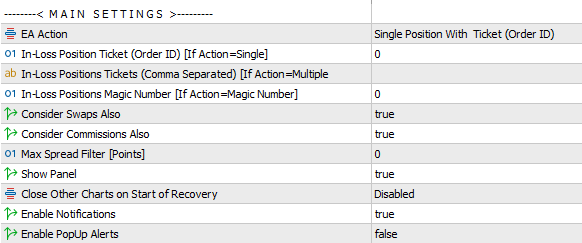
- EA Action Modes:
- Tester – run the EA in Metatrader Strategy Tester for backtesting and optimization. Read more.
- Single Position (Ticket ID) – recover one in‑loss position specified in the In‑Loss Position Ticket field, if loss exceeds Distance to Start.
- Multiple Positions (Ticket IDs) – recover all in‑loss positions listed in the In‑Loss Positions Tickets field (comma‑separated), if loss exceeds Distance to Start.
- All Positions on Account – recover every position with losses greater than Distance to Start.
- All Positions on Current Chart – recover positions tied to the chart’s symbol, if loss exceeds Distance to Start.
- All Positions with Magic Number – recover positions with a defined magic number, if loss exceeds Distance to Start.
- Ticket & Magic Settings:
- In‑Loss Position Ticket (Order ID) – specify the ticket ID for single‑position recovery.
- In‑Loss Positions Tickets (Comma Separated) – list multiple ticket IDs for batch recovery.
- In‑Loss Position Magic – define the magic number for recovery when using the All with Magic Number option.
- Additional Recovery Options:
- Consider Swaps – include negative swap values in recovery.
- Consider Commissions – include paid commissions in recovery.
- Max Spread Filter – prevent recovery trades during high spreads (set to 0 to disable).
- Interface & Control:
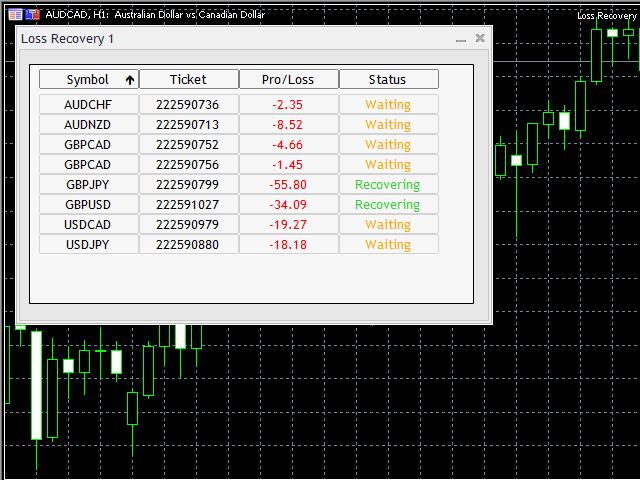
- Show Panel – display a chart panel with selected trades, losses, and recovery status.
- Close Other Charts on Recovery Start – automatically close other charts to avoid interference. Options:
- Close all charts except the recovery chart.
- Close charts with the same symbol as the recovery trade.
- Enable Notifications – receive phone alerts about EA operations.
- Enable Popup Alerts – get desktop pop‑up alerts during recovery.
Start Condition:
This section defines when recovery begins. Simply set your preferred start conditions, and the EA will monitor losses until the threshold is reached, then automatically initiate recovery.
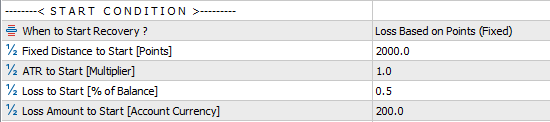
- When to Start Recovery – Options available include: Points (Fixed), Points (ATR), Percent of Balance, Loss Amount.
- Fixed Distance to Start – set a specific number of points at which recovery begins.
- Distance to Start [ATR Multiplier] – trigger recovery based on ATR‑calculated values.
- Loss to Start [% of Balance] – define recovery start when a position’s loss reaches a set percentage of account balance.
- Loss Amount to Start [Account Currency] – initiate recovery once the loss equals a specified monetary amount in account currency.
Recommended Values: It is best to trigger recovery using loss points. For most Forex pairs, a distance of around 2000 points provides stable performance. Traders seeking quicker, more aggressive recovery can reduce this to approximately 1000 points.
Step and Volume:
This EA operates through a step‑by‑step recovery process. Here you can specify the step distance and configure two major parameters that control lot size management for recovery trades.
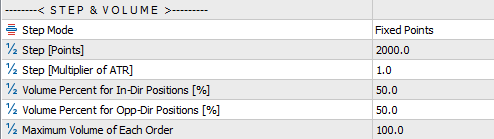
- Step Mode – choose between Points or ATR Multiplier to define recovery steps.
- Step (Points) – set the distance in points for opening the next recovery position.
- Step (ATR Multiplier) – define step distance based on ATR values.
- Volume % for In‑Direction Positions – percentage of lot size for trades in the same direction as the losing position.
- Volume % for Opposite‑Direction Positions – percentage of lot size for trades opened against the losing position.
- Maximum Volume – safety cap to prevent opening excessively large recovery trades.
The image below illustrates these parameters for easier understanding.
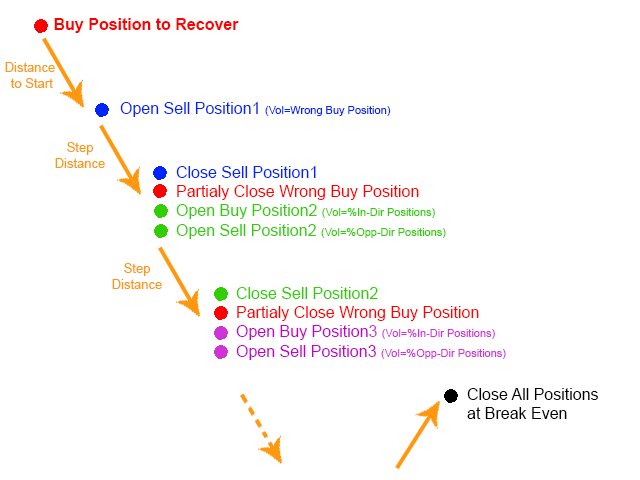
Recommended Values: The optimal step distance for Forex pairs is approximately 1000 points. Traders seeking quicker, more aggressive recovery may reduce this to around 500 points. For lot size management, a standard setting of 50 is suggested for both in‑direction and opposite‑direction positions. To accelerate recovery, use 30 for in‑direction trades and 10 for opposite‑direction trades.
Take Profit:
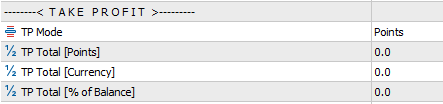
The primary purpose of this EA is loss recovery rather than profit generation. Still, traders may enable a small profit target if desired. Take Profit can be adjusted using three methods: Points, Account Currency, or Percentage of Balance. Setting these values to zero disables TP, allowing recovery to complete at break‑even.
ATR Settings:
If ATR mode was selected in the previous sections, configure the ATR settings here.

Testing the EA:
This EA is not a direct trading tool, so testing it in the Metatrader Strategy Tester requires specific features. The EA includes built‑in options that allow you to simulate performance on historical data and identify the best settings for your trading strategy.
When testing the EA, you need to provide details of a sample trade that was intentionally opened in the wrong direction and moved into loss. This allows the EA to simulate how it manages drawdown and recovery in real trading conditions. Once you specify the time, direction, and volume of the sample position, the EA will open that trade during the test and begin monitoring its performance. As the market moves against the trade, the EA tracks the drawdown until the loss reaches the threshold you have defined. At that point, the recovery process is triggered automatically, and the EA begins applying its step‑by‑step recovery logic. It is important to ensure that the market moves in the opposite direction after the sample position is opened, so the EA can properly demonstrate its recovery mechanism. This testing approach helps you evaluate how the EA reacts under adverse conditions, giving you valuable insight into its ability to manage losses and optimize settings for your trading strategy.
Steps to Configure Testing:
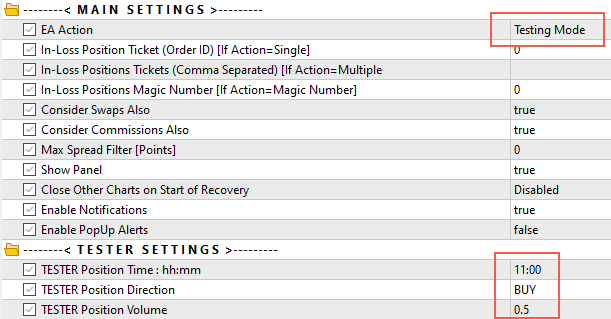
- In the Main Settings, set EA Action = Testing Mode.
- Enter the position details you want to recover using the following parameters:
- TESTER Position Time – specify the time in
hh:mmformat (e.g., 15:35). The position will open at market price on the start date of your testing period. - TESTER Position Direction – choose BUY or SELL.
- TESTER Position Volume – define the lot size of the position.
- TESTER Position Time – specify the time in
- At the start, configure a large deposit in the tester settings to support recovery operations.
- Optimize the EA by adjusting parameters such as:
- Distance to Start
- Step
- Volume Percent for In‑Direction Positions
- Volume Percent for Opposite‑Direction Positions

Example:
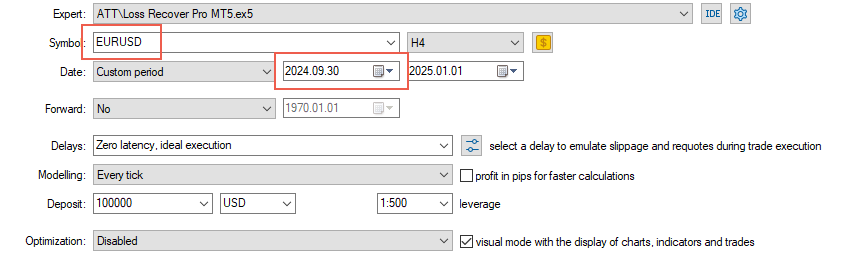
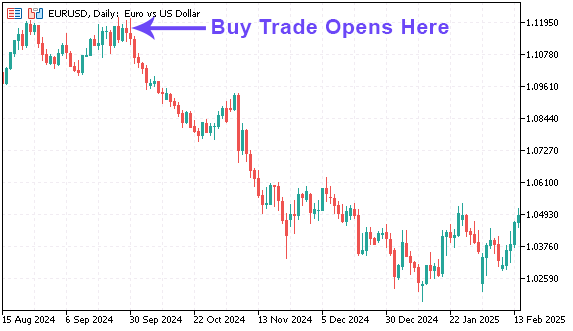
In the test below, the EA opens a BUY trade on EURUSD at 2024.09.30 11:00 and attempts to recover it.
Tester Settings:
Tester Inputs:
Test Position on Chart:
Notes:
- Best Use: Works most effectively for positions with larger volumes (greater than 0.1 lots).
- Concurrent Trading: You can continue trading on your account while the EA manages losing positions and its own recovery trades until losses are recovered.
- Avoid Interference: It is advised to disable trading activity from other EAs on recovery trades once recovery begins, to avoid conflicts.
- MT4 Account History: On MT4 terminal, ensure that “All History” is selected in your terminal’s Account History panel for accurate tracking.
- Timeframe Independence: The EA produces the same results across all timeframes — no difference between M1, H1, or others.
- Market Movement: If the market moves in your favor after recovery begins, simply wait. The EA is capable of recovering trades in both directions of market movement.
- MT5 Netting Accounts: Since the system relies on smart hedging strategies, netting accounts are not supported.
Need Help?
Here are some helpful resources. If you have questions or need assistance, feel free to contact us. You can submit a support ticket or leave a comment. we’ll respond as quickly as possible.
Screenshots
Pricing
New Offer Every 6 Hours up to 50%. Follow.
Testing is free. How to do?

3 Months
3 Months of unlimited use
2 Accounts Activation
Full Support
Free Updates
$ 110.00

6 Months
6 Months of unlimited use
3 Accounts Activation
Full Support
Free Updates
$ 160.00

1 Year
1 Year of unlimited use
5 Accounts Activation
Full Support
Free Updates
$ 220.00

Lifetime
Unlimited use, forever
10 Accounts Activation
VIP Support
Free Updates
$ 300.00
 to be a light for all traders.
I’ve tried other recovery robots before, but they often overtrade and blow accounts. How is Loss Recover Pro different?
Loss Recover Pro is designed with safety in mind. It doesn’t chase losses aggressively or open excessive positions. Instead, it uses smart hedging strategies to gradually recover losing trades while keeping risk low. This approach stabilizes equity curves and prevents catastrophic drawdowns, making it a reliable long-term solution.
I have multiple trades open: AUDNZD buy (0.25 lots) and NZDCAD buy at 0.8720 (0.20 lots). Can Loss Recover Pro handle several exotic losing trades at once, or does it only work on majors?
Yes. The EA can manage multiple trades across both major and exotic pairs. It balances risk intelligently, applying recovery strategies across positions to stabilize the account without overtrading.
Loss Recover Pro saved my account from heavy drawdowns.
Does it support MT5 netting accounts?
No, because it relies on hedging strategies, netting accounts are not supported.
I use it alongside my main strategy, and it’s become my go-to risk management tool.
Can professionals use it for client accounts?
Yes. Portfolio managers and professionals often use Loss Recover Pro to stabilize performance across multiple accounts. By reducing drawdowns and recovering losses automatically, it helps maintain client trust and ensures smoother equity curves. It’s not just for individuals, it’s a professional-grade risk management tool.
I didn’t believe recovery robots worked. After testing Loss Recover Pro, I was proven wrong. It actually reduces losses.
An urgent situation: I opened a gold (XAUUSD) buy at 4890 with 0.50 lots. The market has since dropped to 4840, and I’m facing a heavy drawdown. Can Loss Recover Pro intelligently manage this trade, hedge it, and recover the loss without risking further equity damage?
Yes. Loss Recover Pro is built for exactly this type of scenario. It applies smart hedging strategies to balance the losing position, gradually reduce drawdown, and recover losses over time. The system prioritizes safety and stability, ensuring recovery is controlled rather than aggressive.
Thank you. The position recovery finished some days ago successfully. This EA is the best I see until now. Every active trader needs this EA.
How does Loss Recover Pro impact trader psychology?
One of its biggest benefits is removing emotional decision-making from losing trades. Traders often panic or overreact when positions go against them. Loss Recover Pro automates recovery, allowing traders to stay calm and disciplined. This psychological relief is as valuable as the technical recovery itself.
I used to panic when trades went against me. Loss Recover Pro changed that. It manages losing positions calmly, reduces drawdowns, and recovers losses without emotional interference.
Loss Recover Pro gave me confidence to trade larger positions, knowing recovery is automated.
Is Loss Recover Pro suitable for long-term use, or is it mainly designed for short-term recovery situations?
Loss Recover Pro is built for long-term stability. While it can recover losses in the short term, its real strength lies in consistently reducing drawdowns and protecting capital over months and years. Traders who want longevity in the markets benefit most from its steady, disciplined approach. It’s not just a quick fix — it’s a sustainable solution for risk management.
Does Loss Recover Pro promise to recover every single loss, or are there limitations traders should be aware of before using it?
No trading tool can guarantee recovery of every loss. Market conditions, volatility, and account settings all play a role. However, Loss Recover Pro significantly improves the chances of recovering losing trades by applying structured, low-risk strategies. It’s about increasing stability and reducing risk, not promising miracles. Traders should view it as a professional risk management tool rather than a profit-chasing robot.
Lovely EA !
I was searching such an EA and find it now.
Now trading is a lovely work for me.
Does it work in volatile markets?
Yes. It’s designed to act as a safety net during volatility, reducing the impact of sudden drawdowns.
Does it guarantee profits?
No tool can guarantee profits. Loss Recover Pro focuses on reducing drawdowns and recovering losses.
I used to panic when trades went against me. Loss Recover Pro changed that. It manages losing positions calmly, reduces drawdowns, and recovers losses without emotional interference.
I have a question: Is there a fault point on this EA?
Hi,
There is no fault or issue in the EA’s logic or algorithm. However, aggressive settings on a small account can cause the recovery system to fail, so it’s important to match the settings to the account size.
Loss Recover Pro keeps losses under control. Smart recovery. Steady results.
Hi, XAUUSD buy at 5000, current price 4900, 0.10 lots. Can the EA recover this?
Yes. Loss Recover Pro can hedge that positions and gradually reduce drawdown.
I run multiple accounts, and Loss Recover Pro has been a lifesaver. It reduces drawdowns across the board and recovers losses without me having to intervene. It’s like having a professional risk manager built into my trading system.
Recovery is steady, not instant. I had one account where results were slower than expected, but overall it recovered my losses completely.
Low risk, high control. Perfect balance.
It’s not flashy, but it’s reliable. That’s what matters in trading.
I’ve been trading for years, and managing losing trades was always the hardest part. Loss Recover Pro gave me a structured, automated way to handle them. It’s not about chasing wins. It’s about protecting capital and staying in the game. That’s priceless.
Hi, I entered a DAX30 short at 16,200 with 0.30 lots, but the index climbed to 16,350. That’s a painful drawdown. Can Loss Recover Pro realistically recover this, or is it too far gone?
Yes. The EA can still manage recovery by applying hedging strategies. While recovery may take longer in this case, the system is designed to stabilize equity and reduce losses without risking account blowouts.
It turned my losing trades into manageable outcomes.
I’ve tried other EAs, but none managed losing positions as smoothly as this one. It’s a real confidence booster.
The comments section is now open. Feel free to share your feedback, reviews, questions, and personal experience with the product. You can also interact with other users and join the discussion. Our support team is active there as well and will respond whenever assistance is needed.