

Easy Trade Copier EA
Easy Trade Copier EA is a powerful yet user‑friendly MT4/MT5 trade copier that enables instant synchronization across multiple accounts and terminals. Designed for both hedge and netting account types, it ensures seamless cross‑platform copying (MT4 ↔ MT5) with customizable settings, advanced money management, and real‑time control — all from a simple visual panel.
Category : Trade Copiers
Version : 5.7
Updated : 2026-01-15
Key Features
Description
Easy Trade Copier EA is the ultimate solution for traders who need reliable, fast, and flexible trade copying across MetaTrader 4 and MetaTrader 5 platforms. Whether you’re managing multiple accounts, copying trades between hedge and netting systems, or running cross‑platform strategies, this EA delivers instant synchronization with precision.
With its intuitive panel, traders can easily configure master and slave accounts, adjust symbol names, set custom prefixes/suffixes, and fine‑tune volume management. Advanced options allow you to reverse trades, copy pending orders, apply partial closings, or protect accounts with equity/margin thresholds. Each receiver account can be tailored with unique settings, while Telegram notifications keep you updated in real time. Built for speed, safety, and flexibility, Easy Trade Copier EA empowers professional traders and money managers to streamline operations and maximize efficiency.
For advanced customization or managing larger copy networks, choose Forex Trade Copier Pro.
Quick Tutorial:
- Attach the EA in Master Mode to the account(s) you want to copy trades from (the source or sender accounts).
- Attach the EA in Slave Mode to the account(s) you want to copy trades to (the receiving or target accounts).
- On the Slave Panel, select the master account(s) you wish to receive trades from.
- Adjust and customize any settings as needed to match your trading preferences.
Detailed Manual:
Input Parameters:
Main input parameters displayed on the EA startup window include:
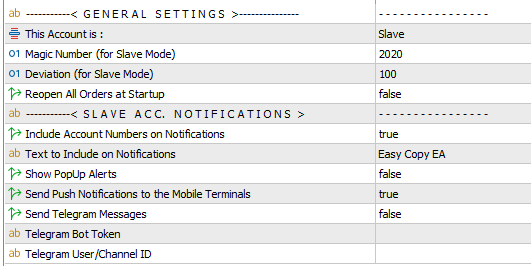
General Settings:

- Account Mode: Select the EA operation type — Master or Slave.
- Master = the source account where trades are sent.
- Slave = the destination account where trades are received.
- Magic Number: Defines the unique identifier for trades opened by the Slave EA.
- Deviation: Sets the maximum slippage allowed for trades executed by the Slave EA.
- Reopen All Orders at Startup:
- True = all existing trades on the Master account will be copied to the Slave account during initialization.
- False = only trades opened after the EA starts will be copied.
Slave Account Notifications:
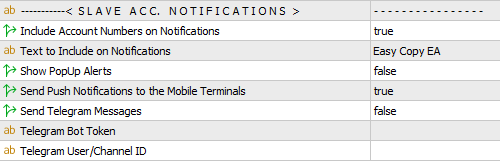
- This section allows you to configure trade event notifications. Options include popup alerts, mobile notifications, and Telegram integration. Notifications are available only for Slave accounts. To set up and enable Telegram alerts, please follow the instructions provided on the setup page.
Master EA:

No specific configuration is required for the Master EA. Simply attach the EA to a chart and select the Master option. The EA panel will then appear on the chart. A Pause/Resume button is available on the panel to control trade transmission — when paused, no actions are sent to connected Slave accounts. The animated colorful boxes on the right side of the panel confirm that the EA is running properly.
Slave EA:
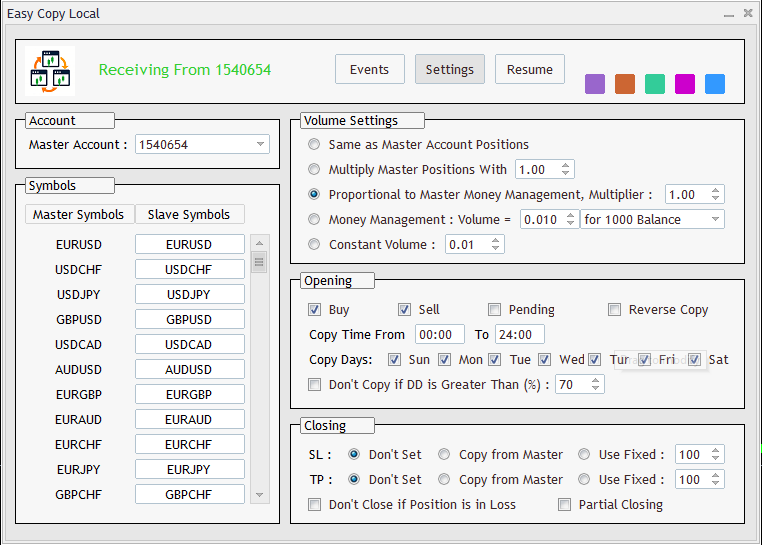
Once the EA is attached to the chart in Slave mode, the corresponding panel will appear as shown below.
Primary Controls:

The upper area of the panel displays copier activity along with key controls. When copying is active, the panel shows the master account number (e.g., ‘Receiving from xxxxx’). On the right side, animated colorful boxes confirm that the EA is running properly.
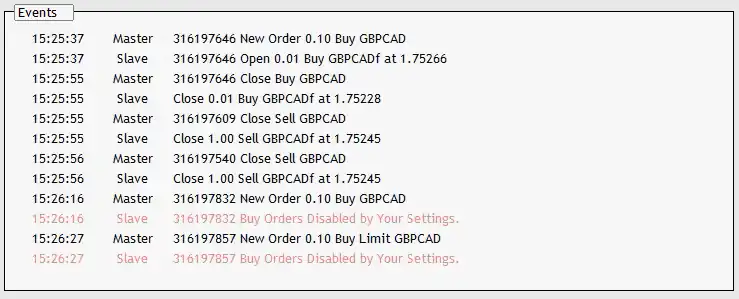
The Pause/Resume button allows you to temporarily stop the copy process; when paused, all master account events are ignored by the Slave EA. The Settings button opens the full range of configuration options available for the slave account. The Events button provides access to the events panel, where all important actions, mirrored operations, warnings, and errors are logged. Below is an example of the logs displayed in the Events panel.
Account:
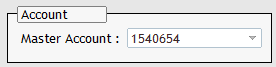
In this area, a dropdown menu is provided to select the master account number. All active master accounts are added automatically, allowing you to choose easily. If the desired account number does not appear, ensure that the EA is running in Master mode on that account.
Symbols:
In this area, you can fully customize symbol selection and rename symbols as needed.
In this area, you can fully customize symbol selection and rename symbols as needed.
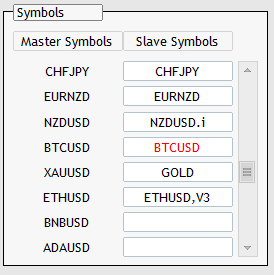
In this area, you can fully customize symbol selection and rename symbols as needed.
- After choosing the master account number in the previous section, the EA displays all available symbols from the master terminal’s Market Watch in the left column. These entries are read‑only and update automatically if the master account’s symbol visibility changes.
- The right column contains editable symbol names. The EA fills these automatically at startup, but you can modify or customize them at any time.
Rules for Customizing Symbols:
- The Slave EA uses the symbol names you enter in this column for trading. You may change them completely or add/remove prefixes and suffixes.
- If a field is left empty, the Slave EA will ignore that symbol.
- If a field appears in red, the symbol does not exist in the Slave terminal’s Market Watch. In this case, you must add the symbol manually to the Slave Market Watch window.
The example settings illustrated in the image above signify:
- If NZDUSD is opened/closed on the master, then NZDUSD.i will be opened/closed on the slave.
- BTCUSD does not exist in the master terminal’s Market Watch window.
- If XAUUSD is opened/closed on the master, then GOLD will be opened/closed on the slave.
- If ETHUSD is opened/closed on the master, then ETHUSD,V3 will be opened/closed on the slave.
- If BNBUSD or ADAUSD opens on the master, the Slave EA will ignore them completely.
- Other symbols such as CHFJPY or EURNZD will be copied normally.
Volume Settings:
The EA provides five different options for configuring trade lot sizes:
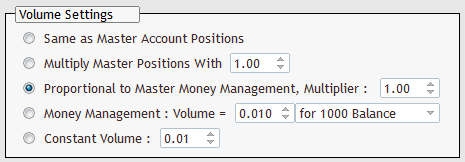
- Same as Master Account: Copies the exact lot sizes from the master account to the slave account.
- Multiplier: Applies a lot size multiplier to master trades. The multiplier can be set below 1.00 to reduce lot sizes or above 1.00 to increase them.
- Proportional to Master Money Management: Calculates lot size on the slave account based on the ratio of lot size to balance on the master account. A multiplier can also be applied.
Example: If a 0.10 lot trade opens on a master account with a $1000 balance, and the slave account has a $2000 balance, the slave trade will be 0.20 lots. This value is further adjusted by the multiplier parameter. - Custom Money Management: Allows you to define a lot size per 1000 units of balance, equity, or free margin. The EA then calculates the appropriate lot size based on the slave account’s actual properties.
- Constant Value: Opens trades on the slave account with a fixed lot size specified in the input box, regardless of the master account’s lot size.
Opening:
This section provides several settings to adjust and customize how trades are opened on the slave account:
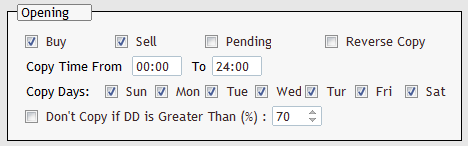
- Buy/Sell/Pending: Enable or disable specific trade types.
- Reverse Copy: When enabled, trades are opened in the opposite direction of the master’s trades.
- Copy Time From: Restrict trade copying to a defined time window (based on broker server time). Trades outside this period are ignored.
- Copy Days: Select specific days of the week on which trades from the master account will be copied.
- Don’t Copy if Drawdown Exceeds: A safety feature that prevents new trades from opening if account drawdown surpasses the defined threshold.
Closing:
This section provides settings to customize how trades are closed on the slave account:
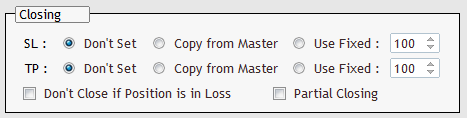
- SL/TP Options: Choose whether to remove stop‑loss/take‑profit levels, copy the master’s values, or set custom values based on points.
- Don’t Close in Loss: Enable this option if you prefer to manage losing positions manually. When active, losing trades will remain open on the slave account even if they are closed on the master.
- Partial Closing: When enabled, partial closures on the master account will also be mirrored on the slave. If disabled, the slave trade will only close once the master trade is fully closed.
Notes:
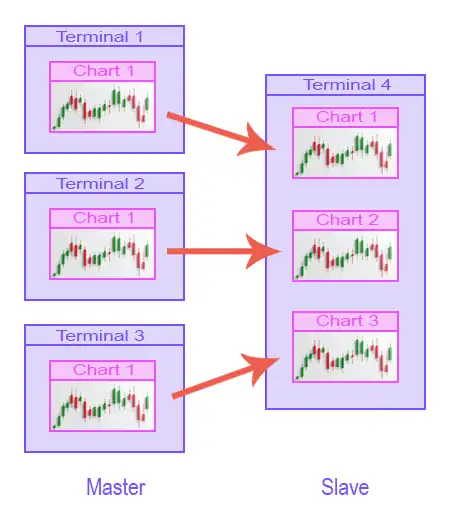
- Multiple Masters → One Slave: Open separate terminals for each master account and attach the EA in Master mode to a chart on each. Then, on the slave account, attach the EA in Slave mode to multiple charts. On each chart, select the corresponding master account number.
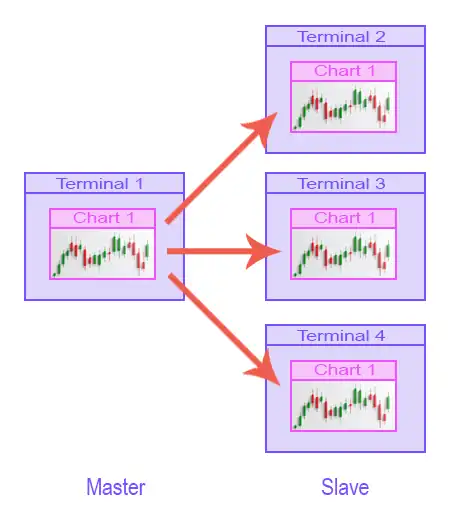
- One Master → Multiple Slaves: Attach a single instance of the EA in Master mode to the master account terminal. Then, open multiple slave account terminals, attach the EA in Slave mode to a chart on each, and select the master account number.
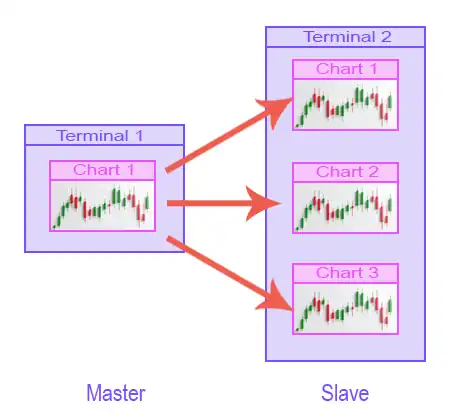
- One Master with Different Settings: If you want to apply different settings per symbol, or duplicate trades with varied configurations, attach the EA in Master mode to a chart on the master account. Then, on the slave account, attach multiple instances of the EA in Slave mode to different charts, each with its own settings.
- MT5 Account Types: The EA supports MT5 Netting accounts, but it is recommended to use Hedge accounts for optimal performance.
- This is a local trade copier, which requires all master and slave terminals to be opened and running on the same machine. To copy trades between terminals on different machines (PC or VPS), the remote version of the copier will be required — coming soon.
- If you are using the MT4 versions, set trade history to All History (right‑click on the Account History tab → select All History).
Need Help?
Here are some helpful resources. If you have questions or need assistance, feel free to contact us. You can submit a support ticket or leave a comment. we’ll respond as quickly as possible.
Screenshots
Pricing
New Offer Every 6 Hours up to 50%. Follow.
Testing is free. How to do?

Testing on Live
2 Days of unlimited testing
3 Accounts Activation
Full Support

1 Month
1 Month of unlimited use
3 Accounts Activation
Full Support
Free Updates
$ 30.00

3 Months
3 Months of unlimited use
5 Accounts Activation
Full Support
Free Updates
$ 35.00

6 Months
6 Months of unlimited use
10 Accounts Activation
Full Support
Free Updates
$ 40.00

1 Year
1 Year of unlimited use
15 Accounts Activation
Full Support
Free Updates
$ 45.00

Lifetime
Unlimited use, forever
20 Accounts Activation
VIP Support
Free Updates
$ 50.00
 to be a light for all traders.
No lag, no errors, just clean execution.
Does it require constant internet?
Yes, both terminals must stay connected.
Hi, I want to open XAUUSD positions when the master opens EURUSD trades. Is it possible using this EA? How?
Of course! In the symbol name field, just swap EURUSD for XAUUSD.
The updates are frequent and useful.
Exactly what I was looking for.
I often trade during high‑volatility sessions, such as news releases, where execution speed is critical. How does the copier handle these situations, and is there any risk of lag or missed trades when markets move quickly?
The copier is designed to be lightweight and efficient, minimizing resource usage even during volatile periods. Trades are mirrored in real time, and the Events panel logs every action so you can verify execution. While no copier can completely eliminate the risk of slippage during extreme volatility, the system ensures that trades are copied as quickly as the broker’s infrastructure allows. For added control, you can use features like “Copy Time From/To” to restrict copying to specific sessions, or apply multipliers and safety limits to manage exposure during high‑risk events.
I’ve heard that some copiers struggle with risk management, especially when accounts hit high drawdown levels. How does this copier protect slave accounts from excessive losses, and what safety features are built in?
The copier includes several risk management safeguards. You can set a maximum drawdown threshold, and if the slave account reaches that level, new trades will be skipped automatically. This prevents compounding losses during high‑risk periods. Additionally, you can configure lot size rules (constant, proportional, or multiplier‑based) to keep exposure under control. Combined with options like “Don’t Close in Loss” and time/day filters, these features give you granular control over how trades are copied, ensuring that risk is managed proactively rather than re-actively.
I’ve used this copier for several months now, and it has become a core part of my trading setup.
The proportional money management option ensures that trades are scaled correctly across accounts, saving me from manual adjustments.
The ability to customize symbols is another highlight, especially when dealing with brokers that use different naming conventions.
The pause/resume button gives me instant control.
The safety features protect me from excessive drawdown.
It’s a tool I rely on daily.
I recommend it to every trader I know.
It’s lightweight but feature‑rich.
Hello friend, How many account do you running for copy?
I am running this tools on 7 terminals on a PC without any problem. But I think can support many more terminals/accounts.
If I want to copy trades only when the master account is in profit, is that possible?
This feature is not supported by this Expert Advisor (EA).
However, our Forex Trade Copier Pro does support this functionality. You can enable the ‘Better Price’ option within the Trade Copier Pro to copy trades once the original trade reaches a predetermined profit level.
Hello support team. How does the copier handle situations where the master account uses multiple EAs simultaneously, each with different strategies?
Hello. The copier mirrors all trades from the master account, regardless of which EA opened them. On the slave side, you can configure multiple instances with different settings to handle varied strategies. For example, one slave chart can replicate scalping trades with proportional lot sizing, while another handles swing trades with constant lot sizes. This ensures flexibility when managing diverse strategies.
How quickly are updates and bug fixes released, and how do I ensure my copier stays current?
Hello. Updates are released regularly based on user feedback and performance improvements. Critical bugs are prioritized, and patches are typically delivered within days. To stay current, always download the latest version from the official source and check the version number written on product page. Keeping your copier updated provides access to the newest safety and customization options.
Can I use it with demo accounts?
Yes, demo accounts are supported.
All account types are fully supported.
Thanks. What about using investor password on master account?
Master accounts can be accessed using the investor password, since this EA does not perform any trading operations on the master side.
I was impressed by how easy it was to customize symbols. Even complex broker suffixes are handled smoothly.
When brokers use hedge accounts versus netting accounts, and trades must be copied between them, what does Forex Trade Copier Pro offer to handle this scenario, and what should traders be aware of?
It supports both account types, but because these account types operate differently, certain features may behave with limitations in specific situations.
I appreciate the flexibility in lot size settings. Whether I want exact replication or proportional scaling, it adapts perfectly.
Hello. I want to manage losing trades manually instead of having them closed automatically when the master closes. Is there a way to prevent the copier from closing trades in loss on the slave account, while still copying profitable closures?
Yes, the copier includes a Don’t Close in Loss option. When enabled, losing trades on the slave account remain open even if the master closes them. This allows you to manage recovery strategies manually, such as waiting for a reversal or applying hedging techniques. Profitable trades, however, will still close in sync with the master. This feature gives you flexibility to override the master’s decisions when it comes to loss management, without disrupting the overall copying process.
Hi,
Every person have a good account to copy from that?
I need it also. Everyone have?
Me too!!!!!!
Does everyone have it?
I run multiple VPS setups, and this copier handles them without issue. It’s lightweight but powerful. Thanks for the tool. I rate it 5 stars.
In my opinion, the pause/resume button is the best feature of this copier. It gives me instant control without needing to stop the entire EA.
What happens if the master account is paused during an open trade, and the slave account has different SL/TP settings configured?
If the master is paused, the slave stops receiving updates. Existing trades remain open with the slave’s configured SL/TP values. This means the slave may close trades independently if its custom SL/TP levels are hit. Once the master resumes, synchronization continues, but differences in SL/TP may cause trades to close at different times. This flexibility allows you to tailor risk management per account.
Installation was quick, and the documentation was clear. Even as a non technical trader, I had no trouble setting it up. Also The reverse copy option is surprisingly useful. It allows me to hedge strategies without opening separate accounts.
I’ve tried others. This one stands out.
The comments section is now open. Feel free to share your feedback, reviews, questions, and personal experience with the product. You can also interact with other users and join the discussion. Our support team is active there as well and will respond whenever assistance is needed.