
Linked Charts
The Linked Charts Indicator is a powerful MetaTrader tool that synchronizes multiple charts in real time. Instead of manually matching multiple charts manually, traders can link charts together so that changes in one chart are instantly reflected across others. This saves time, reduces errors, and provides a seamless multi‑chart trading experience.
Category : Utilities
Version : 2.2
Updated : 2026-01-13
Key Features
Description
The Linked Charts Indicator is designed to bring efficiency and clarity to multi‑chart trading by synchronizing actions across multiple MetaTrader charts in real time. Its core abilities include linking chart groups so that changes in one — such as zooming, or scrolling — are instantly mirrored across all connected charts. Traders can customize which elements to sync, making it flexible for different workflows, whether comparing instruments side by side or analyzing multiple timeframes of the same asset. Lightweight and fast, the indicator ensures smooth performance even with several charts open, while its group management feature allows users to organize charts by instrument or strategy. By eliminating repetitive manual adjustments, the Linked Charts Indicator enhances accuracy, saves time, and provides a seamless, unified trading experience.
Details and Manual:
Below is the list of input parameters for the indicator:
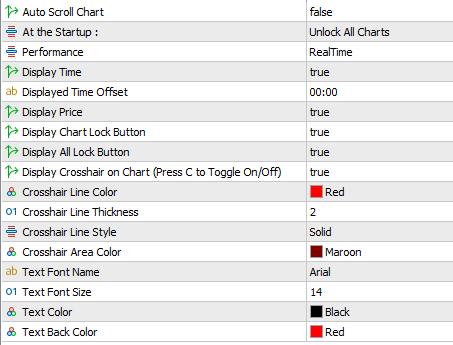
- Auto Scroll Chart: Keeps the chart automatically scrolled so the crosshair remains centered.
- Startup Options: Choose whether the crosshair is locked or unlocked when the indicator loads.
- Performance Modes: Select between Real‑Time or Lightweight operation to control update speed.
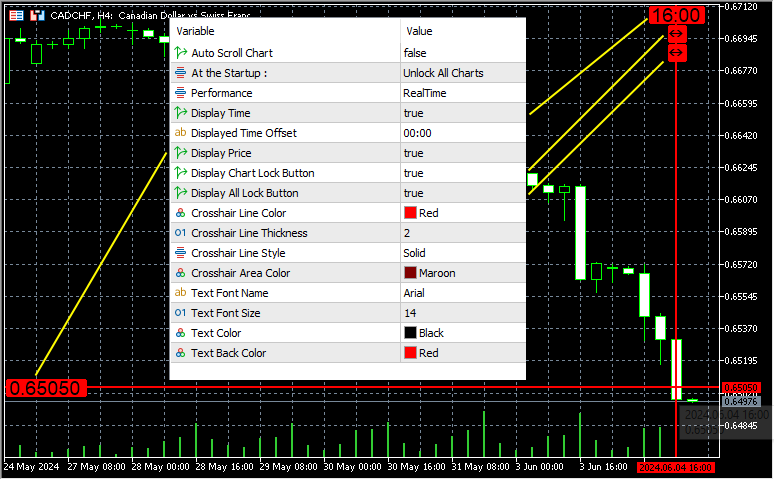
- Display Time: Show the crosshair’s time value at the top of the chart.
- Time Offset: Apply a custom offset to align displayed time with your preferred time zone.
- Display Price: Show the crosshair’s price value on the left side of the chart.
- Chart Lock Button: Add a lock/unlock button to the crosshair, or press L to toggle instantly.
- Global Lock Button: Add a lock/unlock all charts button to the crosshair, or press A to toggle across all charts in real time.
- Crosshair Visibility: Show or hide the dynamic crosshair and its labels on the chart.
- Crosshair Line Color: Customize the color of the crosshair lines.
- Crosshair Line Thickness: Adjust the thickness of the crosshair lines.
- Crosshair Line Style: Choose the style of the crosshair lines (solid, dashed, dotted, etc.).
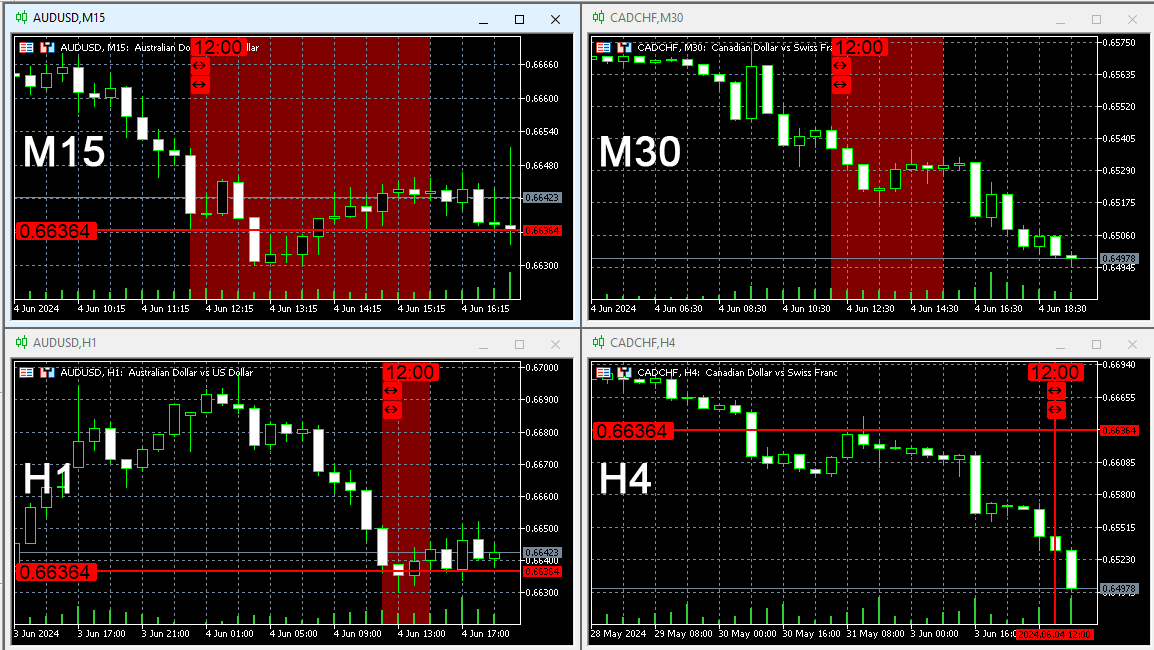
- Crosshair Area Color: When syncing with higher timeframes, display the crosshair as a filled area and adjust its color.
- Text Font Name: Select the font used for time, price, and button labels.
- Text Font Size: Adjust the size of the displayed text for time, price, and buttons.
- Text Color: Customize the color of the displayed text.
- Text Background Color: Set the background color behind the displayed text.
Keyboard Shortcuts:
- C : Show/Hide Crosshair
- L : Lock/Unlock Chart
- A : Lock/Unlock All Charts
Need Help?
Here are some helpful resources. If you have questions or need assistance, feel free to contact us. You can submit a support ticket or leave a comment. we’ll respond as quickly as possible.
Screenshots
Pricing
New Offer Every 6 Hours up to 50%. Follow.
Testing is free. How to do?

Testing on Live
2 Days of unlimited testing
1 Account Activation
Full Support

Lifetime
Unlimited use, forever
5 Accounts Activation
VIP Support
Free Updates
$ 30.00
 to be a light for all traders.
I can’t imagine trading without it now.
I use Linked Charts to synchronize EURUSD across three timeframes. It keeps my analysis consistent.
This makes me feel more in control of my workspace. Instead of juggling multiple charts manually, I now have a clean, organized setup where everything moves together. It reduces stress and keeps me focused on trading decisions.
It makes MetaTrader feel modern and efficient.
I’ve integrated Linked Charts into my daily routine. It saves me from repetitive tasks and lets me focus on actual trading.
Linked Charts is lightweight and doesn’t slow down my platform, even with multiple charts open.
I recommend Linked Charts to anyone who trades multiple instruments. It’s simple, powerful, and reliable.
It’s not a magic bullet, but it’s a reliable productivity tool.
The comments section is now open. Feel free to share your feedback, reviews, questions, and personal experience with the product. You can also interact with other users and join the discussion. Our support team is active there as well and will respond whenever assistance is needed.