

Auto Close
Auto Close EA is a professional MetaTrader utility (MT4/MT5) that automatically closes trades based on predefined conditions. Instead of manually monitoring every position, this Forex risk management software works in the background to protect your account, lock in profits, and reduce losses. Whether you’re a manual trader or rely on Expert Advisors (EAs), Auto Close EA ensures your trades are managed intelligently and efficiently.
Category : Utilities
Version : 3.5
Updated : 2026-05-20
Key Features
Description
Auto Close EA gives traders complete flexibility by allowing up to three independent closing conditions to be defined simultaneously. These conditions can be based on account properties such as closed profit, current profit, equity, balance, margin, … or selected orders properties like profit/loss, volume, … Also you can even set a fixed time closing rule, ensuring trades are automatically closed at a specific hour regardless of market activity. Once any of the defined conditions are met, the EA executes the closing operation instantly, protecting your account and securing profits without delay. This intelligent automation means you no longer need to watch the charts constantly — Auto Close EA enforces your risk management rules with precision and consistency.
A lightweight version of this EA is available, called Close All EA. It only supports manual closing.
How it works?
It is simple. The EA automatically closes selected trades whenever your predefined closing conditions are met. (Some Examples)
Trade Closing Conditions:
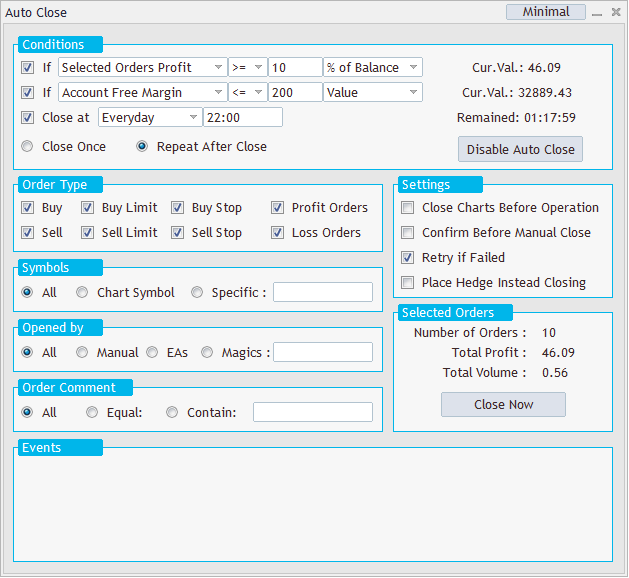
You can define up to three independent closing conditions directly on the EA panel, each of which can be enabled or disabled separately.
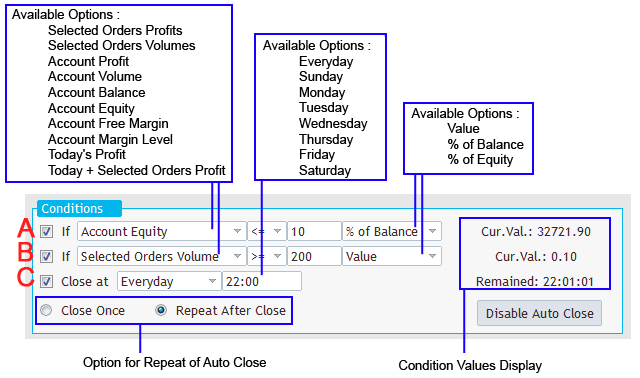
Conditions A & B can be based on the following properties:
- Selected Orders Profit – Current profit/loss of all selected open trades
- Selected Orders Volume – Total lot size of selected open trades
- Account Profit – Current profit/loss of the entire account
- Account Volume – Total lot size of all open trades on the account
- Account Balance
- Account Equity
- Account Free Margin
- Account Margin Level
- Today’s Profit – Sum of profit/loss from all closed trades on the account
- Today + Selected Orders Profit – Combined profit/loss of all closed trades plus the current profit/loss of selected open trades
Condition C is a time‑based closing rule. You can select a specific day or apply it every day. At the chosen time, all selected trades will be closed automatically, ensuring your account is managed even when you’re away.
Each property is compared against a value that you define. This value can be set as a net amount, a percentage of balance, or a percentage of equity, giving you full flexibility in how conditions are triggered.
Condition Values Display – The current value of every enabled condition is shown on the panel for full transparency.
Repeat Logic – Choose whether Auto Close EA should stop after closing trades once, or continue repeating the operation whenever conditions are met again.
Enable/Disable Button – After setting up your conditions, simply click the button to activate automated closing. You can disable it anytime with one click.
Trade Selecting Filters:
Various types of filtering is available for selecting trades.
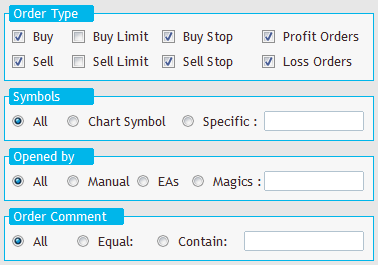
Order Type:
Select which types of orders to close: Buy, Sell, Buy Limit, Sell Limit, Buy Stop, Sell Stop
Close orders on profit/loss: Choose to close only profitable or losing trades or both
Symbols:
Choose which symbols to apply the operation to:
- All symbols: No filtering; all trades are eligible
- Chart Symbol: Only trades matching the current chart symbol
- Specific: Enter one or more symbols (e.g.,
EURUSD,GBPJPY,GOLD,BTCUSD) separated by commas
Opened by:
Filter trades based on how they were opened:
- All: No filtering
- Manual: Selects only manually opened trades on desktop terminal / Web terminal / Phone App
- EAs: Trades opened by Expert Advisors
- Magic: Enter one or more magic numbers (e.g.,
212,125,40152,36258)
Order Comment:
Filter trades by comment text:
- All: No filtering.
- Equal: Match exact comment (case-sensitive)
- Contain: Match partial text (e.g., input
My01to select trades likeMy01,My015,BestMy0100)
Settings:
These are some general settings. Options available:
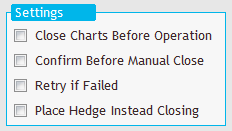
- Close charts before operation: A useful feature to disable opening trades again by other EAs after closure
- Confirm before start: Enable a safety prompt before executing
- Retry mechanism: If closing fails, EA retries up to 3 times
- Place hedge instead closing: Hedge selected trades with equal lot size (not available on MT5 netting accounts). The magic number of hedge trades can be determined on the EA inputs window.
Other Features:
Selected Orders:
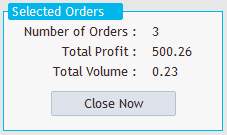
Displays a real‑time overview of selected trades: Number of trades, Total lot size, Total profit.
Clicking Close Now will execute the closing operation immediately after click.
Events:
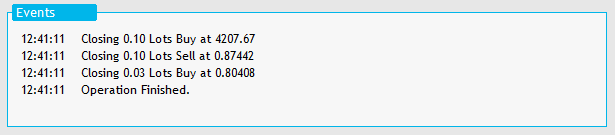
Track all EA operations for transparency and audit purposes.
Minimal:
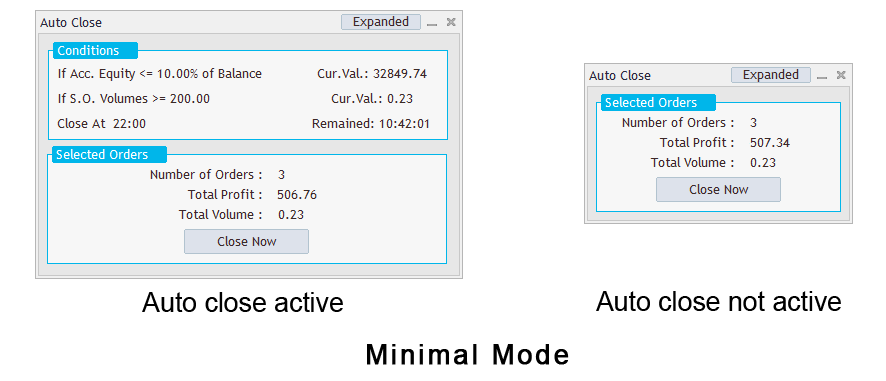
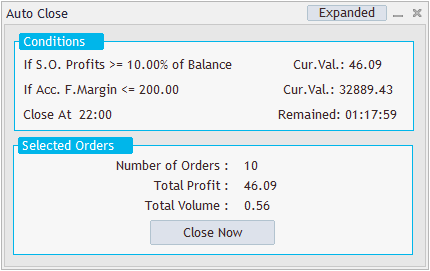
Minimize the panel to view more of the chart. Summary of defined conditions, their current values and selected orders will be displayed on the minimal panel. You can toggle back to full mode anytime by clicking Expanded.
Examples:
Example 1:
Under the following conditions, all selected trades will be closed: when the cumulative profit (of selected trades) is at least 250 (in the account’s currency), or when the cumulative loss (of selected trades) equals or exceeds 10% of the account balance.

Example 2:
Selected trades will be closed when any of the following occurs: (a) today’s cumulative profit is at least 400 in the account currency, (b) the account balance reaches or exceeds 5,200, or (c) the time is Friday at 23:00.

Example 3:
Selected trades will be closed if the cumulative lot size of all positions reaches or exceeds 1 lot

Need Help?
Here are some helpful resources. If you have questions or need assistance, feel free to contact us. You can submit a support ticket or leave a comment. we’ll respond as quickly as possible.
Screenshots
Pricing
New Offer Every 6 Hours up to 50%. Follow.
Testing is free. How to do?

Testing on Live
2 Days of unlimited testing
1 Account Activation
Full Support

6 Months
6 Months of unlimited use
6 Accounts Activation
Full Support
Free Updates
$ 40.00

Lifetime
Unlimited use, forever
10 Accounts Activation
VIP Support
Free Updates
$ 50.00
 to be a light for all traders.
The panel feels functional but outdated! The EA works well. Thanks.
Does Auto Close EA update live?
Yes. It executes instantly when conditions are met.
Too many filters for my taste. I prefer something simpler.
But I’d like to see more customization options for the panel design
The equity‑based closing condition is a game changer for my risk management.
Simple, reliable, and effective.
Auto Close EA is like having a safety net for my trading account.
It would be great if the time based condition allowed multiple time slots instead of just one.
We appreciate you reaching out. We designed our products with simplicity in mind, which is why we haven’t included more options in that area.
Solution: If you need to set multiple time conditions, you can achieve this by running separate instances of the EA on different charts, each with its own time rules.
Auto Close EA saved me from unexpected drawdowns.
It’s incredibly useful for managing strategies separately without interfering with each other.
Can I run Auto Close EA on VPS?
Yes. It’s fully compatible with VPS hosting.
The EA works well, but the panel design could be more modern.
I love the time‑based closing feature. It fits perfectly with my daily routine.
It does the job, but beginners might need clearer documentation to set up filters correctly.
Hi, We’ve updated the content with clearer explanations and some examples. Take a look, and just tell me if you’d like any further assistance.
It is better now. Many thanks.
Can Auto Close EA close trades across multiple symbols?
Yes. You attach the EA to a single chart (any symbol) and it can close trades across all instruments at once.
The transparency is excellent — I can see the current values of each condition right on the panel. Knowing exactly why trades are being closed builds trust in the EA. It’s a must‑have for anyone serious about risk management.
The ability to define multiple closing conditions based on account equity, margin level, or daily profit gives me complete control. It’s like having a personal risk manager watching my trades 24/7. Auto Close EA stands out.
Setup takes a bit of learning, but once configured, it runs smoothly.
If you need help, feel free to ask and I’ll assist you.
Thanks a lot for your support.
Not for me. I prefer manual control.
Finally, an EA that closes trades exactly when I want — no more sleepless nights.
I wish there were more than three conditions available. For complex strategies, that would be perfect.
The comments section is now open. Feel free to share your feedback, reviews, questions, and personal experience with the product. You can also interact with other users and join the discussion. Our support team is active there as well and will respond whenever assistance is needed.